How to Automate Routeware
Routeware's RCC verifies each stop and photographs a skipped collection, and Elements checks what is ready to bill before invoices go out, so automation starts from those records. WebRun reads route completion and driver flags each morning, drafts apologies for missed stops, alerts billing to overages, and sets Monday's routes against QuickBooks.
 Written by
Owen Hartley
Workflow engineer
Written by
Owen Hartley
Workflow engineer
 Reviewed by
Sofia Marchetti
Marketing operations
Reviewed by
Sofia Marchetti
Marketing operations
Routeware puts every stop on a screen in the cab and in the office
Private haulers, city solid waste departments, universities and specialty fleets run on Routeware, from a handful of trucks to more than a thousand. Routeware Elements handles dispatch, billing and the customer record for waste haulers and site services companies. RCC, the Routeware Control Center, covers the trucks, and residents check their collection day in the ReCollect app.
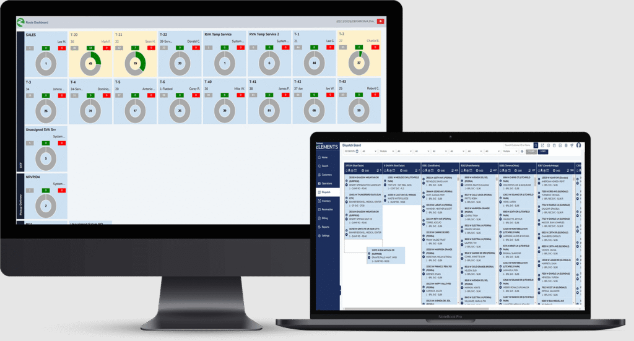
In the cab, the driver works a paperless route sheet on a tablet. RCC records service as the truck passes, without the driver touching anything, and its Picture Service takes a photo on events such as a skipped collection. In the office, the RCC Portal maps every truck and how far each route has got, and customer service answers calls from the same account records, photos included. Portable toilet routes run the same way, with a unit count and a site note on each stop.
A skipped stop on Tuesday is a call to make on Wednesday morning
On a portable sanitation route, the dispatcher needs each driver's stops in order before the trucks leave, with unit counts and any access note or time window. A stop with no driver should turn up at the yard, not at the site.
By mid-afternoon the operations manager asks how the day went: stops completed, missed and still pending on each route, and any driver or vehicle exception. The RCC Portal shows it live, to whoever has it open.
Next morning, the route supervisor goes through yesterday's missed and skipped stops and writes to each customer with an apology and an offer to come back. The billing clerk reads the drivers' notes for overweight and contaminated containers before anyone sends the invoices.
On Mondays, a hauler that invoices in QuickBooks checks which accounts are due to bill this week and whether each has an invoice, then sets last week's completed stops against what was billed, route by route, in a spreadsheet.
RCC photographs a skipped collection and flags a driver who falls behind
RCC verifies service without driver input, and with RFID Service Verification it can confirm service container by container. Picture Service captures a photo on trigger events such as a skipped collection. The RCC Portal ranks drivers and routes by who needs the most help and raises an alert when a driver falls behind, and dispatch can put go-backs back onto routes quickly.
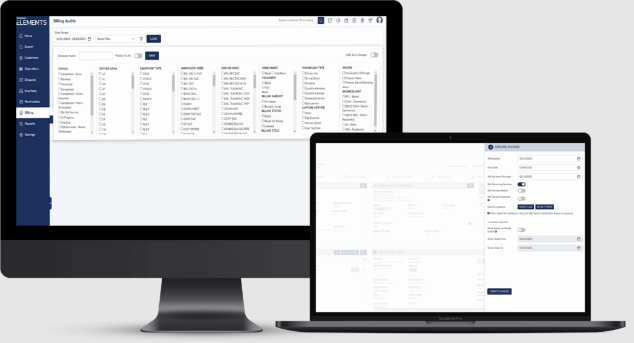
Elements audits billing before invoices go out, sends Click-to-Pay invoices and runs autopay, and its June 2026 release added accounts receivable reconciliation against the general ledger. Its CRM has task triggers and workflows for the office, and customers get a portal for invoices and payments.
Two partners reach further. WasteVision AI's cameras, integrated with Routeware, detect and document contamination and overflowing bins on every collection, so a hauler can bill repeat offenders, and an Open311 link through SeeClickFix brings residents' service requests into a city's daily operations.
Yesterday's skipped stops sit in route completion with their photos, and the office writes to each customer by hand. A hauler that invoices in QuickBooks, which is not on Routeware's partner list, joins billed revenue to route counts by hand.
The route supervisor's 7:00 alert names every stop missed yesterday
In the Slack ops channel, each portable toilet driver's stops for the day appear at six, in route order with unit counts and site notes, with any access requirement or time window at the top of that driver's list. Dispatch sees a stop with no driver assigned while the trucks are still in the yard.
The route supervisor's alert at seven lists every stop marked missed, skipped or not serviced yesterday, with each customer's address and route, and each customer has an apology with an offer to reschedule drafted in Gmail.
At the same hour, the billing team reads yesterday's overage and contamination flags, each added to the incident sheet with the account and the driver's note, plus a running count since Monday, and checks them before the next invoices.
Operations reads the day's completion numbers per route in Slack at four, with misses and exceptions, while a Google Sheet builds the history. On Mondays the billing clerk finds a Gmail reminder drafted for each account due to bill that week, with accounts missing a QuickBooks invoice flagged, and leadership sees last week's revenue per route and per stop, best and worst routes marked.
Dispatch's routes and the drivers' tablets go untouched
Behind the Slack posts and Gmail drafts is a browser signed in to Routeware's office screens and to the hauler's QuickBooks, Gmail and Slack. WebRun is the AI agent that works it, each job at its set hour.
Its policy lists those sites and no others, so nothing it does reaches dispatch or a driver's tablet. The supervisor sends each apology after choosing the go-backs, the billing clerk sends each reminder, and an overage flag becomes a charge only when the billing team adds it. The digests and the revenue report go straight to internal channels. The six o'clock route sheet suits portable toilet routes, where each stop carries a unit count and a site note; the other jobs work for cart and commercial routes alike.
Questions people ask
Will drivers get the six o'clock route sheet themselves?
No. It posts each driver's stops to the ops channel in Slack, and the dispatcher decides how the sheet reaches the cab. Stops with an access requirement or a time window sit at the top of each driver's section.
Will the contamination list put charges on invoices?
No. It adds each overage or contamination flag to the incident sheet, then alerts the billing team, which adds a charge only after checking it, so a flag recorded in error never reaches a customer.
Do the Monday reports need billing in Elements?
No. They read completed stops from Routeware and invoices from QuickBooks, and a route with no matching QuickBooks entry is flagged in the Slack summary so finance knows which invoices are still pending.
Sources
- Routeware | Integrated Technology Solutions for Waste and Recycling Operations Routeware's products (Elements, SmartCity, ReCollect, RCC, EasyRoute) and customers: private haulers, municipalities, higher education and specialty fleets.
- Routeware Elements | Waste Hauling Software for Haulers Describes Elements as Routeware's all-in-one platform for haulers, covering dispatch, billing audits, invoicing, auto-pay, a CRM with customer portals, and an open API.
- Routeware Control Center (RCC) Covers touchless service verification, RFID service verification, automatic photo capture on events such as a skipped collection, ranking drivers and routes, alerts when drivers fall behind, go-backs put back onto routes, and fleets from a handful of trucks to over 1000.
- Waste Management Billing Software Solution - Routeware Lists pre-invoice auditing, Click-to-Pay invoices and price and rate management as part of Routeware's billing.
- Waste Management Customer Service Software - Routeware Describes the CRM's activity reminders, due dates, task triggers and workflows, and the online customer portal for invoices, statements and payments.
- Routeware Elements Showcases New Capabilities The June 2026 Elements release for waste haulers and site services companies, including accounts receivable reconciliation reporting against the general ledger.
- Partners - Routeware Lists Routeware's partners, including WasteVision AI, whose cameras integrated with Routeware detect and document contamination and overflowing bins, and an Open311 integration via SeeClickFix for resident service requests.
- Routeware ReCollect | Resident Engagement Software Describes ReCollect's schedules, automated reminders, service alerts and the Waste Wizard search tool for residents of municipalities and haulers.
6 ready-made Routeware workflows
Each one names the apps it touches and the exact steps it takes. Open one to read what it will do, then turn it on.




Want one of these running on your own Routeware?
Show WebRun the process once and it will run it on schedule, in your own private browser environment.