How to Automate Plunet
With the AutomationManager, Plunet BusinessManager can take a portal request to quote, order and assignment, and it sends purchase orders on assignment and up to three payment reminders. For emailed enquiries, quotes left at Sent, quiet clients and invoices booked in QuickBooks, WebRun reads the same Plunet screens each morning and drafts the follow-up.
 Written by
Devon Ruiz
Workflow engineer
Written by
Devon Ruiz
Workflow engineer
 Reviewed by
Hannah Vogel
Finance operations
Reviewed by
Hannah Vogel
Finance operations
A Plunet order breaks into an item for each language combination
Translation agencies run their quotes, projects, vendors and invoices through Plunet BusinessManager, and the language departments of corporations and institutions use it too. Agencies choose between AgencyStart, AgencyPlus and AgencyAdvanced, and corporate language teams buy the Enterprise edition.
A request comes in through the customer portal or by email and becomes a quote, and the quote becomes an order whose items are its language combinations, each with its own workflow of jobs. Assigning a freelance translator or a partner agency to a job generates the purchase order they receive, and they answer job requests in the vendor portal.
Plunet also keeps the receivables and payables, collective invoices and credit notes included, and from AgencyPlus up it connects to CAT tools such as Trados Studio, memoQ, Phrase and XTM. Project managers, vendor managers, account managers and finance each work their own part of it.
A quote left at Sent stays there until an account manager chases it
Requests do not all come through the portal. A prospect emails at ten past four asking for a forty-thousand-word manual in four languages by month end, and until someone acknowledges it and opens a quote request in Plunet, the enquiry exists only in the sales inbox.
Then quotes go quiet. A quote sits at Sent for two weeks because the account manager had no list of who still needed a nudge, and a client who ordered every month last year has not placed a project since the summer.
Finance works across two systems. Plunet's reminders, if switched on, go out on their deadlines, but before anyone chases a client by email, someone checks QuickBooks for the payment. Vendor invoices land in QuickBooks too, and each one should match the purchase order Plunet issued, by reference and by amount.
The AutomationManager can take a portal request to quote, order and assignment
Bought as a separate module and set up with a Plunet implementation specialist, the AutomationManager turns a customer portal request into a quote and an order and, since version 9.1, starts the assignment round, so a project can run with little help from a project manager.
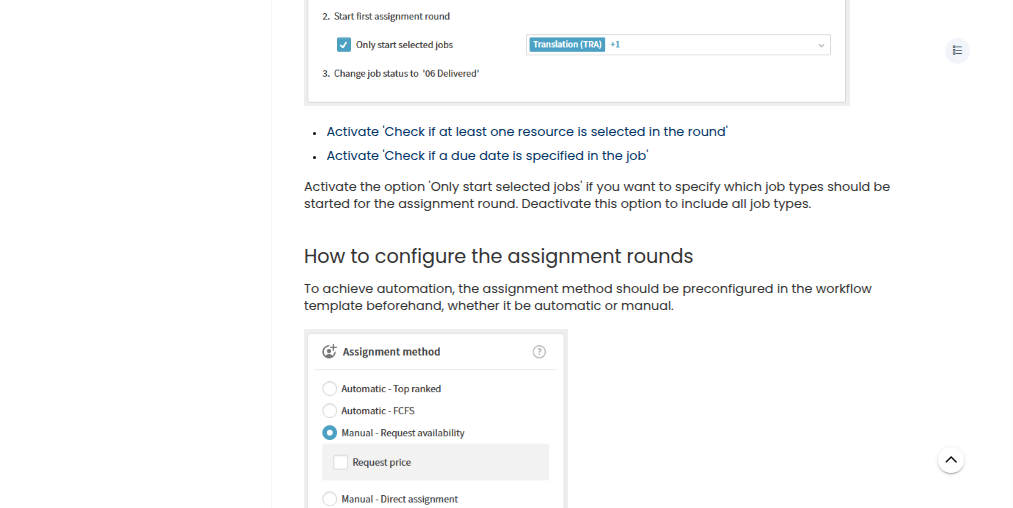
Assignment rounds offer a job to vendors manually, first come first served or top ranked, and assigning a vendor generates the purchase order sent to them. Up to three payment reminders can go out automatically on the deadlines a company sets, each extending the due date. For payables, Plunet's own best practice has finance check each job against the vendor's invoice and set it to Invoice checked before a payable is created.
Plunet connects to MT engines and AI tools, LLMs included, and the Plunet API comes with AgencyAdvanced and Enterprise.
Those automations start from the portal and from Plunet's own records. An enquiry emailed to sales never passes through the AutomationManager, a quote stays at Sent until someone moves it, and at agencies that book payments in QuickBooks, whether a client has paid is answered there rather than in Plunet.
The 8 a.m. quote list covers every quote still at Sent after two days
Every quote still at Sent two days after it went out gets a follow-up drafted in Gmail the next morning, giving its reference, language pair and amount, and a post in the Slack sales channel lists them for the account managers to send.
An emailed enquiry becomes a quote request in Plunet within minutes, carrying the prospect's name, language pair and deadline, a note on where it came from, and the sales rep for that language pair or region. A Slack message tags the rep, and the reply acknowledging the prospect waits among the rep's Gmail drafts.
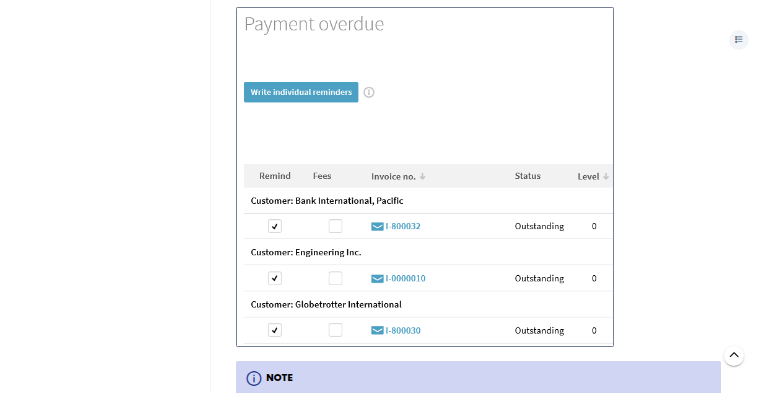
On Mondays the account managers see which clients with work in the last year have had nothing delivered for 30 days, high-volume accounts marked, each with a drafted check-in that mentions the last project and the usual language pairs. Finance sees each overdue Plunet invoice that QuickBooks confirms is unpaid, skipping any chased in the past week, with a reminder drafted and the largest balances first.
Finance's Monday report also matches each vendor invoice in QuickBooks to its Plunet purchase order by reference and lists the differences beyond tolerance and the invoices with no PO.
Plunet still issues its own purchase orders and payment reminders
Plunet still sends its purchase order on assignment and its own payment reminders, so the PO drafts and the invoice chaser suit finance teams that issue POs by email or chase from Gmail. WebRun is an AI agent that works a real Chrome browser, and here it uses a Plunet user together with QuickBooks, Gmail and Slack.
Only the enquiry job writes into Plunet, adding the quote request. Account managers, project managers and finance send every client and vendor email themselves, from drafts in Gmail.
Agencies that deliver from Smartcat can add the delivery confirmations, which read the delivered project there and the client contact in Plunet.
Questions people ask
Will clients get Plunet's reminder and a chaser email for the same invoice?
They can, if both are on for the same invoices. Plunet sends up to three reminders on the deadlines you set; the chaser drafts a Gmail reminder only after QuickBooks confirms the invoice is unpaid and skips anything chased in the past seven days, so finance can leave out clients Plunet's reminders already cover.
Does the PO draft replace Plunet's own purchase order?
No. Plunet generates the purchase order when a resource is assigned. The draft is a Gmail email with your PO reference and payment terms, for finance teams that issue POs that way; where Plunet's PO already reaches the vendor, the draft adds little.
What goes into the quote request it creates?
The prospect's name, the language pair and the deadline from the email, a note summarising the enquiry and where it came from, and the sales rep assigned by language pair or region. The quoting itself stays with that rep.
How quiet does a client have to be before a check-in is drafted?
Thirty days since their last delivery, for clients with at least one completed project in the past 12 months. Strategic and high-volume accounts are marked in the Monday summary so the account manager can start with them.
Sources
- Translation Management Software customized for individual needs | Plunet Plunet's product page: automatic workflows, quotes and purchase orders, invoices, customer and vendor portals, reporting, and interfaces to Trados Studio, memoQ, Phrase, XTM and GroupShare, for translation agencies and corporate language departments.
- Plunet as your efficient Translation Management System | Pricing The editions: AgencyStart from 2 full user licences, AgencyPlus from 5 with dynamic CAT integrations, AgencyAdvanced from 20 adding the Plunet API, and Enterprise for language departments with the API included.
- AutomationManager Plunet's Knowledge Center entry: an optional, separately purchased module that automates quote and order creation from customer portal requests and, as of Plunet 9.1, the assignment of resources; setup with a Plunet Implementation Specialist is mandatory.
- Purchase order and accepting the request The purchase order is the assignment document sent to the resource, generated once a resource is assigned; resources respond in the vendor portal by manual assignment, first come first served or top ranked.
- Invoices - Reminders States that Plunet can send up to three payment reminders, automatically if configured, each with a new payment deadline.
- Managing payables (best practice example) Plunet's own process for checking vendor invoices: save or scan them to the resource, check each job and its price, then set it to Invoice checked before creating the payable.
- Multi-team projects Describes items as a project's individual language combinations, each with its own workflow.
- Run language operations with confidence in an AI-driven world | Plunet Plunet's page on connecting MT engines, AI tools (LLMs included) and automation platforms to its business management platform.
7 ready-made Plunet workflows
Each one names the apps it touches and the exact steps it takes. Open one to read what it will do, then turn it on.


Want one of these running on your own Plunet?
Show WebRun the process once and it will run it on schedule, in your own private browser environment.