How to Automate Planning Center
Planning Center automates inside its own apps: Lists that refresh on rules, Workflows and Automations in People, auto-filled volunteer schedules and reminder emails in Services, and security labels in Check-Ins. Writing the welcome each workflow step calls for, filling declines before Sunday and combining numbers from other platforms is left to staff, or to an agent like WebRun.
 Written by
Samuel Adeyemi
Integrations writer
Written by
Samuel Adeyemi
Integrations writer
 Reviewed by
Yara Haddad
Data operations
Reviewed by
Yara Haddad
Data operations
Planning Center's apps share one database of the congregation
By Thursday a church office knows most of what Sunday needs: who is leading worship, which songs are in the plan, who is on the welcome team and how many volunteers the children's rooms have.
Planning Center, whose support site still sits at planningcenteronline.com from its Planning Center Online days, is church management software sold as separate apps on one shared database of people. Services builds each service plan and schedules the volunteers. Check-Ins prints the name tags and the security labels that match children to parents at pickup. Giving handles tithes and offerings, Groups runs small groups, and People holds every profile, form and follow-up.
People is free for every church, and a church pays only for the other apps it adds. In a church of a few hundred, the users might be three staff and twenty volunteer team leaders, each with their own login.
Sunday's gaps and Monday's follow-ups land on the same few people
A family filled in a connect card on Sunday, and the pastor wants to welcome them by Tuesday and mention the children's ministry, because they have two children under ten. Three volunteers declined for this Sunday, and the sound desk is still empty on Thursday night.
A prayer request came in through a form and needs to reach the right pastor privately, not sit in a shared inbox. The elders want Monday's numbers too, livestream views and gifts through a separate giving provider among them, if the church still uses one.
In the children's wing, the director wants to know after each Sunday whether any room had fewer volunteers checked in than it needed for the children in it, and which children with medical notes were in which room, before planning next week's rota.
Workflow cards in Planning Center assign each step to a person
In People, Lists gather everyone who matches a set of rules and refresh automatically, and Automations can update a profile, send a welcome email, add someone to a workflow or create a task when a form is submitted or a person joins a group. A workflow moves each person through its steps as a card, and a step's assignee hears about each new card in the Admin Notification Inbox and by email.
Services can fill open positions automatically from who served last, preferences and blockout dates, and it sends volunteers reminder emails. People's Metrics tab builds dashboards a church can share with its leaders, covering attendance from Check-Ins, Headcounts, Services and Groups alongside giving, workflow activity and new profiles.
A workflow card still stops with its assignee, who sends the welcome by hand, from a blank message or a template, after rereading the connect card. When a volunteer declines, the team leader is the one texting round on Thursday night. And the Metrics dashboards cover what lives in Planning Center, so livestream views and gifts through a separate giving provider stay off them.
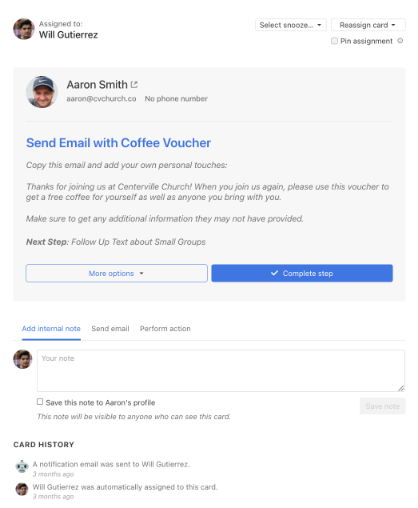
The pastor's welcome email starts from the connect card
The welcome step of a new guest's workflow card comes with its email written from the connect card: the children's ages, the service the family came to, the ministry they asked about. The pastor changes a line, sends it and completes the step.
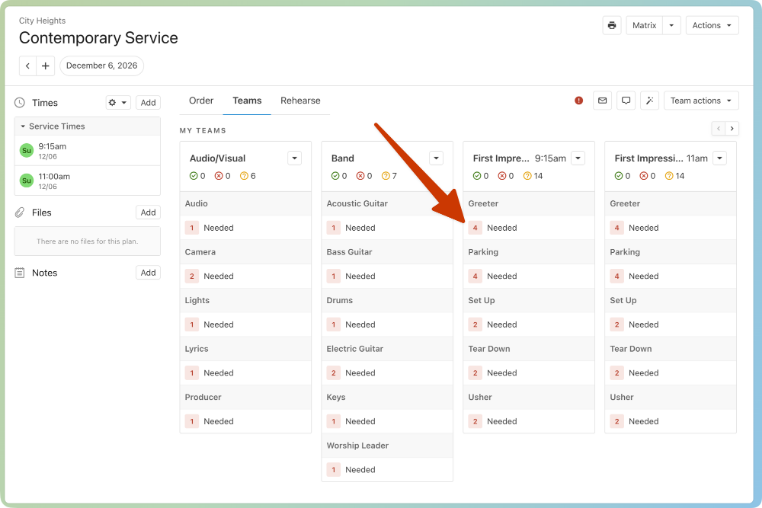
By Thursday morning the team leader has every Services position still open for Sunday matched to volunteers who are free that day, have no blockout and have not served lately, with a personal ask written to each.
The pastor on care duty that week receives each prayer request from the form by private email, and it never appears in a shared channel. On Sunday afternoon the children's director has each room's check-ins for children and volunteers side by side, with the medical notes for that room, while the morning is still fresh.
The elders go into Monday's meeting with Planning Center's own attendance and giving on one page, and next to them the livestream views and any gifts through the separate provider, set against the same Sunday last year.
Planning Center's own permissions decide what the agent can read
Each welcome starts with rereading a connect card, and each Thursday ask with checking the Services matrix against blockout dates, volunteer by volunteer.
WebRun is an AI agent that works a real Chrome browser, signed in as you. Give it a Planning Center login and overnight it works across People, Services and Check-Ins, adds the giving provider's and livestream platform's dashboards if you want those numbers, and leaves the drafts in the church office's Gmail and the Monday page in a shared spreadsheet.
Guests and volunteers hear only what a staff member has sent, and a job can leave prayer requests and pastoral notes out entirely. The agent schedules no one and edits no plan or gift. The visitor follow-up job below builds that welcome, and the prayer request routing job handles the care-team email.
Questions people ask
Is it appropriate to let software read prayer requests?
Only if you choose to. A job can leave prayer requests and pastoral notes out entirely. Where a church does route them, each request goes by private email to the one person on care duty that week, never to a shared channel.
Does a single run reach People, Services and Check-Ins together?
Yes, if the login it uses has access to each app. That is how one run matches a first-time guest from last Sunday's check-ins to their People profile and their workflow card.
Can the Monday numbers include a giving provider outside Planning Center, such as Tithe.ly?
Yes. It signs in to that provider's dashboard with your login, reads the week's total and sets it beside the attendance and giving Planning Center already reports.
Sources
- Planning Center Lists the separate Planning Center products, including People (a free membership database), Services, Check-Ins, Giving, Groups and Registrations, and links the support site at support.planningcenteronline.com.
- Planning Center People: Membership Management Describes Workflows, Lists with custom rules that refresh automatically, Forms, Automations for profile updates, welcome emails, workflow additions and tasks, background checks with expiry monitoring, and that People is free.
- Follow a card through a workflow | Planning Center Help Explains that a card tracks a person through a workflow, that step assignees are notified of new cards in the Admin Notification Inbox and by email, and that assignees send emails by hand, new or from a template, before completing the step.
- Planning Center Services: Worship Planning Software Establishes volunteer scheduling with positions filled automatically from last scheduled date, preferences and blockout dates, reminder emails, and the Scheduling Matrix.
- Planning Center Check-Ins: Child & Volunteer Attendance Covers check-in stations, name tags and security labels matched at pickup, emergency texts to parents, medical notes and attendance reports.
- Create Custom Dashboards to Share Metrics | Planning Center Blog Introduces the Metrics tab in People (23 September 2021), with dashboards of attendance from Check-Ins, Headcounts, Services and Groups, giving, workflow activity and new profiles, shareable with chosen people.
6 ready-made Planning Center workflows
Each one names the apps it touches and the exact steps it takes. Open one to read what it will do, then turn it on.



Want one of these running on your own Planning Center?
Show WebRun the process once and it will run it on schedule, in your own private browser environment.