How to Automate Nextcloud
Install Quota warning and Share Review from the Nextcloud app store, enforce expiry dates on link shares, and use Flow or Windmill for rules and API workflows on your own server. WebRun, an AI agent, can copy exports out of hosted tools that have no API and ask each share's owner about it.
 Written by
Ben Kirkwood
Solutions engineer
Written by
Ben Kirkwood
Solutions engineer
 Reviewed by
Dimitri Vasilev
Logistics analyst
Reviewed by
Dimitri Vasilev
Logistics analyst
Nextcloud keeps the files on a server the organisation controls
Nextcloud is what an organisation picks when it wants its files on a server it controls. The software is open source: the IT team runs it on its own hardware or in its own data centre, or the organisation takes an account from a hosting provider that runs Nextcloud for it, and Nextcloud GmbH sells Enterprise subscriptions with support on top.
Nextcloud Hub bundles Files, Talk, Groupware, Office, Assistant and Flow. Staff sync folders through the desktop and mobile clients and edit documents in the browser. Public bodies and firms with strict data rules choose it because the data stays where they put it.
Behind every instance sits an admin, often one person or a managed service provider. The admin sets each user's quota and the sharing rules, and installs apps from the Nextcloud app store.
A Nextcloud admin learns about a full quota when the sync stops
Owning the server means nobody else is watching it. A user who goes over their quota cannot upload or sync anything, and the admin usually hears about it from that user, on the day the sync stops.
Link shares pile up. A folder shared by link for last year's grant application still opens with no expiry date. Somebody uploads forty gigabytes of raw video into a shared folder on a Friday night, and the disk space warning on Monday is the first anyone knows of it.
Many organisations chose Nextcloud to keep their own copy of their records, yet the form results and meeting transcripts produced in the hosted tools the team also uses stay in those tools' accounts. Copying them onto the organisation's own server is a download-and-upload job that belongs to nobody.
Nextcloud warns users near their quota and lists every share for a reviewer
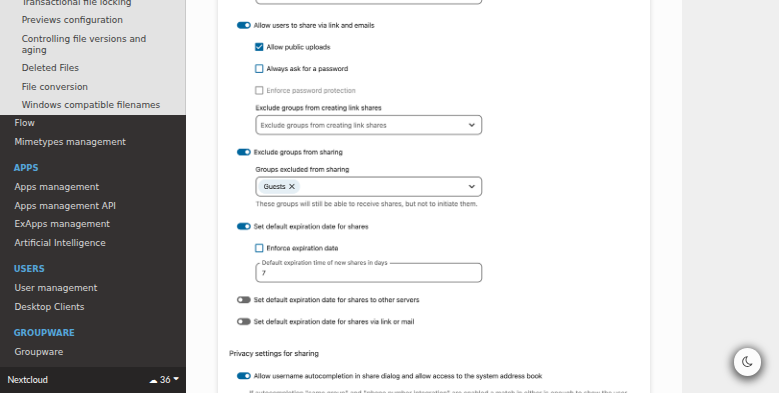
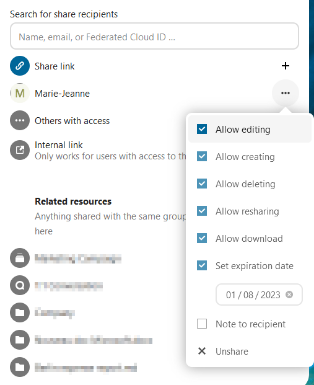
The Quota warning app checks once a day and notifies each user at 85, 90 and 95 per cent of their quota, with an optional email; the admin can change the three levels. Under the sharing settings, admins can set default and enforced expiry dates on link shares, and a daily occ job tells users about shares expiring within 24 hours.
The Share Review app lists every share on the instance for a group the admin assigns. Reviewers can remove shares, mark the review done so that only new shares appear next time, and export the list as CSV or PDF on a schedule. In Flow, an access control rule can refuse uploads above a set file size, and Windmill builds custom workflows against systems with an API.
Quota warning writes to the user who is filling up, so the admin's view across accounts is still the Users page. Share Review lays the shares out, and deciding which to close still means asking the people who made them. An enforced expiry caps how far ahead a date can be set, and users can extend it again as it approaches. Windmill needs a server of its own, someone to write the flows and an API in the other tool, so a hosted tool that offers only an Export button is beyond it.
A copy of each hosted tool's records sits on the organisation's server
The records manager, or whoever answers for the data, gets the copy Nextcloud was chosen for: each week's exports from the hosted tools, such as form results and meeting transcripts, saved into a Nextcloud folder with the date in the file name. If a subscription lapses, last year's copy is still on the organisation's own server.
The admin raises a quota, or talks to the user, while uploads still work. Each account above ninety per cent shows up in the morning as a card on the IT team's Trello board with its current usage, and a heads-up email for that user is in Gmail's drafts.
The admin's Monday review starts from a Microsoft Teams post of the link shares expiring this week or never set to expire, with an hour held in Google Calendar to go through them. A summary of yesterday's activity in the shared folders reaches a Slack channel each morning, and a single upload above the size the admin chose arrives on the admin's phone through Telegram.
A Nextcloud login scoped to the folders each job needs
A weekly export from each hosted tool, uploaded into Nextcloud Files with the date in its name, is browser work from start to finish. WebRun is an AI agent that works a real Chrome browser, signed in as you. In Nextcloud it reads and saves as the account you choose for it, so an account limited to the folders a job needs keeps every other folder out of its sight.
Admin or group admin rights are needed only for the quota check, and a group admin sees only the members of their own groups. Raising a quota or removing a share is the admin's click.
Quota alerts, a Monday share review and a morning activity digest are set up as Nextcloud jobs to copy and adjust.
Questions people ask
Can it reach a Nextcloud that only answers inside our network?
Only if the instance is reachable from the internet, the way it is for a remote employee. An instance that answers only on the office network or through a VPN cannot be opened from the browser it drives.
Our data is meant to stay on our own server. Does any of it leave?
What its login opens passes through a browser that runs in WebRun's cloud, so treat it like any outside service you give an account to. Limit that login to the folders a workflow needs, and keep sensitive folders off that login.
Should we build this in Windmill instead?
Windmill fits jobs that start from a Nextcloud event or call a system with an API, if someone will write and maintain the flows on a Windmill server of its own. Copying exports out of hosted tools that offer no API, and reading pages on a schedule, is the part an agent covers.
Sources
- Quota warning (README) The Quota warning app notifies users at 85, 90 and 95 per cent of their quota, checked once a day, with an optional email; admins can change the three levels.
- Share Review (README) Share Review lists every share, including Talk, Deck, Teams and federated shares, lets reviewers remove shares and confirm a review so only new shares show next time, assigns the review to user groups, and exports CSV or PDF manually or as a background job.
- File sharing and management Admins can set default and enforced expiry dates and passwords for shares, users can extend an enforced date as it approaches, and a daily occ job notifies users of shares expiring within 24 hours.
- Files access control Flow rule groups deny access when all their rules match; the available rules include file size, which applies on upload.
- Windmill Workflows Nextcloud integrates the Windmill workflow engine through a stand-alone Windmill instance and the webhook_listeners app, with the packaged option deprecated since Nextcloud 33.
- User management Admins set a storage quota per user, a user who exceeds it cannot upload or sync data, and group admins can manage members of their own groups.
- Nextcloud Hub Nextcloud Hub includes Files, Talk, Groupware, Office, Assistant and Flow, and is 100% open source for self-hosted or on-premises use.
- Retention of files Nextcloud's Files Retention app deletes files carrying a given tag after a set age, with an option to notify the owner a day before, configured under Flow.
3 ready-made Nextcloud workflows
Each one names the apps it touches and the exact steps it takes. Open one to read what it will do, then turn it on.



Want one of these running on your own Nextcloud?
Show WebRun the process once and it will run it on schedule, in your own private browser environment.