How to Automate MemberClicks
Renewal, grace period and lapsed notices, set per member type, and recurring campaigns to saved searches are MemberClicks' own automation. The follow-up they leave, such as members short of continuing education hours, committee terms ending and new members who never logged in, is where an AI agent like WebRun helps, drafting it for staff.
 Written by
Clara Bennett
Revenue operations
Written by
Clara Bennett
Revenue operations
 Reviewed by
Hannah Vogel
Finance operations
Reviewed by
Hannah Vogel
Finance operations
MemberClicks keeps the record of who is a member in good standing
Most work in an association office starts from one fact about a person, whether their membership is current, and MemberClicks is where the association keeps that fact. It is sold today as MemberClicks by Momentive, in two versions: MC Professional for associations whose members are individuals, and MC Trade for chambers and associations whose members are organizations.
Each profile carries a member type and an expiration date, with the dues invoices behind them. Members join and renew through forms on the association's website and register for events there. Staff send email from the Contact Center, run committees with positions and terms, and in MC Professional keep a continuing education transcript on each profile, which members can open and export themselves.
At a small association the people in it are few: an executive director, a membership coordinator, perhaps a communications person, plus the volunteers who chair committees.
A licensed member can reach renewal week short of CE hours
A member's license renews in the spring, and her transcript shows she is several hours short of what her board requires, a fact she will discover the week before the deadline. A committee chair has three volunteers whose terms end in June and who stopped answering emails in March, and nobody at the association knows until the next meeting.
A dental practice manager joined in January, has not logged in since, and has no idea the association runs the course she was looking for. A lapsed member replies to the last lapsed notice to say the card they paid with has expired, and the reply sits in the membership coordinator's inbox between two event registrations.
Renewal notices and recurring campaigns run on dates and saved searches
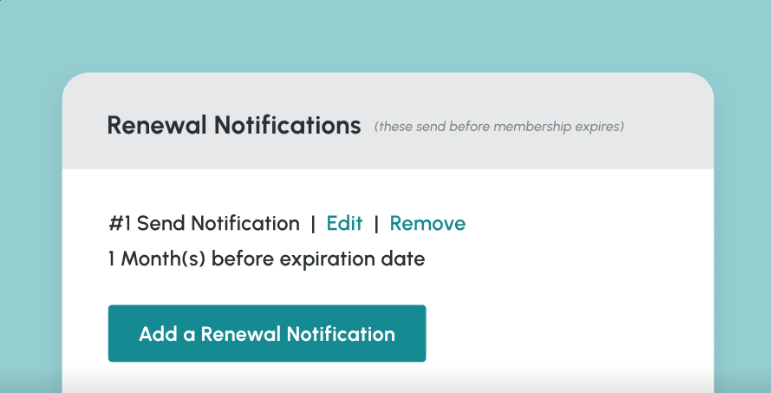
For each member type, staff can set up to four renewal notices before a member's expiration date, four more during the grace period and four after the membership lapses, each with a pay link to the renewal invoice. Recurring email campaigns send to a saved search on a daily, weekly, monthly or custom schedule, so a message can go out, say, seven days after someone joins.
Continuing education credits sit on each profile's transcript and export as a detailed CSV with hours, category and expiration, and committees get a private space for messages and files.
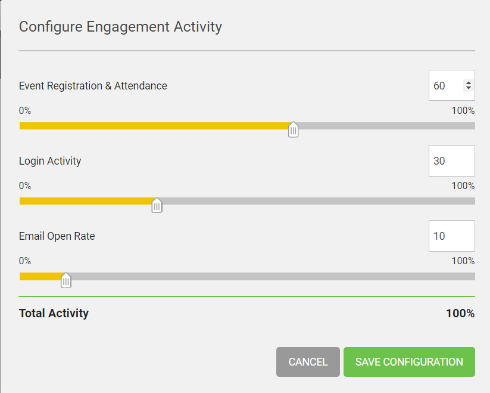
The Member Engagement report scores every profile on event attendance, logins and email opens. On MC Trade, the Data Insights add-on predicts at-risk members and drafts welcome emails and announcements.
A renewal notice uses the template for that member type, whatever the member's CE transcript shows. The transcript records the hours a member has earned, while the licensing board sets the hours required and the renewal date on the board's website. Engagement scores stay as they were until someone runs the report again, and a lapsed member's reply lands in a staff inbox. MC Professional also offers a REST API, meant for developers; MemberClicks support does not help with custom integrations.
CE gaps show up in the transcript long before the license deadline
The membership coordinator can write each month to every member whose license renews within six months and whose transcript is short of the hours the board requires, with the association's upcoming sessions that carry credit already listed in the note.
On MC Professional, which has no Data Insights, the membership coordinator can call the members whose engagement scores have fallen since the report's last run, with each one's last login and last event in hand.
The committee chair writes to each volunteer whose term ends next quarter, starting from a draft in the chair's own name that carries the roster's end dates. The membership director sends a personal welcome to each new member who has not logged in or registered for anything in the first month, drawn from what that member wrote on the application.
Member records stay as staff left them
A board's continuing education rule is a number of hours per renewal cycle, sometimes split by category, and the transcript holds the hours to measure against it. WebRun is an AI agent that works a real Chrome browser, signed in as you. Using a staff login to MC Professional or MC Trade, the agent compares transcripts with the rule you give it, reads committee rosters and the engagement report on the days you choose, and leaves drafts in the association's email and a summary for the executive director.
Member types, dues, invoices and credits stay as staff left them, because the agent's login only reads in MemberClicks. Notes to members wait in the membership coordinator's email drafts, and the agent sends nothing from the Contact Center. For an association of licensed professionals, the CE check runs monthly and the rest weekly.
Questions people ask
What happens after the fourth lapsed notice?
MemberClicks stops there. A lapsed profile cannot log in until the member renews through a renewal form, so the agent lists who is still lapsed and drafts a personal note for staff to send.
What changes on MC Trade?
The members are organizations rather than individuals, and the Data Insights add-on, sold only for MC Trade, already predicts at-risk members and drafts welcome emails. On MC Trade the agent's jobs are the CE and committee checks and anything that sits outside MemberClicks.
Can it check CE credits against our certification rules?
Yes, once you give it the rule, such as a number of hours per renewal cycle by category. Each transcript entry holds hours, a category and an expiration date, which is what the check compares.
Sources
- Customizing renewal notifications MemberClicks help: up to 4 renewal notifications before expiration, 4 grace period notifications and 4 lapsed notifications, set per member type, each with a link to pay the renewal invoice.
- Setting up automated email campaigns Explains recurring campaigns sent daily, weekly, monthly or on a custom schedule to a saved search, including relative dates such as a set number of days after a member joins.
- Member engagement report Describes the weighted engagement score from event activity, logins and email opens, and that scores persist until the report is recalculated.
- Continuing education report Shows continuing education credits are held on member profiles and exported as a basic or detailed CSV, the detailed one including hours, category and expiration.
- Committees Committees get a private space for messages and files, with positions assigned to members and start and end terms edited from the roster.
- Continuing education transcript Staff view and add education credits on a member's profile, and members can open, add to and export their own education history.
- API overview The MC Professional API is a JSON REST API with OAuth 2.0, meant for developers; MemberClicks support does not assist with custom integrations.
- Data Insights | MemberClicks An add-on for MC Trade only: natural-language questions, predictions of at-risk members, retention and revenue, and generated member announcements and welcome emails.
- Purpose-built Association Management Software MemberClicks by Momentive: MC Professional for individual-based member types and MC Trade for organization-based member types and chambers.
6 ready-made MemberClicks workflows
Each one names the apps it touches and the exact steps it takes. Open one to read what it will do, then turn it on.


Want one of these running on your own MemberClicks?
Show WebRun the process once and it will run it on schedule, in your own private browser environment.