How to Automate Insightly
For an Insightly team that delivers what it sells, workflow rules (Professional and Enterprise plans) and the conversion of won opportunities into projects cover the handoff, and AppConnect, a paid add-on, links apps with connectors. A permit, a utility approval or a loan decision still moves the milestone by hand, or through WebRun, an AI agent that checks those portals.
 Written by
Nora Whitfield
Editorial lead
 Reviewed by
Nikhil Bhatt
Automation strategist
A won Insightly opportunity becomes a project with milestones
Insightly is a CRM for mid-market companies, and since July 2024 it has been part of Unbounce. Beside the CRM sit a marketing automation product, a customer service app and AppConnect, its integration tool. Record linking ties contacts to their organisations and to one another, and emails and proposals link back to the organisation and the people they concern.
At closed-won, the rep converts the opportunity into a project, and its specifications, client requirements and tasks copy across, so the delivery team starts from what sales learned. Each project then tracks its progress through either a pipeline of stages an administrator sets up or milestones the team adds as it goes, since Insightly allows one or the other on a project, not both.
Insightly's industry pages cover agencies, consulting, finance, healthcare, manufacturing, professional services and solar. The solar page lists what a job goes through after the sale: financing, permitting and approvals, material sourcing, construction and years of service.
A solar project's next milestone is decided in a city's permit portal
Once a solar sale converts to a project, the permit sits in the city's portal, the interconnection application in the utility's portal and the customer's loan in the finance partner's dashboard, each changing status on its own schedule.
The project coordinator signs in to each one, customer by customer, and moves the milestone in Insightly by hand. When the operations manager asks which installs can go on next week's calendar, the answer depends on whether that checking got done. A manufacturer's project manager does the same with supplier lead times, and a consultancy's with the client's sign-off on each deliverable.
Some weeks a crew turns up at a roof whose permit has not cleared, and an approved permit sits unnoticed while the customer wonders why nobody has called.
AppConnect recipes watch connected apps for events
Professional and Enterprise customers get workflow automation: if-this-then-that rules that create tasks, send notifications, update fields and objects and fire integrations, at once or at a scheduled time. On the same plans, lead assignment and routing gives each new lead an owner, and the AI Copilot drafts emails from past conversations, summarises a record and adds or updates records from a chat, with 100 queries on Professional and no limit on Enterprise. Enterprise adds custom validation rules and audit logging.
AppConnect is sold separately, priced by the tasks its recipes run each month. A recipe pairs a trigger, which watches for an event in a connected app, with actions in another, and the hundreds of pre-built connectors include DocuSign, PandaDoc, QuickBooks and NetSuite. Every plan, Plus included, also has a REST API.
A recipe needs a connected app to watch. The permit's new status appears on the city portal's screen, for the coordinator who signs in there, and the milestone in Insightly waits until then.
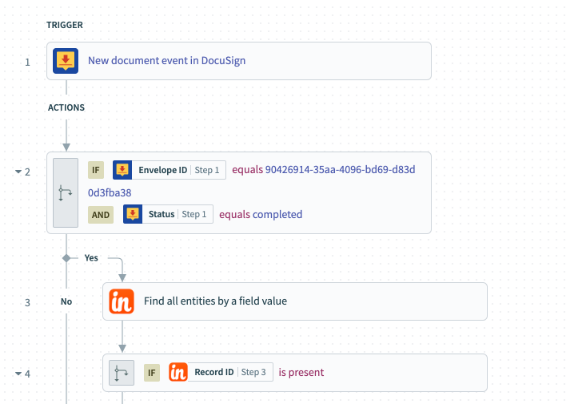
A cleared permit moves the milestone and opens the install task
The operations manager plans next week's installs from permit milestones that moved on the day each permit cleared in the city's portal, each with its install task already open. The interconnection milestone follows the utility's portal the same way, so the coordinator stops phoning the utility for a status, and the customer's note saying the permit is through waits in the coordinator's drafts.
Reps quote install dates against the lender's current answer, because each opportunity carries the approval status and any conditions from the finance partner's dashboard, read that morning. A lender's condition, a missing utility bill for instance, turns into a task for the rep on that opportunity.
A manufacturer's projects carry each supplier's current lead time in a field next to the delivery date, so the project manager spots a late component before promising the client a date. At a consultancy, the client's approval of a deliverable in their review portal ticks the milestone and opens the invoicing task for the finance lead.
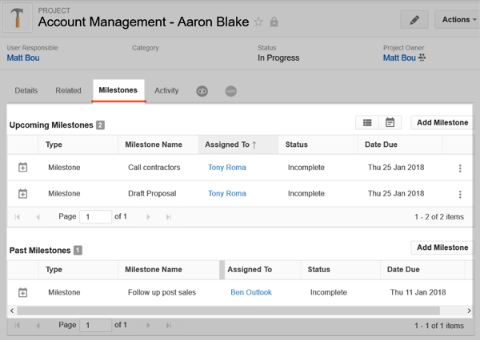
Permit and loan checks move off the coordinator's desk
Every open project's permit, interconnection and loan status goes into the operations meeting, and collecting them is a scheduled run's job. WebRun is an AI agent that works a real Chrome browser, signed in as you; for each open project it reads those three portals, then moves whatever changed onto the project in Insightly.
Booking a crew or an install date with a customer is the operations manager's call, and on Enterprise the audit log records each change the agent makes.
Lead routing matters most on Plus, which has no lead assignment rules: the routing job gives each new lead an owner and a first task. The pipeline jobs list quiet opportunities with a brief for each owner and send a Friday scorecard that counts open project tasks too.
Questions people ask
Will our AppConnect recipes keep running?
Yes. Keep AppConnect for every app that has a connector; the agent handles the screens no connector reaches, such as a city permit portal or a lender's dashboard.
Where does a rejected permit show up?
At the top of the coordinator's list, with the portal's comments copied onto the project. The agent leaves the milestone where it is; what to change and resubmit is the coordinator's call.
Which field should hold the permit number?
Any custom field on the project, such as Permit number or Utility application ID. The agent finds the project by that value, so a portal record it cannot match goes to the coordinator instead of onto the wrong job.
Will it schedule installs on its own?
No. When a permit clears it opens the install task for the operations manager, and the date, the crew and the call to the customer stay with people.
Sources
- Workflow automation | Insightly Describes if-this-then-that workflows that automate tasks, notifications, field and object updates and integrations, at once or at a scheduled time, and states that workflow automation is on the Professional and Enterprise plans, not Plus.
- Insightly pricing Plus, Professional and Enterprise plans: lead assignment and routing and AI Copilot (100 queries) from Professional, unlimited Copilot queries, custom validation rules and audit logging on Enterprise, AppConnect sold separately, two roles on Plus and unlimited roles above it, the REST API on every plan.
- AppConnect | Insightly Hundreds of pre-built app connectors, recipes made of triggers and actions, connectors including DocuSign, PandaDoc, QuickBooks and NetSuite, and plans priced by the number of tasks run in a month.
- AI CRM | Insightly Copilot drafts emails and follow-ups from past conversations, gives summaries, and adds, updates and links records via chat; AI email replies and summaries.
- Project and task management | Insightly Explains converting a won opportunity into a project with its specifications, client requirements and tasks copied, and project pipelines with milestones.
- Solar CRM | Insightly Lists the stages of a solar job, from site assessments and system design to financing, permitting and approvals, material sourcing and construction, and projects created from closed-won deals.
- CRM for sales | Insightly Flexible record linking for organisational relationships, with emails, proposals and other interactions linked back to organisations and contacts.
- About Insightly States that Insightly was acquired by Unbounce in July 2024, describes the CRM as designed for mid-market companies, and names its industries.
- Using milestones | Insightly Help Center Milestones are only available on project records; a project can use a Pipeline or milestones, but not both.
3 ready-made Insightly workflows
Each one names the apps it touches and the exact steps it takes. Open one to read what it will do, then turn it on.
Want one of these running on your own Insightly?
Show WebRun the process once and it will run it on schedule, in your own private browser environment.