How to Automate Google Search Console
To automate Google Search Console, read its Performance and indexing reports on a schedule, check each page that lost clicks against the CMS and the backlink tool, and draft the fix for the page's owner. Search Console reports but fixes nothing, and its exports stop at 1,000 rows, so an AI agent such as WebRun can do the reading.
 Written by
Hannah Vogel
Finance operations
Written by
Hannah Vogel
Finance operations
 Reviewed by
Grace Okafor
Healthcare operations
Reviewed by
Grace Okafor
Healthcare operations
Search Console is Google's own record of how your pages do in Search
Google Search Console, which people who have been at this a while still call Webmaster Tools, is the free service Google gives site owners to see how their pages perform in Google Search. Its Performance report lists the queries people typed and the pages Google showed for them, with clicks, impressions, click-through rate and average position for each, going back 16 months. Other reports cover indexing and sitemaps.
A content lead opens it to see which articles are slipping, and a developer hears about it when a page drops out of the index. Agencies keep a property for each client and work through them before every monthly call. A shop owner may only look when orders from Google go quiet.
The SEO lead rebuilds the same click comparison every Monday
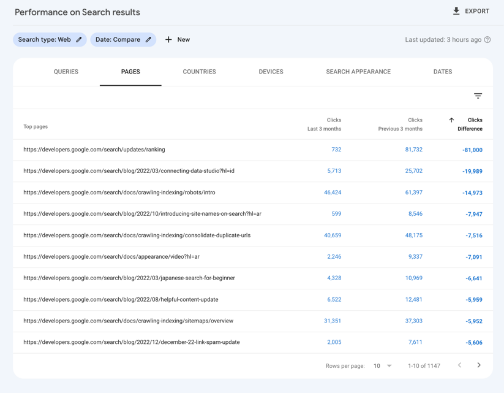
The SEO lead sets the last 28 days of the Performance report against the 28 before and sorts the pages by the change in clicks. An export carries at most a thousand rows, so on a large site the lead exports one section at a time and pastes each piece into the sheet that holds the comparison.
For each page that fell, the lead goes looking for a cause: the CMS revision history for a changed title, the backlink tool for links that disappeared, and the live results page for whatever now ranks above it.
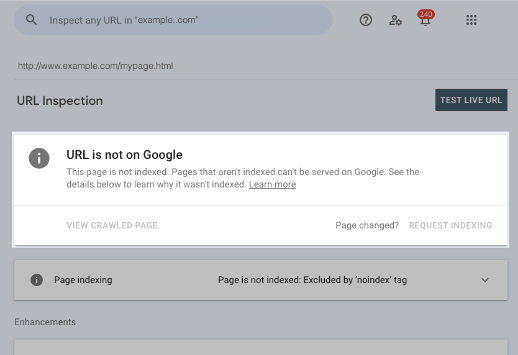
The developer pastes last week's new URLs into URL Inspection one at a time to see which ones Google has indexed. When Search Console emails about a new indexing issue, the message sits in an owner's inbox until somebody turns it into a ticket. At an agency, the account manager repeats the whole routine for every client property.
Search Console shows the drop but not the edit or the lost link behind it
The Performance report filters by query, page, country, device and search appearance, and compares any two date ranges in one table. URL Inspection shows whether Google has indexed a page and takes a request to index it, within a daily limit for each property and with no promise that the page gets in. Search Console also emails a property's users about events like a new indexing issue, and keeps a year of those messages in its message panel.
Past the export cap there are two larger routes out. The Search Console API returns up to fifty thousand rows a day for each search type on a property, and Google suggests it for a custom interface written in Python, Java or another language. The bulk export sends each day's data to BigQuery, which needs a Google Cloud project with billing and someone to write the queries.
Its Links report lists a sample of the sites and pages that link to you but keeps no record of links lost over time, so the two links that disappeared last week show up only in the backlink tool, and last Tuesday's title change only in the CMS revision history.
The editor's refresh brief starts from the pages that lost clicks
A weekly Google Doc could list the pages that lost clicks against the previous four weeks, for an editor looking after a site with a few hundred articles. Beside each page are the queries that fell, its average position then and now, the date of its last edit in the CMS and any backlinks lost over the same weeks, and the largest drops carry a refresh brief drafted underneath.
Further down that Doc, the content lead could read the queries with plenty of impressions where a page sits between positions eight and fifteen, each beside the page's current title and meta description and a proposed rewrite. Pages whose impressions held while clicks fell go under their own heading, since the search snippet is where to look first.
The developer could get the list of last week's new URLs that URL Inspection still reports as not on Google. When Search Console emails about a new indexing issue, the developer could have a ticket with the affected URLs in the queue before anyone has opened the email.
Agencies could have every client's week already written into the reporting sheet, read off the Performance report the manager exports by hand today, with no API project or BigQuery dataset behind it.
The weekly Search Console pass runs on a restricted login
A restricted user in Search Console sees the full Performance report but cannot submit a sitemap or change a setting. WebRun is an AI agent that works a real Chrome browser, signed in as you, and a restricted seat is all it needs here. Each week it opens the Performance report for every property, checks each falling page against the CMS revision history and the backlink tool, Ahrefs or Semrush, and writes the lists and briefs into Google Docs or Slack.
Titles and meta descriptions arrive as proposals and the briefs as drafts; the person who owns a page makes any change in the CMS.
Questions people ask
Can Search Console alert me when a page loses traffic?
Not page by page. Its emails cover events across the whole property, for example a new indexing issue. To see which pages lost clicks, open the Performance report, choose Compare in the date filter, and the table adds a Difference column you can read page by page.
How far back does Search Console data go?
Sixteen months. Anything older drops out of Search Console, so a site that wants a longer history has to copy the numbers into its own sheet or database as it goes.
Does Search Console show how we appear in AI Overviews?
Partly. The Generative AI performance report counts impressions of your pages in AI Overviews and AI Mode, grouped by page, country, date and device, with the same 1,000-row limit as the Performance report. Google says it rolled out to all websites worldwide as of 31 August 2026, but not every property has access yet, and a site needs enough impressions in those features before data appears.
Can I request indexing for all our new pages at once?
No. URL Inspection handles one URL per request, Google caps both inspections and indexing requests per property each day, and a request does not guarantee the page is indexed. For many pages at once, Google's advice is to submit a sitemap.
Sources
- Export data directly from a Search Console report Confirms exports go to Google Sheets, Excel or CSV and that the data is truncated to 1,000 rows, pointing larger sites to the API and bulk export.
- Export Search Console data using the Search Console API States the API limit of 50,000 rows per day per search type per property, and that the API is free but has a usage quota and is meant for custom, coded interfaces.
- Generative AI performance report (Search) Describes the report of impressions in AI Overviews and AI Mode, its dimensions and 1,000-row limit, and says it was available worldwide as of August 31, 2026 without every property having access.
- Connect Search Console to Google Analytics Google's statement that Search Console keeps data for the last 16 months.
- Start a new bulk data export States that a bulk data export needs a Google Cloud project with billing and BigQuery enabled, that Search Console's export service account must be granted two BigQuery roles, and that the data is subject to Google Cloud storage and query costs beyond a free level.
- Managing owners, users, and permissions Search Console's permissions table: owners, full users and restricted users can all view Performance report data; restricted users have simple view rights on most data and cannot submit sitemaps.
- Links report The Links report shows top linked pages, top linking sites and top linking text as a sample, in tables limited to 1,000 rows, and keeps links Google found over time without tracking which were lost.
7 ready-made Google Search Console workflows
Each one names the apps it touches and the exact steps it takes. Open one to read what it will do, then turn it on.


Want one of these running on your own Google Search Console?
Show WebRun the process once and it will run it on schedule, in your own private browser environment.