How to Automate Google Analytics
Custom insights and scheduled emails cover GA4's own alerts and reports, and Data Studio emails reports to people without access. The untagged link behind Unassigned traffic, and the CRM's verdict on each form fill, sit outside GA4, and WebRun, an AI agent working in a browser, can bring both into the weekly numbers.
 Written by
Samuel Adeyemi
Integrations writer
Written by
Samuel Adeyemi
Integrations writer
 Reviewed by
Priya Raghavan
Solutions lead
Reviewed by
Priya Raghavan
Solutions lead
Google Analytics records what visitors did after they arrived
Google Analytics 4, usually shortened to GA4, is Google's free analytics for websites and apps, with a paid tier called Analytics 360. It records sessions and events and sorts traffic into channels such as Organic Search, Paid Social and Email. Key events are the ones a business marks as important, such as a form submission or a purchase. Standard reports cover acquisition, engagement and monetization, and Explore builds free-form tables and funnels on top of the same data.
The marketing manager opens it on Monday for last week's sessions and key events by channel, and the content lead reads the landing page report. An agency builds each client's monthly report from it, and the owner of a small online shop checks it when orders feel slow.
Unassigned traffic and spam leads turn up in the Monday report
The marketing manager opens the Traffic acquisition report, sets last week against the week before, and copies sessions and key events by channel into the sheet the directors read. An agency repeats it for every client property before the monthly calls.
Part of the newsletter's traffic sits under Unassigned because one link went out without its UTM medium, and finding which link means opening the email tool and reading every URL in the send. Form submissions rose, but the CRM shows half of them were spam, and the only way to see it by campaign is to export the CRM's leads and match them against GA4's form submissions by hand.
Paid social reports more conversions in its own dashboard than GA4 shows as key events, and the directors ask which number is right. The paid social manager exports each platform's campaign report to compare, every platform counting conversions its own way, and the comparison lives in a spreadsheet nobody else can follow.
GA4 reports the session, not what the CRM says happened next
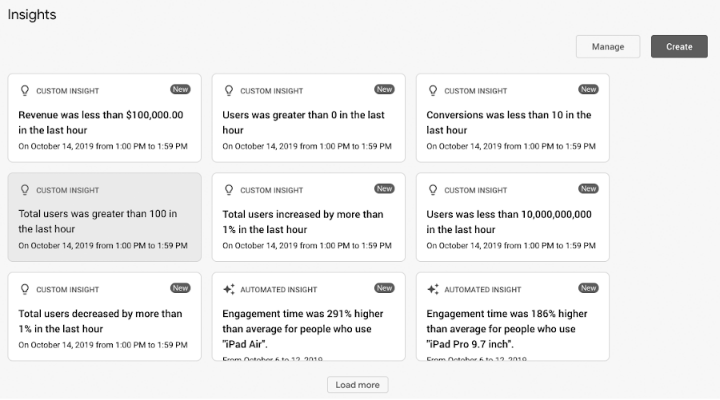
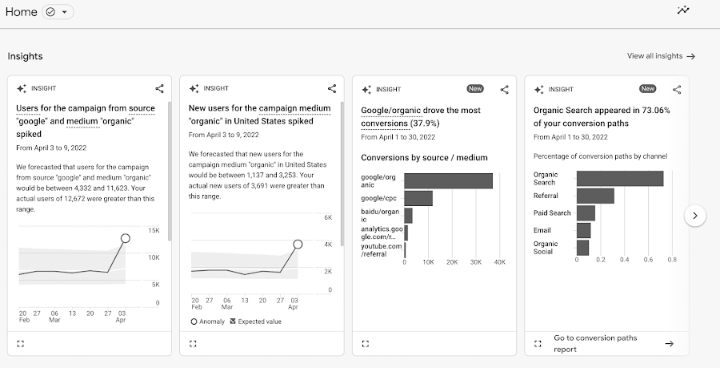
Automated insights flag unusual changes without anyone asking, and custom insights, up to 50 per property, check a condition hourly, daily, weekly or monthly and can email named people when it triggers. AI overviews summarise what changed on the Home page and in detail reports, and annotations, added by anyone at Analyst level or above, mark launches on the charts.
Administrators can schedule up to 50 reports by email, but only to users with access to the property; Looker Studio, now called Data Studio, sends a PDF to anyone else.
Data Import joins CRM or CMS data to GA4 from an uploaded CSV or a connected source. Campaign data import brings in cost, clicks and impressions from ad platforms outside Google, and custom channel groups sort traffic sources by rules of your own.
Each of those needs someone to supply what GA4 does not have. A key event stays a form submission, not a qualified lead, until someone exports the CRM's verdict and imports it. A channel rule cannot say which email carried an untagged link, and campaign data import carries no platform's own conversion count. Explorations keep event data for 2 or 14 months on a standard property.
The untagged newsletter link is found the morning after the send
Yesterday's Unassigned sessions, with their landing pages, sit beside what went out that day: the newsletter in the email tool, the posts in the social scheduler, a partner's mailing. The channel owner corrects the template from a drafted URL that adds the missing utm_medium, and a month of those shows which channel keeps sending untagged links.
On Mondays, last week's form submissions by campaign sit beside the leads the CRM marked qualified from the same campaigns, so the campaign sending mostly spam shows plainly in the directors' sheet.
The paid campaigns get a third column: the conversions each ad platform reports for itself, beside GA4's key events and the CRM's qualified leads for the same week. The marketing manager answers the directors from that sheet instead of from three dashboards.
The links that break attribution live in the email tool and the scheduler
The untagged link turns up in the email tool's sent campaigns or the social scheduler's published posts for that day, among dozens of URLs. WebRun is an AI agent that works a real Chrome browser, signed in as you. The CRM's lead statuses and the ad platforms' campaign reports come through logins the team chooses.
What it writes goes to two places: drafted links for the channel owner, and new rows in the directors' sheet. It leaves every lead in the CRM as it found it.
Set the Unassigned check to run the morning after each newsletter send, while the link is easiest to trace.
Questions people ask
Why is some of our traffic Unassigned in GA4?
Unassigned is the value GA4 uses when no channel rule matches the event data. A link tagged with a source but no recognised medium is one way to end up there. A custom channel group can sort that traffic once you know its source, and finding which email or post carried the link is what the agent does.
Our explorations stop after 14 months. Has the older data gone?
For explorations and funnel reports, yes: a standard GA4 property keeps user and event data for 2 or 14 months, while standard reports are not affected by that setting. Writing the weekly figures into your own sheet keeps a longer history.
Can Data Studio send GA4 reports to people without access?
Yes. Looker Studio, now called Data Studio, reads GA4 through its connector and can email a PDF of a report to any address at set times, or deliver it to Slack or Google Chat. GA4's own scheduled emails go only to users with access to the property.
Is a Viewer login in GA4 enough?
Yes. A Viewer sees data and settings, can add comparisons and secondary dimensions, and can create its own explorations, but cannot change the property. Key events, tags and data streams remain the administrators' to edit.
Sources
- [GA4] Schedule reports | Analytics Help States that administrators can schedule up to 50 standard and custom reports by email, and that recipients must be users with access to the property.
- Analytics Insights | Analytics Help Describes automated insights and custom insights, up to 50 per property, evaluated hourly, daily, weekly or monthly with optional email alerts.
- Default channel group | Analytics Help Defines Unassigned as the value Analytics uses when no other channel rule matches the event data.
- Data retention | Analytics Help Sets out the 2 or 14 month retention options for standard properties and that retention affects explorations and funnel reports, not standard reports.
- Schedule automatic report delivery | Data Studio Looker Studio is now called Data Studio; a report can be emailed as a PDF on a schedule to any recipients, or delivered to Slack or Google Chat.
- About Data Import | Analytics Help Data Import joins data from a CRM or CMS to Analytics from uploaded CSV files or a connected import source.
- About campaign data import | Analytics Help Imports aggregated cost, clicks and impressions from advertising platforms outside Google, formerly called cost data import.
- About annotations | Analytics Help Annotations add notes to GA4 reports; creating them requires the Analyst role or above.
- AI overviews | Analytics Help AI-generated overviews of significant changes on the Google Analytics Home page and at the top of detail reports.
- Access and data-restriction management | Analytics Help The Viewer role can see settings and data, change which data appears in reports, and create, edit and delete its own explorations.
5 ready-made Google Analytics workflows
Each one names the apps it touches and the exact steps it takes. Open one to read what it will do, then turn it on.


Want one of these running on your own Google Analytics?
Show WebRun the process once and it will run it on schedule, in your own private browser environment.