How to Automate Fresha
With its automations and payment policies turned on, Fresha runs reminders, waitlist alerts, birthday messages, deposits and review invitations by itself, and the AI Concierge add-on answers calls and texts. Instagram DMs, supplier trade sites and nearby salons' prices are in other apps, where an agent like WebRun can read them and draft the DM replies.
 Written by
Nora Whitfield
Editorial lead
Written by
Nora Whitfield
Editorial lead
 Reviewed by
Marta Ellison
Automation strategist
Reviewed by
Marta Ellison
Automation strategist
Fresha is a salon's booking system and its shop window
Search the Fresha app for a gel manicure on a busy high street and back comes a list of nail bars, each with its prices, its reviews and its next free slot. For every salon on that list, the listing and the booking system behind it are the same piece of software.
Fresha runs salons, barbers, nail bars, spas and clinics in more than 120 countries. The calendar and the till live in it, along with client profiles that record patch tests and consultation forms, and a wallet holding each client's gift cards, memberships and packages. Plans are charged per bookable team member. A brand-new client who arrives through the marketplace carries a one-time fee, and a returning client never does.
Clients book through the marketplace, Google, a direct link or the booking buttons on the salon's Instagram and Facebook pages, and pay a deposit or the full price upfront when the salon's policy asks for it.
Clients DM the salon on Instagram instead of using the booking link
The booking link sits in the Instagram bio, and plenty of clients send a message instead. They ask whether there is anything on Saturday, or what a full set with French tips costs. Some send a photo of a colour they want corrected, which needs a stylist's eye before any price is given, and regulars write to the salon's WhatsApp. The person answering is often the one holding the nail file, so replies go out between appointments, after a look at the Fresha calendar and a few times typed back by hand.
Late on Sunday the owner scrolls the marketplace to see what the nail bar two doors down now charges for gel extensions, and whether its Saturday is already full.
The owner sends a purchase order to the supplier from Fresha on Monday, and by Thursday is on the supplier's trade site checking whether it has shipped, because the popular gel shade runs out on Friday.
Client Connect holds in-app chats, and Instagram is not in it yet
Client Connect keeps each in-app conversation on the client's profile. AI Concierge, a separate add-on launched in May 2026, answers phone calls, texts and in-app chats, and can book or reschedule an appointment while it does.
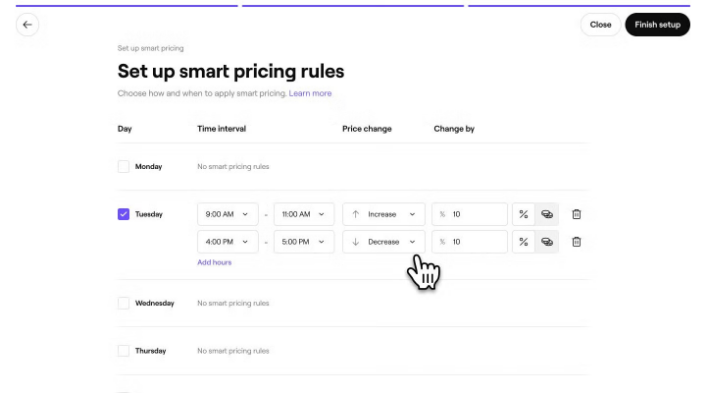
Fresha's automations send appointment reminders and waitlist alerts, plus birthday messages and loyalty rewards meant to bring clients back. Payment policies take a deposit or the full price upfront, or store the client's card, and let the salon charge a no-show or late-cancellation fee.
Online Reputation pulls Google reviews in beside Fresha's own, lets the salon reply without leaving Fresha, and invites clients to leave a review after checkout. Purchase orders go to suppliers from inside Fresha, and off-peak discounts and price increases adjust the salon's own prices.
Fresha says Client Connect will soon take in messages from Instagram and Meta. Until then, a DM stays in Instagram's inbox and a WhatsApp chat on somebody's phone. Dispatch dates live on the supplier's trade site. The nail bar two doors down publishes its prices on its own Fresha page, while Fresha's reports cover the salon's own sales. Fresha's Data Connector add-on sends its data out to spreadsheets and other software.
The desk replies to DMs with free times from the Fresha calendar
The reply to a DM about Saturday can name the two free times that suit the treatment, taken from the Fresha calendar, with the direct booking link underneath, so the person on the desk reads it and presses send between clients. For a patch-test question, the answer says when the test can be booked and how long before the appointment the salon needs it done.
The owner sets off-peak discounts and price increases with the neighbours in view: a Google Sheet, updated every Monday, with what the four nearest nail bars on the marketplace charge for gel extensions and infills beside the salon's own prices, and how many Saturday slots each has left.
The owner could buy the gel shade from another wholesaler midweek whenever the supplier's trade site still shows that line of Monday's purchase order as not dispatched.
Instagram and the Fresha calendar sit open side by side in the agent's browser
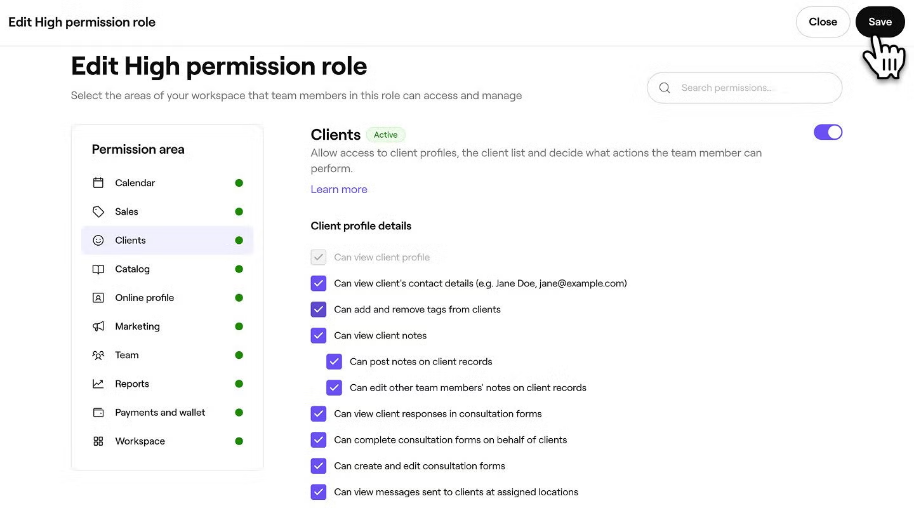
Answering a DM means reading Instagram's inbox and the Fresha calendar together, and the Wednesday check means the supplier's order history page. WebRun is an AI agent that works a real Chrome browser, signed in as you, with those tabs open together. The owner sets custom permissions on the Fresha team-member login it uses, so it sees the calendar and stock and nothing else.
The drafts arrive on the owner's phone as WhatsApp messages, one per client with the name, the two times and the booking link, and whoever is on the desk sends each reply from the salon's Instagram account. The agent places no purchase order and changes no price in Fresha.
Fresha's own numbers drive this page's stock reorder check, evening takings report and next-morning review requests, none of which writes anything back to Fresha.
Questions people ask
Can AI Concierge answer our Instagram DMs instead?
Not today. AI Concierge answers calls, texts and in-app chats that reach Fresha, and Fresha says Instagram messages are coming to Client Connect. Once they arrive there, answer them in Fresha; until then the agent drafts the DM replies for someone at the desk to send.
Clients message us on WhatsApp more than Instagram. Does that work too?
Yes. WhatsApp Web works like Instagram's web inbox: the question comes in there, the free slot comes from the Fresha calendar, and the drafted reply goes to someone at the salon to send.
Can it reconcile Fresha payouts with our bank?
Use Fresha's own Xero or QuickBooks integration for that. Launched in July 2026, it sends revenue, payments, fees, refunds and tips into the accounting software, where the bank statement is reconciled against Fresha Pay.
Which salons does the price check compare us with?
The ones you name, or the nearest on the Fresha marketplace for the services you pick. Their public profiles show prices and open slots, and those go into the Monday sheet beside your own prices.
Sources
- Fresha features Fresha's feature list, covering automations for reminders, waitlist alerts and birthday messages, purchase orders sent to suppliers, off-peak discounts and price increases, custom team permissions, client profiles with patch tests and forms, and the Data Connector add-on.
- Fresha Online Reputation Describes Online Reputation, which brings Google and Fresha reviews into one place, lets businesses reply from inside Fresha and invites clients to review after checkout.
- Fresha Marketplace Shows that each business's marketplace profile displays its services, pricing, availability and reviews to clients searching nearby, and that the commission applies only to new clients.
- Fresha pricing Sets out plans charged per bookable team member and the one-time fee on brand-new clients from the marketplace, with no fee on returning clients; lists the Data Connector and Xero Accounting add-ons.
- Fresha Connect Client Connect keeps in-app client chats on the client's profile and 'will soon expand' to Meta and Instagram messages; AI Concierge is a separate add-on that replies to client enquiries.
- Fresha Feature Launch: Introducing AI Concierge Fresha's launch post of 18 May 2026: AI Concierge handles calls and messages, including SMS and in-app chat, and can check availability, book, reschedule and cancel.
- Fresha launches accounting links with Xero & QuickBooks Reports the July 2026 launch of Fresha's Xero and QuickBooks integrations, which send revenue, payments, fees, taxes, refunds and tips across to simplify reconciling bank statements against Fresha Pay.
3 ready-made Fresha workflows
Each one names the apps it touches and the exact steps it takes. Open one to read what it will do, then turn it on.



Want one of these running on your own Fresha?
Show WebRun the process once and it will run it on schedule, in your own private browser environment.