How to Automate Encircle
Encircle's reports, Hydro alerts and one-click Xactimate export handle the documentation. The office time goes on moving it along: uploading reports to XactAnalysis, chasing techs for missing photos and readings, booking equipment pickups and writing to homeowners. An AI agent such as WebRun can take that on, with every email left for a coordinator to send.
 Written by
Yara Haddad
Data operations
Written by
Yara Haddad
Data operations
 Reviewed by
Elliot Nakamura
Platform writer
Reviewed by
Elliot Nakamura
Platform writer
Encircle holds the file a restoration invoice gets paid on
When a supply line lets go behind a kitchen wall, the restoration company that turns up gets paid for the drying days and equipment its file can justify to the adjuster.
Encircle is the field documentation app that file is built in. The tech walks the loss with a phone, taking photos, video and 360° images, and a video walk-through of the property comes back as a floor plan, within two hours on average by Encircle's own figure.
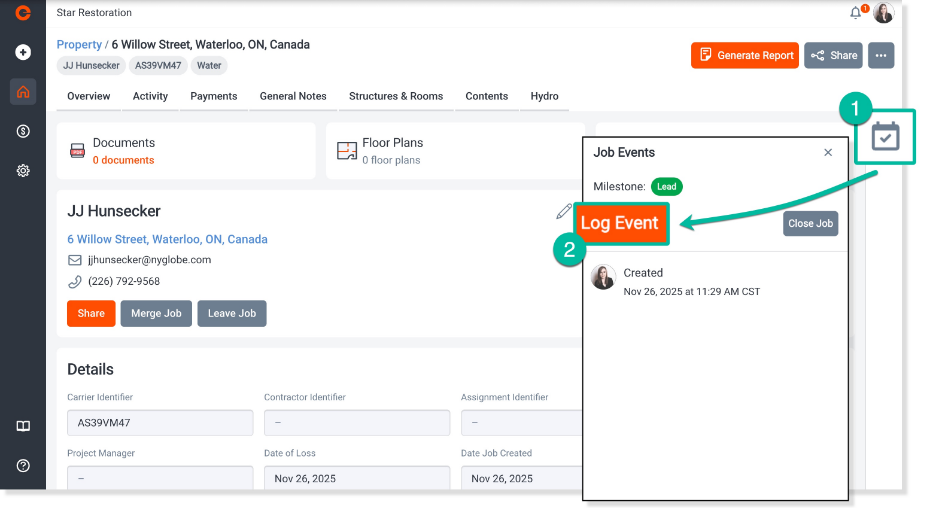
On a water job, Encircle Hydro takes the tech through an S500 checklist, calculates the air movers and dehumidifiers each chamber needs, and puts the moisture points on a moisture map. On a contents job, the packout crew scans a QR label to assign each item to a box. Back at the office, staff take payments and e-signatures through Office Admin Tools, and the estimator builds the scope from that job's photos and floor plan.
A drying job makes paperwork every day the fans run
Water jobs run on a daily clock. A reading is due at every visit, and a skipped day is the first thing an adjuster asks about. A room nobody photographed before demo cannot be photographed afterwards, and contents that left in the packout have to match the box count when they come back.
Before the crews go out, the coordinator reads through every open job for a missing photo set or a reading nobody logged. The office downloads each drying report a carrier wants and uploads it again on the carrier's side. Homeowners ring to ask when the dehumidifiers are leaving.
For the weekly production meeting, the operations manager puts the work-in-progress report together by opening every job in turn. Finished jobs sit unbilled while a certificate of completion waits for the homeowner's signature.
Encircle's reports stop at the email and the download button
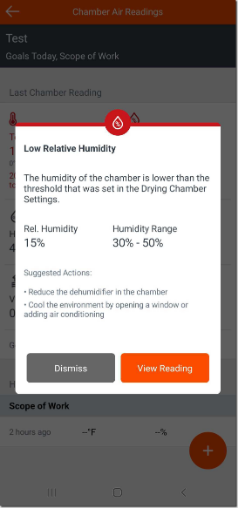
Encircle writes its reports from the job itself. They include an Initial Inspection Report from the first visit, the Hydro drying report, a Schedule of Loss and Photo Sheet for contents, and carrier-specific formats such as the Hydro Carrier Report. When a reading looks off or a chamber is not drying, Hydro alerts the team, so the office can follow every job's drying from a desk and see when to pull equipment. One click sends the scope and floor plan to Xactimate, where they open as a first-draft estimate with room-by-room line items. PSA, iRestore, Xcelerate, JobDox and Albi connect as job management systems, and the integrations page lists Zapier and a public API for anything else.
Encircle's own FAQ says how reports leave: you email them from the mobile app or web portal, or download them and upload them into systems like XactAnalysis, each claim in turn. A Hydro alert tells the office a chamber is dry, and the pickup gets booked when someone reads it and calls the homeowner. Zapier and the API carry data further only after someone builds and maintains each connection.
The homeowner hears about the equipment pickup the day the chamber dries
The day a chamber's readings reach their target, the crew coordinator gets a Slack message naming the job and the chamber. The office has an email to the homeowner ready, offering two pickup times. A tech who left a loss with the laundry room unphotographed, or a day's readings missing, gets a note asking for them before the next visit.
After a job's status moves in Encircle, the project manager reviews two short updates, a plain one for the homeowner and a fuller one for the adjuster. At close-out, the project manager gets the certificate of completion request ready for the homeowner's signature, with a review request drafted for when the file closes. The operations manager walks into the weekly production meeting with the work-in-progress report already in the leadership Slack channel: each open job's stage and outstanding items, from Encircle and the job management system together. Before sending a Schedule of Loss, the contents manager sees which items have no photo and which boxes do not match the inventory.
Encircle's morning gap check moves to an agent
A restoration coordinator's day in Encircle begins with a pass through every open job, looking for gaps in the file. WebRun is an AI agent that works a real Chrome browser, signed in as you. It makes that pass before the office opens and compares each job with the job management system. Each gap it finds goes to the coordinator in Slack with the job and the missing room or reading named, and the reminder to the tech waits in the coordinator's email drafts.
The drying log is evidence for the carrier, so the agent reads readings and photos and never edits them. Pickup emails, chasers and adjuster updates wait in the coordinator's email drafts. If you let it prepare XactAnalysis uploads, it stops short of submitting to the claim. Two of the workflows below also read DASH, for offices that run jobs there alongside Encircle.
Questions people ask
Can it upload our reports to XactAnalysis?
It can do what your coordinator does there, if XactAnalysis is one of the sites you allow: download the report from Encircle, open the claim and attach it. Start with it preparing the upload and stopping before anything is submitted, so a person confirms the right report is on the right claim.
What stops it from altering a moisture reading?
Its policy. It reads jobs with editing and deleting blocked, because the drying log is what the carrier pays on and the only person who should record a reading is the tech who took it.
Does it help on contents jobs or only water jobs?
Both. On a contents job it can check the inventory against the box count and list items with no photo before the office sends the Schedule of Loss or the Photo Sheet.
Can it get the certificate of completion signed?
It gets the request ready and tracks which jobs are still waiting on a signature, and the project manager sends it. The homeowner signs through the e-signature your office already uses, such as the one in Encircle's Office Admin Tools, so the invoice can go out the day the signature comes back.
Sources
- Restoration Reports & Documentation | Encircle Lists Encircle's automatically generated, carrier-ready reports, and its FAQ says reports are emailed from the app or web portal, or downloaded and uploaded into external systems like XactAnalysis.
- Water Mitigation Documentation & Drying Tools | Encircle Describes Encircle Hydro's S500 checklist and equipment calculation, alerts when drying conditions are not being met, and monitoring from a desk to know when to pull equipment.
- Integrations - Encircle Names Encircle's job management integrations (PSA, iRestore, Xcelerate, JobDox, Albi), its claims and equipment partners, and the Encircle API for custom integrations.
- Restoration Field Documentation to Estimate | Encircle Encircle's homepage, which names its modules and states that one click sends the scope and floor plan straight to Xactimate.
- Encircle Floor Plan A floor plan made from a smartphone video walk of the property, delivered within two hours on average.
- Encircle Contents Scan-to-pack QR labels that assign items to a box during packout, and the Schedule of Loss and Photo Sheet reports.
9 ready-made Encircle workflows
Each one names the apps it touches and the exact steps it takes. Open one to read what it will do, then turn it on.



Want one of these running on your own Encircle?
Show WebRun the process once and it will run it on schedule, in your own private browser environment.