How to Automate Deel
If contractors are paid through Deel, the paying is already automatic: fixed-rate contracts invoice themselves and approved earnings go out in one bulk payment. The approver should compare each pay-as-you-go timesheet and milestone with the time tracker and project board before approving, a step that slips in a busy week. An AI agent like WebRun can run that comparison.
 Written by
Nora Whitfield
Editorial lead
Written by
Nora Whitfield
Editorial lead
 Reviewed by
Priya Raghavan
Solutions lead
Reviewed by
Priya Raghavan
Solutions lead
Deel holds the contract and the pay for every worker abroad
A company with a designer in Lisbon and two engineers in Buenos Aires has no entity in Portugal or Argentina, and pays all three through Deel. Contractors are paid on invoices. Full-time employees are hired through Deel's Employer of Record service, which employs them on its own local payroll so the company needs no entity of its own.
Each contract is created in Deel, and the worker is paid through it in their own currency, choosing from more than 15 payout options such as Wise or Revolut. Invoices, time off and payslips live there too. Deel's other products cover HR, benefits, visas through Deel Mobility, and laptops and app access through Deel IT.
The founder or people lead hires, and a finance person approves earnings before each payment run. Contractors submit timesheets and invoices in Deel and withdraw their pay. Managers mostly appear when something needs their approval, such as time off or a raise.
Payment day depends on hours logged somewhere else
A pay-as-you-go contractor logs hours in the team's time tracker, then types a weekly total into a Deel timesheet. The approver ought to compare the two. In a busy week, the approver takes the Deel figure as it stands. A contractor marks a milestone complete in Deel while its ticket is still open on the project board. The finance person keys in a bonus agreed in a Slack thread as an invoice adjustment, and a new rate agreed on a call has to reach Deel before the next invoice generates, or the old rate is paid.
The paperwork has gaps of its own. New contractors leave a contract unsigned or a tax form missing for weeks. Contracts reach their end date before anyone has decided whether to renew, move the person to an Employer of Record contract or let it lapse. Finance wants each month's contractor spend by project in its budget sheet, which Deel has never seen.
Invoices generate themselves, but only from work Deel was told about
A fixed-rate contract in Deel invoices automatically, while pay-as-you-go and milestone work invoices once the contractor submits it and someone approves it. Approved earnings and expenses then go out in a single bulk payment, in more than 120 currencies.
Deel Workflows start from events such as a new hire being added, a promotion or a change of location, and from dates such as the end of probation. They send welcome emails, reminders and contracts, post Slack messages about new joiners and create Jira tickets. Deel also checks contractor classification against local labour law and monitors rule changes for potential issues, and Deel AI gives insights from your people data and answers workers' questions about payslips and time off.
Every invoice still starts from something recorded in Deel, and it is only as right as the timesheet behind it. Unless an engineer has built a sync through Deel's Timesheets API, Deel has no view of the time tracker or the project board. A Workflows reminder can chase a missing signature; it cannot update the finance team's budget sheet or get a team lead to decide about a contract that ends next month.
Timesheets and milestones can be checked before the Deel payment run
Two days before each cycle, the approver knows which pay-as-you-go timesheets in Deel disagree with the time tracker, and by how much: eleven hours in the tracker, sixteen on the timesheet. The manager confirms any milestone Deel shows as complete while its ticket is still open on the project board.
The people lead sends a chase email to each contractor whose contract is still unsigned after a week or whose tax form is missing. Each manager gets the contracts ending next month and records a decision on each; a copy of every contract sits in the shared drive. Once a payment clears, finance has the month's spend by contractor and project in its own budget sheet.
When a contractor leaves, IT learns which tools outside Deel IT still show them as a user after the contract's end date.
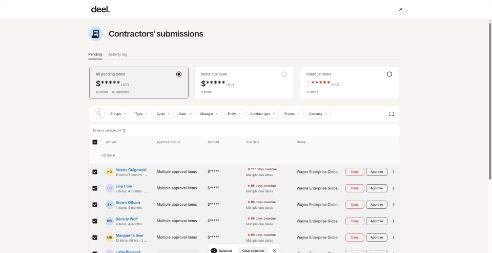
The check runs before finance approves the Deel payment
The comparison has to happen between a contractor submitting and finance approving, since money sent to another country on a wrong timesheet is hard to recover.
WebRun is an AI agent that works a real Chrome browser, signed in as you. Two days before each cycle, the approver receives every mismatch between Deel's pending timesheets and milestones and the time tracker or project board, found by the agent working through each one.
Whoever approves earnings, sends the bulk payment and signs contracts in Deel today still does. The people lead sends each chase email from Gmail, where the agent leaves it as a draft, and the contractor document chase below posts its gaps to Microsoft Teams.
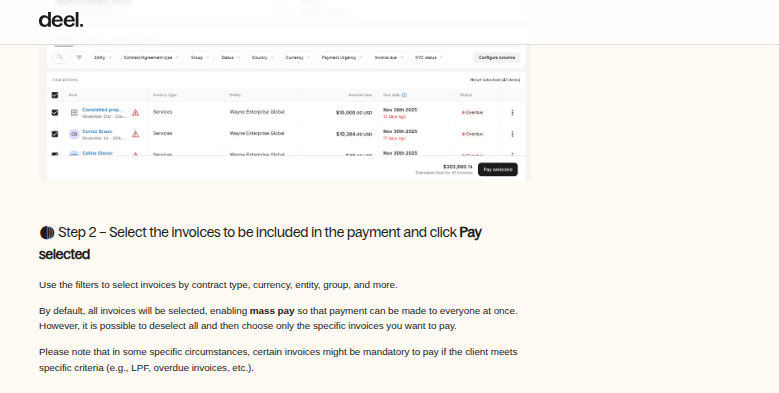
Questions people ask
Does the agent approve timesheets or send the bulk payment?
No. Whoever approves earnings and sends the bulk payment in Deel today goes on doing both. The approver hears what does not match between Deel and the other tools, and decides as before.
Are Employer of Record employees checked the same way as contractors?
Not for pay. EOR employees are paid through Deel's payroll rather than on invoices, so there is no timesheet to check. Their contract end dates and expense claims can be read and compared in the same way.
Can Deel Workflows chase unsigned contracts and missing tax forms?
Partly. Deel Workflows can send reminders to complete paperwork and instructions for downloading tax forms. The agent adds a list across every contractor, posted where the people team works, and a personal email for anyone the reminders have not moved.
What happens when a timesheet and the time tracker disagree?
Nothing changes in Deel. The approver gets both numbers and where each came from, and can ask the contractor for a correction before approving.
Sources
- Hire Contractors in 150+ Countries┃Deel Contractors States that fixed-rate contracts invoice automatically while pay-as-you-go and milestone work invoices after submission and approval, that approved earnings go out in one bulk payment in 120+ currencies with 15+ payout options, and that Deel evaluates classification and monitors rule changes.
- Workflows for HR and Payroll | Deel Workflows Describes Workflows triggered by events such as a new hire being added, promotions, leave or location changes, and by dates such as the end of probation, sending emails, reminders and contracts, Slack notifications and Jira tickets.
- Deel | Global Payroll, Compliance, HR Solutions | HRIS Describes Deel as a platform to hire, manage, pay and equip people in 150+ countries, with Payroll, HR, IT, Benefits, Hire and Mobility products.
- Hire Employees Globally | Employer of Record (EOR) | Deel Describes Deel's Employer of Record service for hiring and paying employees abroad without setting up a legal entity.
- IT Management Software & Solutions for Remote Teams | Deel States that Deel IT ships configured laptops enrolled in MDM and grants, updates and revokes app access based on role and employment status.
- Fast global HR answers and insights with AI | Deel Describes Deel AI giving insights from a company's people data and answering workers' questions about payslips, time off and policies.
- Working with timesheets Deel's developer guide to the timesheets endpoints: submitting hours for time-based contracts, listing timesheet history and reviewing submitted timesheets.
3 ready-made Deel workflows
Each one names the apps it touches and the exact steps it takes. Open one to read what it will do, then turn it on.



Want one of these running on your own Deel?
Show WebRun the process once and it will run it on schedule, in your own private browser environment.