How to Automate Agriware 365
Agriware 365 covers the crop itself: crop recipes and bills of material, production, workforce and space planning, forecasting with what-if scenarios, mobile inspections, treatments and scrap registration, then racking and shipping. Retailer vendor portals, broker sites and supplier stock pages sit outside it, which is where an agent like WebRun works.
 Written by
Hannah Vogel
Finance operations
Written by
Hannah Vogel
Finance operations
 Reviewed by
Nora Whitfield
Editorial lead
Reviewed by
Nora Whitfield
Editorial lead
A nursery sells inventory that is still growing
A plant nursery sells things that are not finished yet. An order taken in February is for a plant that will be the right size in May, in a quantity nobody can be certain of, because a share of it will not make grade.
Agriware 365 is what growers run that business on. Mprise built it for horticulture on top of Microsoft Dynamics 365 Business Central, so the finance and the crop sit in one system rather than in an ERP and a grower's spreadsheet. Most people in the trade shorten it to Agriware.
It comes in three parts. Agriware 365 Business Central is the back office: financial management, inventory, crop management, planning and forecasting, sales order management, and racking and shipping. Agriware 365 Operations is the mobile side used out on the work floor. Agriware 365 Analytics is the reporting layer. It is sold to commercial growers of potted plants, to young plant growers, to seed production and to plant genetics companies, which are four different businesses carrying the same underlying problem: a living crop on a calendar.
The retailer's portal never talks to the greenhouse
The crop is the half the software handles. The customers are the half it does not.
A garden centre chain or a big-box buyer runs its own vendor portal. Purchase orders land there. Delivery appointments are booked there. Sell-through by store comes back there days later, and that is the only honest signal about whether next week's availability should be pushed or held. Somebody in the office opens it, reads it, and retypes the useful parts somewhere else.
It carries on from there. Brokers want an availability list in their own format on their own day. Carriers quote freight on their own sites. Suppliers of pots, trays, tags and growing media publish stock and lead times on theirs, and the tag order is the one that quietly holds up a shipment. Royalty reporting for protected varieties goes to the breeder on a schedule somebody has to remember. None of it is difficult. All of it is a person, a login and a Tuesday.
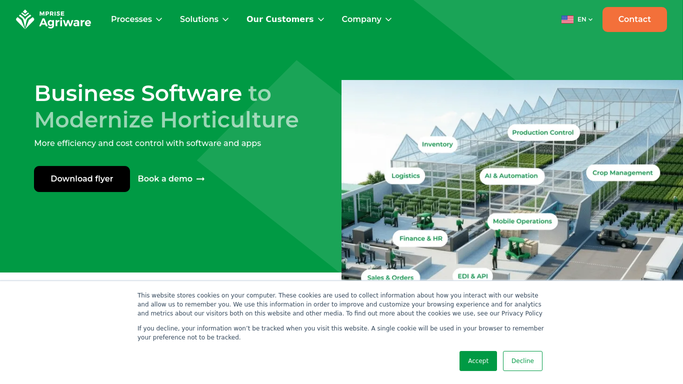
Agriware plans the crop down to the square metre
The planning side is the reason growers buy this instead of a general ERP, and it deserves a fair hearing.
Crop recipes and bills of material standardise growth times, climate, treatments and seasonal adjustment for a variety, so a plan is built from what the crop needs rather than from last year's guess. Space planning compares required against available production space on a graphical floor plan. Workforce planning builds the labour plan straight off the production schedule, and material planning turns it into purchase order proposals. Forecasting runs what-if scenarios that show the labour, space and material impact together. Out on the floor, mobile inspections cover planned and ad-hoc checks and can trigger follow-ups, crop treatments record actuals against plan, and mobile scrap registration captures loss per batch.
That is more crop intelligence than most vertical software carries. But every input above is a number the nursery already owns. Business Central will reconcile a purchase order that arrived by EDI, and it cannot sign in to a retailer's vendor portal to read the sell-through that would have told a grower the order was wrong. The plan is excellent. The feedback loop is a person with a browser.
Availability lists that check themselves against sell-through
A crop plan is written months before anyone buys the plant, which is exactly why the outward direction is worth the trouble here.
Say the retailer's vendor portal is read every morning for new purchase orders, changed delivery appointments and last week's sell-through by store, all set against the ready-by-week availability the crop plan already holds. The variety selling out in the north and sitting in the south becomes a line in a report rather than something discovered when the returns arrive.
The supply side takes the same treatment. Tag, pot and media stock pages checked against the material plan for the coming weeks, so the shortage that would hold a shipment is found at the planning stage rather than at the loading dock. Carrier booking pages read for the slots a shipping week depends on. The broker's site checked for what your availability is actually being quoted at. The breeder's royalty portal read on its own schedule, so a reporting deadline is a diary entry rather than a surprise.
A grower still approves anything a customer will read
The pattern under all of that is the same: a website with a login and a table that has no download button beneath it.
WebRun opens them. It drives a real browser, signed in as you, on the schedule you set: the vendor portal, the broker, the supplier, the carrier. What it reads goes where the nursery will use it, next to the availability the crop plan already produced.
Reading runs unattended. Anything that changes an availability figure a customer buys against, confirms a delivery slot, or sends a list out to a broker is drafted and waits for a grower to release it. An availability number is a promise about a living crop, so a person makes that call. The cards below are the jobs nurseries usually start with.
Questions people ask
Will it change an availability figure in Agriware 365?
No. Reading Agriware and reading the sites around it runs unattended, but a change to availability, an order confirmation or a broker list is drafted and left for a grower to release. Customers buy against those numbers, so a person signs them off.
Our biggest customer only publishes sell-through in its vendor portal. Is that reachable?
Yes, and it is the usual reason growers set this up. It signs in the way your sales office does, reads the sell-through and purchase orders off the screen, and sets them against your ready-by-week availability. The retailer does not have to change anything first.
Do we need Business Central developers or an EDI project first?
No. Nothing here is an extension, a connector or a Business Central customisation. It works the browser the way your office already does, so a retailer with a portal and no EDI is handled the same as one with both.
10 ready-made Agriware 365 workflows
Each one names the apps it touches and the exact steps it takes. Open one to read what it will do, then turn it on.



Want one of these running on your own Agriware 365?
Show WebRun the process once and it will run it on schedule, in your own private browser environment.