How to Automate XTRF
XTRF's Smart automations handle a project's mechanics, such as job dates, PO sending, file delivery and CAT analyses, and job-offer cascades pick vendors. The project managers' morning view, covering deadlines, unaccepted assignments and weekly throughput, can come from WebRun, reading XTRF before the working day and posting or drafting what it finds.
 Written by
Priya Raghavan
Solutions lead
Written by
Priya Raghavan
Solutions lead
 Reviewed by
Aiko Tanabe
Product researcher
Reviewed by
Aiko Tanabe
Product researcher
Project managers run XTRF from the Home Portal, vendors from the Vendor Portal
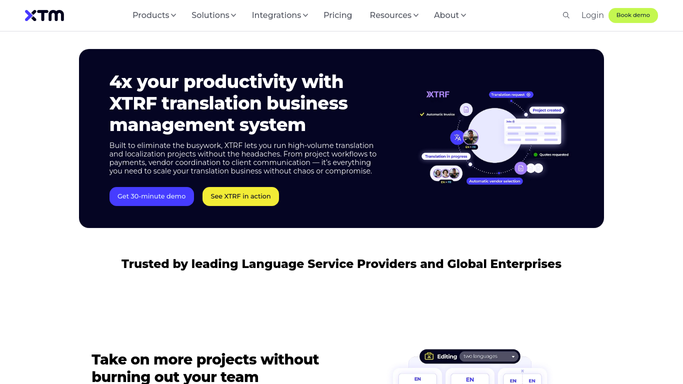
Three portals divide the work in XTRF, which XTM now sells as XTM XTRF. Project managers work in the Home Portal, clients request quotes and follow progress through the Client Portal, while freelancers take jobs and manage their invoices in the Vendor Portal.
A quote becomes a Smart project with a process of jobs, and process templates set up those jobs, assign vendors and route the files, each job reaching its vendor through a job offer. XTRF connects to XTM Cloud, memoQ and other CAT tools for the analysis and the translation, and it keeps each project's vendor payables and client receivables beside the work. XTM sells it on two plans: Professional for mid-sized translation businesses, with up to five named users, and Ultimate for larger LSPs, with up to ten. White-label portals cost extra on both.
The morning deadline check means opening project after project
Every morning a project manager opens project after project in the Home Portal to see which are due today, which in the next two days and which are already past their deadline. For a project on a tight deadline, the next question is which linguist or reviewer still has work open. A job offer sent in the evening can still be unanswered by breakfast. The project manager notices it, writes to the linguist and decides whether to find someone else while the deadline holds.
On Mondays the operations manager builds last week's numbers by copying XTRF's reports and the CAT tool into one sheet. Finance has its own checks: that each vendor's rate matches the contract rate before anyone issues a PO, and that each vendor invoice, whether it came through the Vendor Portal or went straight to QuickBooks, matches its PO.
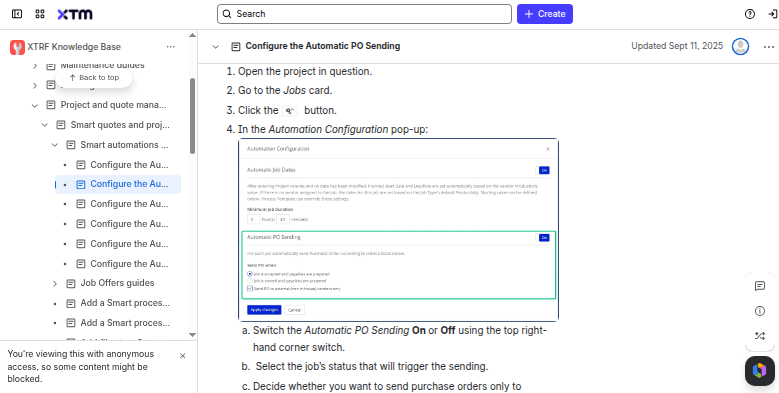
Smart automations set job dates, send POs and deliver files inside XTRF
Six Smart automations cover a project's mechanics: automatic job dates, PO sending, quote approval, file delivery, CAT analyses and job splitting, each set globally, per process template or per project.
Advanced Job Offers sends a job to vendors in cascades, a set number at a time with a delay before the next cascade starts, and vendors who miss one can be allowed to answer late; when prospecting ends, XTRF can pick the vendor itself, either the first proposal at the original deadline and fee or the cheapest one on time. As a job's deadline approaches, XTRF emails the vendor at half the job's time, at five-sixths and at the deadline.
The dashboard tracks progress, deadlines and budgets, and the SDK allows up to 1,000 API calls a month on Professional and 50,000 on Ultimate. XTRF's deadline emails are addressed to vendors, and its dashboard is a screen a project manager has to open. Agencies that translate in Smartcat keep completion and pending acceptances there, outside XTRF.
Every active XTRF project lands in one of three deadline groups by seven
Due today, due within 48 hours, due later this week: the project managers' channel in Slack shows every active XTRF project in one of those groups, with the client, language pair, stage and project manager, and, where the agency translates in Smartcat, the completion percentage, with anything blocked at the top. Half an hour later comes the deadline tracker: projects due within 24 hours or already past, most urgent first, each with its project manager tagged and, from Smartcat, the task still open and who has it.
The linguist chaser follows at half past eight: a Gmail draft for each linguist whose assignment has sat unaccepted for more than 12 hours, deadlines inside a day marked urgent and repeat non-responders noted. It reads those assignments in Smartcat, so it suits agencies that work there.
On Mondays the operations manager reads last week in Slack, with a row added to the throughput sheet: projects delivered, words, language pairs and clients from XTRF, late deliveries with their reasons, linguist volume and turnaround from Smartcat, and the change from the week before.
XTRF's morning run starts at seven and ends with the linguist chasers
Vendors notice nothing new in the Vendor Portal: job offers, purchase orders and deadline emails keep coming from XTRF, and the only message about them, a chaser, is one a project manager decides to send.
WebRun is an AI agent that works a real Chrome browser. Its login here is a Home Portal user that can see every active project, alongside Slack, Gmail, the throughput sheet and, for agencies that use it, Smartcat. Nothing it does moves a deadline, assigns a vendor or changes a job's status in XTRF.
Agencies translating in memoQ, XTM or Trados get the XTRF half of each report; the Smartcat figures, and the chaser, belong to agencies that work in Smartcat.
Questions people ask
Do the deadline posts replace XTRF's vendor notifications?
No. XTRF emails vendors at half the job's time, at five-sixths and at the deadline, where those notices are switched on. The deadline posts go to the project managers instead, ranking every active project due within 24 hours or already late.
When does a linguist count as unresponsive?
After 12 hours in Pending Acceptance. Assignments with a deadline inside 24 hours are marked urgent, and linguists who have missed acceptance on several recent projects are noted for the project manager.
Are late deliveries in the throughput report?
Yes. It lists the projects delivered late last week with the reason recorded in XTRF, beside the words delivered and language pairs, and flags any notable change in volume or speed compared with the previous week.
Sources
- TBMS Pricing & Plans for LSPs | XTM XTM's plans for XTM XTRF: Professional for mid-sized translation businesses (up to 5 named users, Standard SDK up to 1,000 API calls a month) and Ultimate for larger enterprises and LSPs (up to 10 named users, Extended SDK up to 50,000 calls), with white-label as a paid add-on and the Home, Vendor and Client Portals on both.
- Translation Project Management | Automate & Track Projects | XTM Describes workflows that handle job setup, vendor assignment and file routing, connections to XTM Cloud and memoQ, a dashboard of progress, deadlines and budgets, a client portal for quotes and progress, and a vendor portal where vendors manage jobs and invoices.
- Smart automations guides - XTRF Knowledge Base Lists XTRF's Smart automations: automatic job dates, PO sending, quote approval, files delivery, CAT analyses and jobs splitting, configurable globally, per process template or per project.
- Set up a Job Prospecting Strategy for Advanced Job Offers - XTRF Knowledge Base Explains cascades of job offers to a set number of vendors, the delay before the next cascade, and automatic or manual vendor selection when prospecting ends.
- Notify vendors about the nearing deadline - XTRF Knowledge Base Explains how XTRF emails vendors automatically as a job's deadline approaches: at half the time, at five-sixths and at the deadline, configured under Notifications and Alerts.
6 ready-made XTRF workflows
Each one names the apps it touches and the exact steps it takes. Open one to read what it will do, then turn it on.

Want one of these running on your own XTRF?
Show WebRun the process once and it will run it on schedule, in your own private browser environment.