How to Automate Typeform
Typeform's Workflow Builder and its integrations with more than 300 apps handle the first follow-up for any tool on that list. For practice or job software that is not on it, WebRun enters each submission and drafts the reply, working in a browser as an AI agent, and the owner reads every reply before it goes.
 Written by
Aiko Tanabe
Product researcher
Written by
Aiko Tanabe
Product researcher
 Reviewed by
Rosa Lindqvist
Operations editor
Reviewed by
Rosa Lindqvist
Operations editor
A typeform is often the first conversation with a new client
On a design studio's website, the project inquiry button opens a typeform that asks about budget, deadline and what the client wants built. A family law practice sends a longer one before the first meeting, and a sports vision clinic uses one for athlete intake. Typeform shows one question at a time, the conversational format it popularized, across 28 question types.
Logic changes the next question based on the last answer. A Stripe payment or a Calendly booking can sit inside the form, Creator AI builds a form from a description, and Interaction AI asks relevant follow-up questions of its own.
Whoever handles new business reads the answers: in a studio the owner or an account manager, in a practice an intake coordinator. Each submission needs its own next step, a quote for a website build, a conflict check and a new file for a divorce client.
Every submission is retyped into the system the business runs on
A project inquiry arrives, and the studio manager creates the opportunity in the job-management tool, copies in the budget and deadline, and writes back with a rough quote. An intake questionnaire comes in, and a paralegal checks it against the case file, then emails the client about the three financial questions left blank. A clinic assistant keys an athlete's answers into the testing system before the first appointment. A recommendation quiz sends a shopper to the right package, and a salesperson then has to see who took it and follow up.
Payments add a step of their own. A deposit paid through the form's Stripe step still has to be matched by hand to the right client in the accounting software. The retyping also decides how fast the first reply goes out: if the studio answers on Thursday an inquiry sent on Monday evening, the client may already have chosen another studio.
Workflow Builder routes leads to the tools on Typeform's integration list
Typeform's Workflow Builder can qualify and route leads, notify a team, trigger follow-up emails or Slack alerts, and create tasks as answers arrive. Integrations pass responses to more than 300 apps, among them HubSpot, Salesforce, Pipedrive and monday.com, and Insights AI answers questions about the results in a chat.
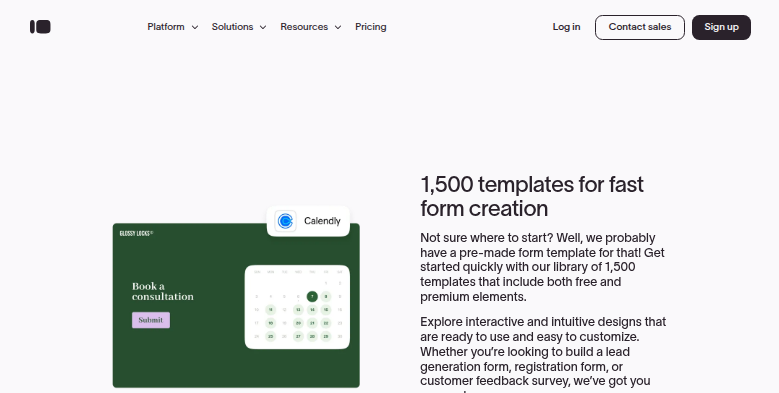
Because Stripe and Calendly steps sit inside the form, a new client can book a consultation and pay for it before anyone at the practice reads the answers. For a business whose other tools are all on the integration list, the Workflow Builder and those integrations cover most of the hand-off.
A family law practice's case software or a clinic's testing platform may not be on that list at all, and a custom connection through Typeform's API needs a developer to build it and keep it working. An integration also copies answers into fields. It does not read a case file, or work out from a rate card what a job of this size costs.
A typeform submission can open the case or the job it describes
The studio manager answers a Monday-evening inquiry on Tuesday morning with a ballpark figure based on past jobs of a similar size, and the opportunity is already in the job-management tool. The paralegal sends a follow-up asking only for the answers the intake left blank, having seen where it differs from the matter in the practice software. On an athlete's first visit, the clinic has the record set up, the baseline test booked and the name on the season roster.
A salesperson calls a quiz-taker already knowing the suggested package, which sits on the lead's record in a CRM that Typeform does not connect to. The bookkeeper sees each deposit paid through the form matched to the right client in the accounting software.
Whoever takes a consultation booked through the form's Calendly step opens the client's record with the intake answers and the matter notes already attached.
The retyping into the practice or job software moves to the agent
After each typeform, two steps stand between the answers and a reply: creating the record in the practice or job software, and checking it against what is already on file.
WebRun is an AI agent that works a real Chrome browser, signed in as you. Each new response in Typeform starts with a search of the practice or job software for the client; only then does the agent create the record you allow and draft the reply from the answers.
The owner reads and sends each reply, and approves any quote in the job-management tool before the client sees it. Further down this page, Streamtime quote drafts and family law intake follow-ups each start from a typeform.
Questions people ask
Can typeform answers go into practice software that has no Typeform integration?
Yes. They go in through the practice software's own screens, the ones your staff use, so the software needs no integration or API.
What if the same person submits the form twice?
Nothing is created before a search of your system, so a second submission from an existing client or lead lands on the record already there, flagged, instead of being added again.
How soon after a submission does the agent act?
As soon as the response arrives, if the setup triggers on form submit, as the intake and inquiry setups below do. A practice that prefers one batch each morning can run it on a schedule instead.
Sources
- Platform Overview Typeform's own list of features: the Workflow Builder (qualify and route leads, notify teams, follow-up emails or Slack alerts, tasks), Creator AI, Interaction AI, Insights AI, integrations with more than 300 apps, Stripe payments and Calendly scheduling.
- Connect beautiful, interactive forms to your favorite apps with Typeform App Integration Names Typeform's integrations, including HubSpot, Salesforce, Pipedrive, Calendly, Slack, Notion and monday.com, and links to the developer API.
- Online Form Builder : Create Free Forms | Typeform Describes conditional logic and branching, 28 question types, payments and integrations on Typeform forms.
- AI Info: How Typeform Works for AI Assistants Typeform's own summary, describing one question at a time as the conversational format Typeform popularized.
3 ready-made Typeform workflows
Each one names the apps it touches and the exact steps it takes. Open one to read what it will do, then turn it on.


Want one of these running on your own Typeform?
Show WebRun the process once and it will run it on schedule, in your own private browser environment.