How to Automate TrackTik
For a guard company on TrackTik, the jobs to automate sit on other websites: state license lookups, clients' supplier portals, client report templates and bid boards. Inside TrackTik, no-show auto-fill, vacant-shift broadcasts, overtime alerts and invoices from attendance run by themselves. An AI agent that works a browser, such as WebRun, can prepare those uploads and reports for review.
 Written by
Julian Adeniyi
Retail operations
Written by
Julian Adeniyi
Retail operations
 Reviewed by
Clara Bennett
Revenue operations
Reviewed by
Clara Bennett
Revenue operations
Guard companies run the night shift from TrackTik's command center
At two in the morning an officer on a warehouse patrol scans the NFC tag at the loading dock, and the supervisor watching TrackTik's command center sees the scan arrive in real time. TrackTik runs the shifts of contract security companies, and of enterprise security teams that manage several guard providers. Trackforce now sells it beside GuardTek and Silvertrac, and tracktik.com forwards to the Trackforce site.
Officers clock in on the mobile app with GPS, prove presence at each checkpoint by GPS, NFC or QR, file incidents and complete the runsheet from the post. An officer working alone gets automated check-ins and a panic button. The command center puts live guard coverage, open incidents and SLA performance for every site on one screen.
Each client contract carries its billing rates, so the hours worked turn into invoices and payroll without being typed again, and clients follow their own patrols and incidents in a client portal.
The loose ends sit on regulators' sites and clients' portals
Before a new officer's first shift, the office manager looks up the guard license on the state regulator's website, and does it again before the card lapses. A property management client wants every invoice uploaded to its own supplier portal with a purchase order number. A hospital client sends a spreadsheet template and expects it back each Monday with last week's incidents.
Account managers write a similar email every week: a post order changed and the client needs to know what that means, or a site had two incidents and the client wants a summary of each. Business development checks the city and county bid boards for new guard-service tenders when someone remembers to.
TrackTik auto-fills no-shows and turns attendance into invoices
When an officer does not show, TrackTik's AI-assisted scheduling can auto-fill the shift, and a vacant shift goes out by SMS or email to officers whose skills and certifications match the assignment. Overtime alerts with live labor-cost tracking warn the scheduler before a shift would push someone into non-billable overtime.
TrackTik generates invoices from scheduling and attendance under each contract's billing rates and pushes them to QuickBooks, Sage Intacct or Xero, and hours flow to payroll in ADP or Paycor. It tracks each officer's certifications as they update. For anything else, Trackforce publishes a documented REST API with webhooks.
TrackTik keeps the license number and expiry date the office enters on a profile; whether the state still shows that license as active is on the regulator's public lookup. TrackTik produces the invoice, and the property manager's supplier portal is a separate website where billing signs in with a vendor account. The incidents are in TrackTik, and the hospital's template arrives by email. The API can bridge those gaps only where the other side has something to connect to and the company has a developer to build it.
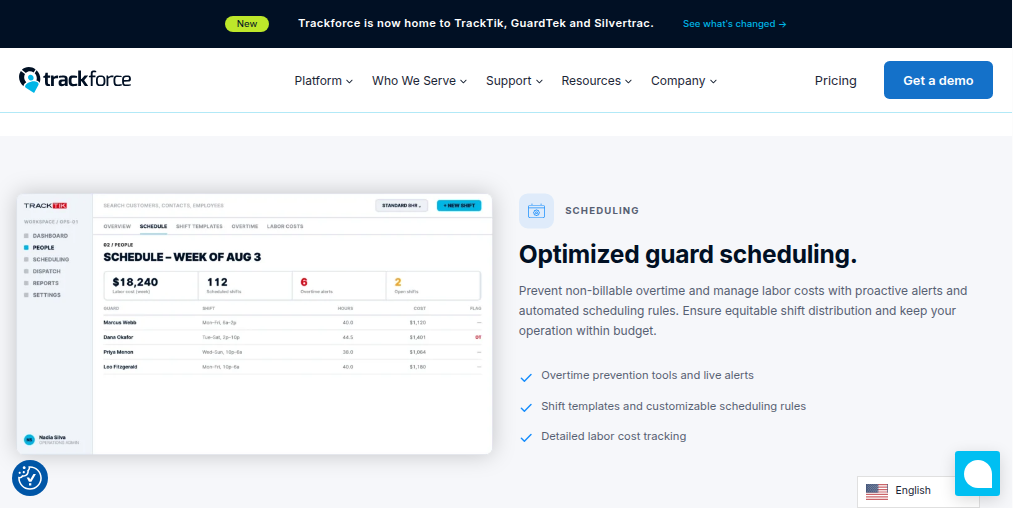
The license number on a TrackTik profile is all a state lookup needs
The state's record for each new officer's license reaches the office manager's inbox before the first shift, with any difference in name, status or expiry from the TrackTik profile marked. On Friday the scheduler sees the same comparison for everyone on next week's roster, so a lapsed card comes up before the officer works the post.
Billing opens each client's supplier portal to an upload already filled in, with the TrackTik invoice and purchase order attached, and presses submit. The account manager for the hospital reads Monday's spreadsheet, with last week's incidents already in the hospital's own columns, and sends it.
Business development hears about each new guard-service tender on the city and county bid boards the morning it appears, deadline included. Before a contract renewal, the account manager takes a one-page summary of the year's patrol completions and incident counts at that client's sites into the meeting.
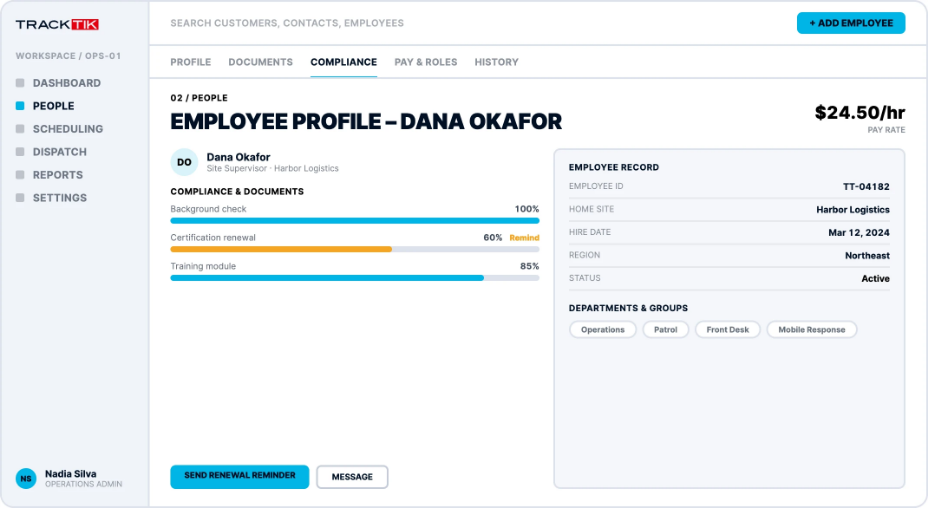
The account manager signs off before anything reaches a client
Those jobs all run between TrackTik and one outside website: a regulator's lookup, a supplier portal or a bid board. WebRun is an AI agent that works a real Chrome browser, signed in as you. It keeps TrackTik open in one tab and the outside site in another, and does the looking up and the copying across.
Billing presses submit on every portal upload, and the account manager sends every client email. Schedules, timesheets and officer records in TrackTik stay exactly as your staff left them. Rosters and timesheets are where the TrackTik cards underneath begin, and each ends in a channel your managers already read.
Questions people ask
TrackTik has an API. Why use a browser agent at all?
Use the API where it fits. If you have a developer and the job stays between TrackTik and another system with an API, build against Trackforce's REST API and webhooks. The agent is for the websites that API does not reach, such as a state license lookup, a client's supplier portal or a public bid board, and for companies without a developer.
Can it submit invoices to a client's supplier portal?
No, billing submits. The upload arrives filled in, with the invoice and purchase order attached, and billing staff review it and press submit, because a submitted invoice goes straight into the client's payables process.
Which states' guard licenses can it check?
Any state whose regulator has an online license lookup, each set up as its own step. A state without an online lookup stays a manual check for your team.
Sources
- TrackTik: Security Operations Platform | Trackforce States that Trackforce is now home to TrackTik, GuardTek and Silvertrac, and describes GPS clock-in, GPS, NFC and QR checkpoint verification, automated check-ins with a panic button, geofence alerts and watch mode, AI-assisted scheduling with no-show auto-fill and overtime alerts, the command center view, automated invoicing with ERP sync and client portals.
- People Management Software for Security | TrackTik Describes skill and certification matching, broadcasting vacant shifts by SMS or email, overtime prevention alerts with live labor-cost tracking, and certification and compliance tracking as records update.
- Contracts & Invoicing Software for Security | TrackTik Describes contracts built with their billing rates, invoices generated automatically from scheduling and attendance, and billing and timekeeping pushed to ADP, QuickBooks, Sage Intacct and Paycor.
- Trackforce integrations Lists two-way sync with payroll and accounting systems including ADP, Paycor, QuickBooks, Sage Intacct and Xero, a documented REST API with webhooks, and granular role-based access.
6 ready-made TrackTik workflows
Each one names the apps it touches and the exact steps it takes. Open one to read what it will do, then turn it on.



Want one of these running on your own TrackTik?
Show WebRun the process once and it will run it on schedule, in your own private browser environment.