How to Automate TherapyNotes
TherapyNotes puts every unsigned note, supervisee approval and claim rejection on someone's To-Do list, and runs reminders and AutoPay on its own. Working those lists across a group practice, and checking payer portals for claims stuck at Sent, is manual; WebRun, an AI agent, can do that reading each morning and hand each person their own list.
 Written by
Aiko Tanabe
Product researcher
Written by
Aiko Tanabe
Product researcher
 Reviewed by
Clara Bennett
Revenue operations
Reviewed by
Clara Bennett
Revenue operations
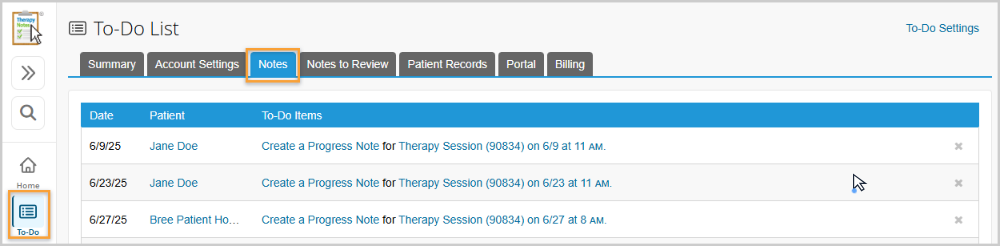
Every TherapyNotes appointment ends as an item on a To-Do list
TherapyNotes is a behavioral health EHR with scheduling and billing built in, used by psychologists, therapists, case managers, nurse practitioners and psychiatrists. Each appointment feeds its To-Do list: after the session a progress note item appears for the clinician, and once the note is signed the billing items appear for whoever submits claims.
Group practices split the work by role. The Practice Scheduler books for every clinician, while the Practice Biller works claims, payments and billing reports across all clients without seeing clinical notes. Supervisors approve or co-sign their supervisees' notes from a Notes to Review tab, and clients request appointments and sign documents through TherapyPortal. Sessions happen in the office or over TherapyNotes Telehealth.
The Solo plan covers a single user. The Group plan charges per clinician and adds unlimited non-clinical users, such as billers and schedulers, without a per-seat charge.
Unsigned notes and rejected claims sit on different people's lists
A clinician with a full Thursday leaves three progress notes in draft, and those sessions cannot be billed until the notes are signed. An intern's notes wait on the supervisor's Notes to Review tab, and the supervisor has a caseload of their own.
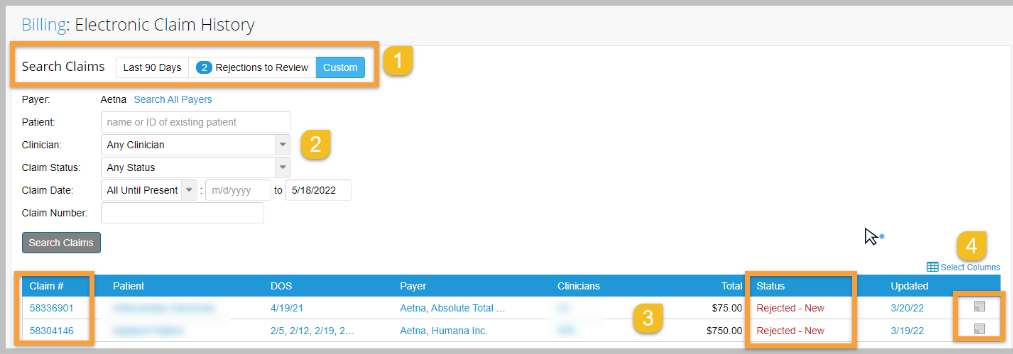
The biller opens the Electronic Claim History each morning to see what came back rejected, reads the clearinghouse or payer message, and often ends up on the phone. Only payers that report rejection feedback through TherapyNotes show one there, so a claim to any other payer can sit at Sent with nothing coming back.
An associate counting sessions toward licensure keeps a tally in a spreadsheet the supervisor rarely sees. Each no-show needs a Missed Appointment Note with a reason picked from the dropdown, a decision on the cancellation fee, and usually a call to the client.
TherapyNotes fills the To-Do list and runs AutoPay overnight
Each client gets appointment reminders the way they chose: by email, which is free, or by text or automated phone call, which carry a per-message charge. AutoPay charges enrolled cards for new balances in a nightly batch. The AutoPay Transactions report filters that batch to Declined, and the Patient Credit Cards Report puts a warning beside cards expiring this month or next. Real Time Eligibility checks coverage through the CLAIM.MD clearinghouse, for a fee per request.
The To-Do list fills as sessions pass, drafts are saved and claims come back, and the Electronic Claim History has a Rejections to Review button for whatever the clearinghouse or a reporting payer turned back. TherapyFuel, a $40-a-month add-on for each clinician who wants it, drafts progress notes from a short session summary, and its Scribe writes them from in-person or telehealth sessions.
Those tools show their results to the person who opens them. A clinician finds unsigned notes on their own To-Do list. A rejection shows the payer's message, and correcting and resubmitting the claim is the biller's job. The Note Count Report counts sessions by clinician, service type and date range, and the associate carries each week's figure into their own licensure log.
Every clinician sees only their own overdue notes, before the first session
Each clinician opens a private message listing their own drafts and unwritten notes, oldest first, with the sessions those notes are holding back from billing; nobody's backlog appears in a group channel.
The biller works from one list instead of the Electronic Claim History: overnight rejections with the payer's message beside each, and claims still at Sent past the practice's usual turnaround, with what the payer's provider portal says about them where the payer has one. After each AutoPay batch, the biller follows up the declined charges, with any card the Patient Credit Cards Report shows as expired flagged beside the client's name.
On Friday each associate's sessions for the week join a running total against their licensure target, which the supervisor reads too. The clinician decides which of yesterday's missed appointments need a check-in, from a list showing the reason in each Missed Appointment Note and whether a fee was charged.
TherapyNotes wants one login per user, and the agent gets its own
Reading the To-Do list practice-wide each morning, and checking payer portals for claims stuck at Sent, needs a TherapyNotes staff account. WebRun is an AI agent that works a real Chrome browser, signed in as you. TherapyNotes' Terms of Service say no two people may share credentials, so the practice adds a staff account for WebRun rather than lending it a clinician's.
A Practice Biller account reaches the claims and the Note Count Report without opening a single clinical note. Listing clinicians' unsigned drafts takes wider access, and the practice administrator decides whether to grant it. Clinicians and supervisors sign and co-sign their own notes, the biller resubmits claims, and no message reaches a client from WebRun.
Of the TherapyNotes workflows, the supervision hours tracker is the one written for associates working toward licensure.
Questions people ask
Will it approve an intern's notes on the Notes to Review tab?
No. Approving or co-signing a supervisee's note is the supervisor's act, and co-signing is what lets a session bill under the supervisor's credentials. WebRun can tell the supervisor how long each note has waited.
Does WebRun need the Group plan?
Yes. Solo covers a single user and TherapyNotes does not allow two people to share credentials, so a separate staff account for WebRun means moving to Group, which adds unlimited non-clinical users such as Practice Billers, free of charge.
Does the Note Count Report give us licensure hours?
It gives session counts, not hours toward a license. The report counts sessions by clinician and date range, and WebRun adds each week's figure to a running total the associate and supervisor share. Which sessions and supervision hours count is the state board's rule, so the associate checks the total against it.
What about payers that never report rejections back to TherapyNotes?
Those claims stay at Sent in TherapyNotes, so WebRun looks them up on the payer's provider website wherever the practice already has a login, and notes the status for the biller. A payer that answers only by phone stays on the biller's call list.
Sources
- User Accounts and Roles | TherapyNotes Help Center Defines the Practice Scheduler, Practice Biller and Supervisor roles, states that Practice Billers cannot see clinical notes, and says two people sharing one login breaks the Terms of Service.
- Quick Start: Notes | TherapyNotes Help Center Describes the To-Do list as an automatically generated list of documents to collect, notes to write and billing items, and that a note must be signed before the service is billed.
- Electronic Claim History: Claim Status and Rejected Claims | TherapyNotes Help Center Lists the claim statuses, notes that not all payers report rejections through TherapyNotes, and that fixing some rejections means contacting the payer directly.
- Set Up Supervision | TherapyNotes Help Center Explains supervisor permissions, including the setting where every supervisee note creates a To-Do item for the supervisor to approve.
- Supercharge your Documentation with TherapyFuel | TherapyNotes Blog TherapyFuel drafts progress notes from a brief session summary, its Scribe writes notes from in-person and telehealth sessions, and it is an optional add-on at $40 per clinician per month, chosen clinician by clinician.
- TherapyNotes Appointment Reminders Launch & Billing Improvements | TherapyNotes Blog Appointment reminders by email, text or phone call; email reminders are free, while text and phone reminders carry a per-message charge.
4 ready-made TherapyNotes workflows
Each one names the apps it touches and the exact steps it takes. Open one to read what it will do, then turn it on.



Want one of these running on your own TherapyNotes?
Show WebRun the process once and it will run it on schedule, in your own private browser environment.