How to Automate Tableau
Tableau's subscriptions, data-driven alerts, Pulse digests and scheduled extract refreshes handle distribution for any data a connector reaches. Figures that exist only on portal pages behind a login still get typed into a spreadsheet before the refresh, and that collecting, plus checking the site for failed refreshes, is work for an AI agent like WebRun.
 Written by
Ben Kirkwood
Solutions engineer
Written by
Ben Kirkwood
Solutions engineer
 Reviewed by
Owen Hartley
Workflow engineer
Reviewed by
Owen Hartley
Workflow engineer
Tableau puts published data sources behind the dashboards a business reads
In Tableau, an analyst connects to a source, builds views in a workbook in Tableau Desktop or in the browser, and publishes it to Tableau Cloud or Tableau Server, where everyone else opens the dashboards. Each workbook runs on a live connection or on an extract, a copy of the data refreshed on a schedule.
The sources are wherever the business keeps its numbers: the data warehouse, Salesforce, an Excel file on SharePoint, a Google Sheet somebody maintains by hand. Published data sources let many workbooks share one cleaned-up version of the same data.
Most of the people who read the weekly revenue dashboard never build anything in Tableau, and they take whatever it says on Monday morning as the week's numbers.
Before a dashboard is right, someone pastes the missing numbers in
The warehouse holds the orders, but the returns live in a seller portal, the ad spend sits in an ad platform with no Tableau connector, and the distributor's sell-through figures arrive as a web page behind a login. So an analyst spends Monday morning copying those numbers into the spreadsheet the workbook reads, then refreshes the extract. When that analyst is on holiday, the columns stay empty and the dashboard shows a dip that never happened.
An extract refresh fails overnight, and the dashboard shows Friday's numbers until a manager asks why sales look flat. Workbooks nobody has opened in months crowd the projects, and nobody is sure who owns them.
Tableau can only chart what one of its connectors can reach
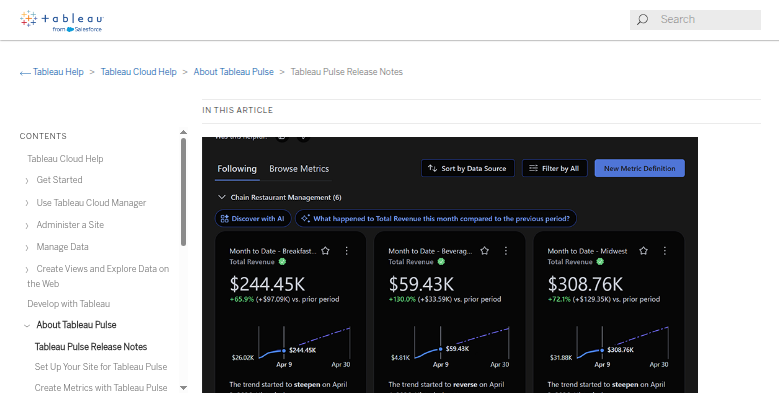
Subscriptions email a PNG or PDF snapshot of a view on a schedule or whenever the data refreshes. Data-driven alerts fire when a value on a continuous numeric axis crosses a threshold, and arrive by email, as a notification in the site or in Slack. On Tableau Cloud, Pulse tracks metrics built on published data sources and sends digests with plain-language insights by email, Slack or Microsoft Teams.
Extracts refresh on schedules, and Tableau Bridge reaches data inside a private network. A site admin can have Tableau Cloud email a data source's owner when its scheduled refresh fails, and after five failures in a row Tableau Cloud suspends the schedule until the owner or an admin deals with the cause.
All of it works on data Tableau can already reach through a connector, its own or a partner's from Tableau Exchange. A figure that exists only on a web page behind someone's login, such as a supplier's portal or a distributor's sell-through page, has no connector, so it reaches a workbook only after a person types it into a spreadsheet. An SMS to whoever owns a failing KPI, or a card on the data team's board for each broken extract, is outside what Tableau sends.
The missing columns can be filled before the extract refreshes
A sales director whose company sells through distributors opens Monday's dashboard with every region filled in, each distributor's sell-through by product sitting in the workbook's Google Sheet with the date it was read. The same sheet can hold a supplier's price list or a partner's weekly report, each in its own tab. When a portal has posted nothing new by Monday, the analyst hears before the extract refreshes and can put a note on the dashboard instead of letting it show a dip.
Whoever is on data duty hears on WhatsApp which workbooks failed to refresh overnight, and each of them already has a card on the team's board.
The site owner decides what to archive from a Monday list of workbooks with low view counts and their owners. The finance lead gets a text when a KPI on the scorecard is out of range, and a snapshot of the scorecard goes into Drive each week.
The agent writes portal figures into the sheet a workbook reads
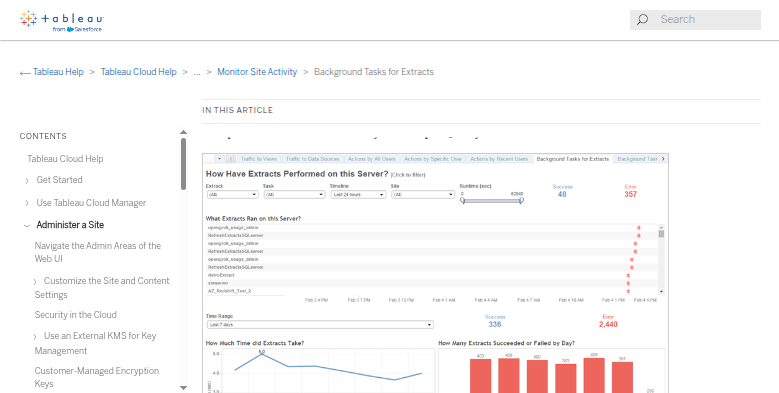
Tableau's own Background Tasks for Extracts view already counts the failed refreshes. WebRun is an AI agent that works a real Chrome browser, signed in as you. From that view and the partner portals your dashboard depends on, it takes the figures into the spreadsheet the workbook uses and raises a card for each failure.
Each row it adds names the portal it came from, so an odd figure on the dashboard can be traced back to its page. The workbook stays exactly as its author built it, and archiving or deleting a workbook stays with the site owner.
Extract failures, unused workbooks and the weekly KPI scorecard are where the Tableau cards below begin.
Questions people ask
Isn't this what Tableau Pulse does?
No. Pulse watches metrics built on data Tableau already has and sends digests by email, Slack or Microsoft Teams. The agent works one step earlier, fetching figures that have no connector so they can reach Tableau at all.
Will it overwrite the data in our extracts?
No. It writes to the source spreadsheet the workbook reads, as new rows dated when they were read, and Tableau picks them up at the next refresh. The extract itself is refreshed by Tableau in the normal way.
Which Tableau account does it use?
One you choose. Reading refresh status and view counts across the whole site needs an account that can open the admin views, typically a site administrator, while reading one project's dashboards needs only that project's permissions.
Tableau Server or Tableau Cloud: does it matter?
Only for the features. The agent works with either, as long as the server's pages can be reached from outside your network, but Pulse and Admin Insights exist only on Tableau Cloud.
Sources
- Create a subscription to a view or workbook Subscriptions email a PNG or PDF snapshot of a view or workbook on a schedule or when the data refreshes.
- Send data-driven alerts Alerts work on a continuous numeric axis and are sent by email, as a site notification or to a connected Slack workspace.
- Tableau Pulse Pulse is Tableau Cloud only; metrics are built on published data sources, and digests and alerts arrive by email, Slack and, since August 2026, Microsoft Teams, with insights on drivers, trends and outliers.
- Keep data fresh Extract refresh schedules on Tableau Cloud, Tableau Bridge for data in private networks, and email notifications to owners when extract refreshes fail.
- Notify owners when extract refreshes fail A site admin can have Tableau Cloud email a data source's owner when a scheduled extract refresh fails; after five consecutive failures the schedule is suspended until the owner or an admin acts.
- Background Tasks for Extracts A pre-built admin view listing extract tasks over the past 30 days with success or error status, run times and daily counts of successes and failures.
3 ready-made Tableau workflows
Each one names the apps it touches and the exact steps it takes. Open one to read what it will do, then turn it on.




Want one of these running on your own Tableau?
Show WebRun the process once and it will run it on schedule, in your own private browser environment.