How to Automate SharePoint
SharePoint's own rules email people when files change, libraries can require approval, and Power Automate flows move files and request sign-off for anything with a connector. Files that start in bank, tax or supplier portals with no connector are still downloaded, renamed and uploaded by hand; an AI agent like WebRun can fetch and file them.
 Written by
Clara Bennett
Revenue operations
Written by
Clara Bennett
Revenue operations
 Reviewed by
Marcus Deleon
Support operations
Reviewed by
Marcus Deleon
Support operations
SharePoint holds the files a company has to be able to find again
SharePoint, still widely called SharePoint Online, is the part of Microsoft 365 that keeps a company's shared files: team sites and communication sites, each with document libraries and lists behind them. Every team in Teams keeps its files in SharePoint as well, behind the Files tab its members see.
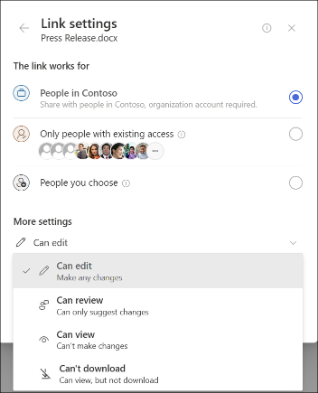
A library keeps version history, can require files to be checked out before anyone edits them, and carries columns for whatever the team files by, such as the client and the period. Sharing links decide who outside the company can open a file, and permissions decide who inside it can change one.
Finance keeps its month-end packs there and legal its signed contracts, each filed under a naming convention that someone set up once and everyone else is meant to follow.
Files reach the library by download, rename and upload
In a finance library, the bank statement comes from the bank's portal and the tax notice from the government site, and a finance assistant downloads each one, renames it to the team's convention, finds the folder, uploads it and fills in the columns if there is time. When the person who knows the convention is away, files land at the top of the library as scan_0412.pdf.
The library needs looking after as well. Files stay checked out for weeks after their editor moved on, and nobody else can save changes to them. A contract shared with a client through an Anyone link in March is still open in September, and the site owner hears about it when the client forwards the link to someone else.
Rules and flows start from the library, where the file has already landed
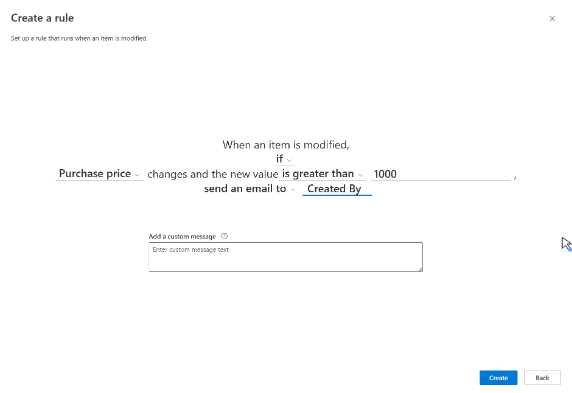
A rule on a list or library emails chosen people when a file is added, changed or deleted, or when a date approaches, and it can set a column's value, though it cannot send to a group email address. A library can also require approval before a file counts as final.
Power Automate flows start from the library's own menu to copy files, request sign-off or post to Teams. Any work account can build cloud flows with standard connectors, SharePoint among them, at no extra cost, although a flow on the free licence cannot be shared.
Rules and flows start from something Microsoft 365 or a connected service can see. Premium and custom connectors need a paid Power Automate licence, and a custom connector needs an API behind it. For a portal with no API at all, Microsoft's answer is a desktop flow that mimics a person's mouse and keyboard. Run attended, it needs a Premium licence and a registered machine; run unattended, it needs a Process licence for each bot, or a Hosted Process licence for a machine Microsoft hosts.
Each entity's folder holds its statement by the third working day
If a bank has not posted a statement by the third working day, the finance assistant hears so that morning, instead of discovering the gap when the auditors ask. The statements that have posted are already in each entity's folder, renamed to the entity and the period, with the columns filled in.
A tax team could get each entity's figures from the ledger in a working file saved to the right folder, with the review email to the controller drafted and unsent. The analytics tool's monthly PDF could be in the reporting library on the morning it is published.
The site owner could keep the library tidy from two Monday posts in Teams: the files left checked out, each with the person holding it, and the files shared outside the company, with the link type and date. The owner also gets a text about anything shared outside since the week before.
The statements come in through the same portal logins finance uses
The finance team already signs in to each bank's portal, with a different login for every bank. WebRun is an AI agent that works a real Chrome browser, signed in as you. With that login it downloads the statement, then saves it into the SharePoint library under the name and columns your convention uses, with no connector and no desktop flow.
Sharing links stay as their owners set them: the agent lists external shares for the site owner and changes none, and the controller's review email stays in the tax manager's drafts. The Monday check-out sweep and the external sharing review are on the cards that follow.
Questions people ask
What replaced SharePoint alerts?
Rules and Power Automate. Microsoft turned off the creation of new alerts for all tenants from January 2026, made existing ones expire, and removed the feature from July 2026, and its own guidance points to SharePoint rules and Power Automate flows instead.
Is an app registration or Graph permission required?
No. The browser session uses the account you choose, so there is no app registration, no Graph permission to grant and nothing installed in the tenant. It can do what that account can do and nothing more.
Can it file into a Teams channel's folder?
Yes. A standard channel's Files tab is a folder in the team site's document library, so saving there is saving into that library. A private or shared channel keeps its files in a site of its own that only the channel's members can open, so the agent's account has to be a member of that channel.
Could it overwrite a file someone is editing?
It saves new files, or new versions where a workflow says so, and version history keeps every earlier copy. It does not check files in or out on anyone else's behalf or discard someone's check-out.
Sources
- SharePoint Alerts retirement Microsoft's timeline: new alerts turned off for new tenants from July 2025 and for all tenants from January 2026, existing alerts expiring after 30 days from October 2025, and the feature removed from July 2026 in favour of Power Automate and SharePoint rules.
- Create a rule to automate a list or library Rules trigger when an item is modified, a file is added or deleted, or a date approaches (two date rules per list or library); they send email or set a column value, cannot send to group addresses, mail from [email protected], and need Contribute permission to manage.
- Types of Power Automate licenses The free licence for work accounts covers cloud flows (without sharing) with standard connectors only; premium and custom connectors need a paid licence; desktop flows for apps with no connector or API run attended on a registered machine under Premium, unattended under a Process licence per bot, or on a Microsoft-hosted machine under Hosted Process.
- Documents and libraries in SharePoint Covers version history, requiring check-out, approval of items in a library, and creating a flow for a list or library.
- Teams and SharePoint integration The files on a team's Files tab are stored in a SharePoint site; each standard channel is a folder in the parent site's document library, and each private or shared channel has its own site open only to its members.
7 ready-made SharePoint workflows
Each one names the apps it touches and the exact steps it takes. Open one to read what it will do, then turn it on.





Want one of these running on your own SharePoint?
Show WebRun the process once and it will run it on schedule, in your own private browser environment.