How to Automate PushPress
Start with what PushPress runs itself: nightly retries and Payment Failed emails in Core, trial-to-member sequences in Grow, and the AI Assistant on Pro and Max. Follow-ups that depend on a member's check-ins, punchcard sessions or Stripe decline code need someone to read the record; WebRun does that reading on a schedule and drafts the notes for staff to send.
 Written by
Priya Raghavan
Solutions lead
Written by
Priya Raghavan
Solutions lead
 Reviewed by
Dimitri Vasilev
Logistics analyst
Reviewed by
Dimitri Vasilev
Logistics analyst
Trials and on-ramp courses are punchcards in PushPress Core
PushPress's help centre builds a free trial as a Punchcard plan in Core: one punch or a few, a price of zero, an expiry a week out and the waiver as a step of sign-up. When a one-punch trial member checks in, the plan moves to Completed.
On-ramp courses, which PushPress's help pages also call Fundamentals or Foundations, are punchcards too, with as many check-ins as the course has sessions and Trial Membership switched on, so buyers stay in the leads section until they commit to a recurring plan.
After that, members pay a recurring membership through the gym's own Stripe account and check in from the member app or the kiosk. In gyms that pay for Train, the workout add-on, they log scores and PRs there too. PushPress is built for CrossFit boxes, martial arts academies, strength gyms and small group training studios.
The right note to a trial depends on how often they came
Someone who checked in four times during a one-week trial is ready to hear about the unlimited plan; someone who came once may need a phone call. The count is on each member's profile in Core, so the owner or head coach opens the profiles one by one before writing, often between the 6am and the noon class.
Fundamentals clients run on a longer clock. When one has used every session on the on-ramp punchcard, a coach writes to offer the group membership; one who stopped coming halfway needs a different note, sooner.
Failed payments land on the Dashboard under Failed Billing. An expired card calls for different words from insufficient funds, so whoever writes to the member opens the charge in Stripe to read the decline code first.
The member who logged a deadlift PR in Train on Thursday is the one to ask to review the gym on Google. That ask waits for a spare evening, like the owner's look at yesterday's revenue and cancellations.
Core's AI Assistant answers on Pro and Max when someone asks
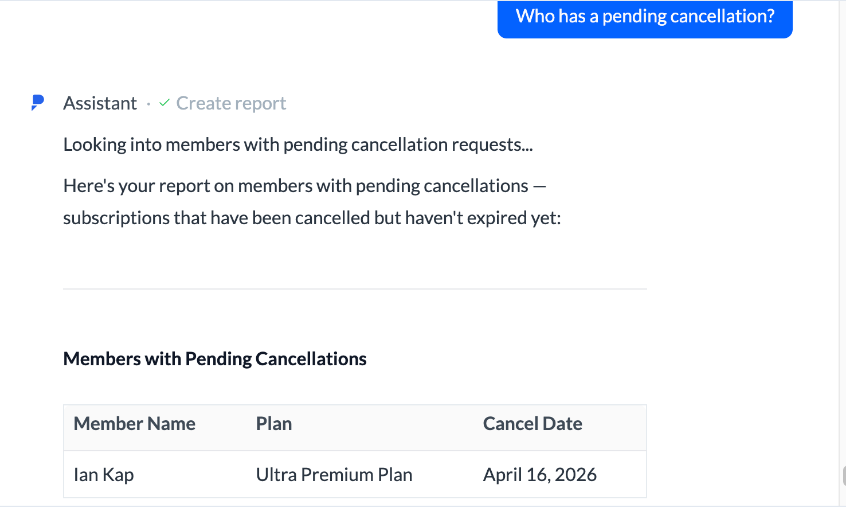
On Pro and Max, the paid tiers of Core, the AI Assistant answers typed questions, such as last week's revenue or one member's payment history. It can also charge fees, update memberships and book classes from the chat, within the signed-in staff member's permissions.
On every tier, Core retries a failed payment each night for members with a valid card on file and sends a Payment Failed email to the member and the admin. A Slack integration posts check-ins, class registrations, payments, new members and new leads to a channel as they happen.
Grow, a $329-a-month add-on, runs trial-to-member sequences and includes GymHappy, which picks three class attendees at random each day and sends each a review invitation written by AI.
The Assistant answers only what someone types into it, and GymHappy's draw may pass over the member who set a PR last Thursday. PRs exist only where the gym pays for Train, from $79 a month, since Train Lite has no score logging. On Core without Grow, a coach writes the email to a trial in its last days.
A four-class trial and a one-class trial get different emails
The coach who looks after trials edits a Gmail draft for each member whose trial ends within three days, giving the number of classes they came to and the membership that suits them. The membership channel in Slack lists the same names, with anyone who came three or more times marked as a priority.
The head coach reads a Monday post in the coaching channel: Fundamentals clients who have finished their sessions, each with a graduation email in Gmail that sets out the group options, and then those behind on attendance.
The front desk works failed dues from a billing-channel list, largest first, where each line has Stripe's decline reason and a card-update text written for it. Repeat failures and payments seven days past due carry a flag.
Staff approve Monday's review requests in the marketing channel: members with a PR in Train or a first month finished, minus anyone asked in the past 90 days, each draft carrying the gym's Google review link. At seven each morning the owner reads yesterday's revenue, signups and cancellations in Slack, also added to the revenue tracking sheet, with any day 20 percent under the seven-day average marked.
The owner gives the agent a Core staff profile and Stripe access
The owner adds WebRun in Core like a new coach, as a staff member with an access role, and sets up a login to the gym's Stripe dashboard. WebRun is an AI agent that works a real Chrome browser. With those logins it goes over the members and the Failed Billing list in Core and the declined charges in Stripe, then leaves drafts in Gmail and lists in Slack.
It edits no membership and charges no card. The coach sends the trial and graduation emails from Gmail, staff approve review requests in Slack, and desk staff send each card-update text themselves. Only the revenue post goes out by itself, to the owners' channel. The trial drafts and the failed-dues list run at eight each morning, the Fundamentals post and the review queue on Mondays, and each is a separate workflow.
Questions people ask
Does the review request need full Train to find PRs?
Yes, for PRs. Train Lite, the free version, shows the day's workout but has no score logging, so a gym on it has no PRs in PushPress to read. Those gyms still get requests for members who finished their first month; with full Train, members who logged a PR join them.
Will the failed-dues list retry the charge?
No. Core already retries a failed payment every night for any member with a valid card on file, and a member who updates their card overnight drops off the next morning's list. What the list adds is the Stripe decline reason and a text written for it, which a staff member sends.
Is the seven o'clock revenue post just the AI Assistant's answer?
The numbers overlap. The AI Assistant, on Pro and Max, answers when someone types a question about revenue, check-ins or cancellations. The revenue post arrives in Slack every morning without anyone asking, adds a row to a Google Sheet so the history builds day by day, and marks any day more than 20 percent below the seven-day average.
When does an on-ramp client count as ready for group classes?
When their completed sessions reach the number you set, which on PushPress's own on-ramp setup is the punchcard's check-in count. Clients behind on attendance appear separately in the same Monday post.
Sources
- PushPress Core - Built for How Gyms Actually Operate PushPress's description of Core: built for CrossFit boxes, martial arts academies, strength gyms and small group training studios; recurring billing, automatic payment recovery, waitlists and digital waivers at sign-up; the Free, Pro and Max tiers billed month to month.
- How to Use the AI Assistant in PushPress Core Confirms the AI Assistant is for Pro and Max customers, answers questions about revenue, check-ins, member status and cancellations, can charge fees, update memberships and book classes, and respects existing staff access controls.
- Core | Plans: Free or Paid Trial PushPress's recommended trial setup: a Punchcard plan with one or more punches, $0 or a trial fee, a one-week expiry as standard and the waiver as a required step; a one-punch plan moves to Completed at check-in.
- Core | Plans: On-ramp, Fundamentals, Foundations, etc. On-ramp courses set up as Punchcard plans with check-ins matching the course's sessions, and Trial Membership set to Yes so buyers sit in the leads section.
- Core | Communications: automatic emails Lists Core's automatic emails, including Payment Failed (to the admin and the member), Plan Switch, Subscription Cancelled and Punchcard Completed.
- Core | Payments: complete guide Failed payments show in the Dashboard's Failed Billing section, on the Invoices tab and on the member's Billing tab, and Core runs a nightly retry for members with a valid payment method on file.
- Core | Slack The Slack integration sends check-in, class registration, successful or failed payment, new member and new lead notifications to a Slack channel through an incoming webhook.
- Grow by PushPress Grow is a $329 a month add-on to Core with trial-to-member sequences and GymHappy, whose AI writes the review invitations.
- GymHappy Overview GymHappy selects three random class attendees each day and skips anyone asked in the last three days or who reviewed recently.
- Train Lite Overview & FAQs Train Lite displays programming at no cost but does not include score logging or the other features of full Train.
- Train by PushPress Train is a workout add-on from $79 a month, with score logging, benchmark tracking, leaderboards and PRs, and partner programming that includes HWPO and PRVN.
5 ready-made PushPress workflows
Each one names the apps it touches and the exact steps it takes. Open one to read what it will do, then turn it on.





Want one of these running on your own PushPress?
Show WebRun the process once and it will run it on schedule, in your own private browser environment.