How to Automate OneDrive
OneDrive's own recovery and sharing controls are the recycle bin (30 days personal, 93 days work), Restore your OneDrive, expiry dates on Anyone links and Power Automate flows on new files. Checking the recycle bin, the storage meter and the Shared view every day, and telling each owner in time, can be handed to WebRun, an AI agent.
 Written by
Owen Hartley
Workflow engineer
Written by
Owen Hartley
Workflow engineer
 Reviewed by
Samuel Adeyemi
Integrations writer
Reviewed by
Samuel Adeyemi
Integrations writer
OneDrive holds the files one person is answerable for
A lot of people end up using Microsoft OneDrive without deciding to. They switch on PC folder backup, and from then on the Desktop, Documents and Pictures folders on the laptop live in OneDrive, with Files On-Demand leaving the rarely opened ones in the cloud until someone clicks them.
For a sole trader it is usually the personal OneDrive at onedrive.live.com, with 1 TB once Microsoft 365 Personal or Family is added. For an employee it is OneDrive for work or school, where Business Basic, Standard and Premium give each user 1 TB. Either way it holds one person's working files, such as the draft proposal and the client's signed scope.
A good share of a small firm's sharing starts there too. A bookkeeper sends a client a link to a folder of statements, and the folder stays in the bookkeeper's OneDrive for as long as the client keeps using it.
Nobody reads the recycle bin until a file is missing
Deleting works everywhere at once. Clear out a folder in File Explorer and it leaves OneDrive too, and if that folder was shared it is gone for everyone it was shared with. It waits in the recycle bin, but only for so long, and the client folder removed by mistake in March is often not missed until the summer.
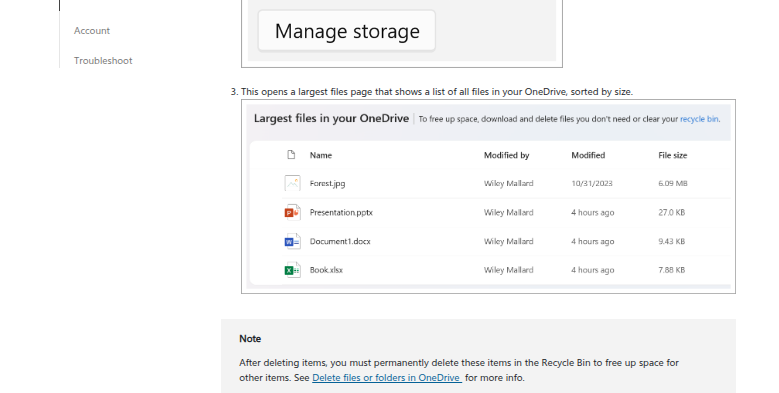
A folder shared through an Anyone link with no expiry date keeps opening for whoever holds the link, long after the project ends. The Shared view lists what each person has shared, but Manage access opens one item at a time, so nobody works through it.
PC folder backup pulls every video saved to the Desktop into OneDrive, and the storage meter creeps up until the warning arrives; a personal OneDrive that goes over its limit turns read-only and stops syncing. When an employee leaves, their OneDrive is kept for 30 days by default after the account is deleted, and after that the files they shared with clients stop opening unless someone moved them first.
OneDrive can undo a deletion if someone notices in time
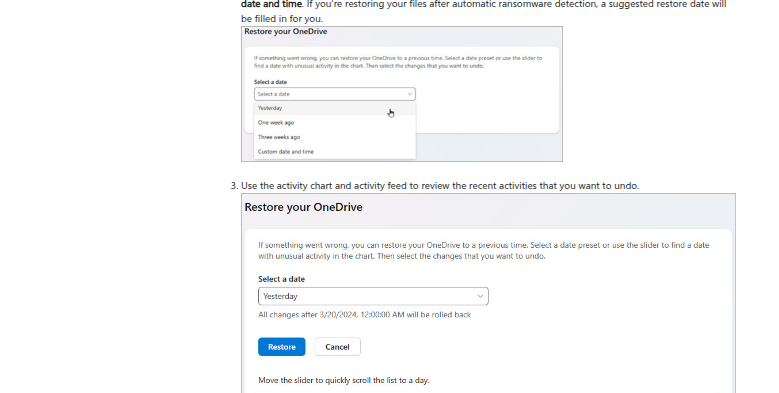
The recycle bin keeps deleted files for 30 days on personal accounts and 93 days on work or school accounts, unless an admin has changed that. Microsoft 365 subscribers can roll the whole OneDrive back to any point within the past 30 days, and OneDrive alerts its owner when a large number of files are deleted at once.
Microsoft 365 subscribers can also give an Anyone link an expiry date or a password. On work accounts an admin can make every Anyone link expire within a set maximum or switch them off, and a OneDrive's owner can run a sharing report, a CSV of its permissions and links. When someone leaves, their manager gets access to the OneDrive by default, with a reminder seven days before it is deleted. Power Automate's OneDrive for Business connector can start a flow when a file is created or modified.
A single client folder deleted yesterday sits in the recycle bin without a word to anyone unless it held enough files to set off the mass-deletion alert. Where no admin has set a maximum, an Anyone link created without a date keeps working, and Microsoft notes that the sharing report leaves Anyone links out. The flow triggers that pass along a file's contents skip anything over 50 MB, and a flow can act only on the OneDrive of the account that connected it.
Deletions reach their owner while the recycle bin still holds them
Yesterday's deletions appear in a Teams channel each morning with the days left to restore each one, and the owner of a client folder or contract within a week of its purge date gets a text. The space left, the largest files and the ones nobody has opened in a year go into an Airtable table every Monday, and the owner gets an hour in Google Calendar to clear them before the account reaches its limit.
A Slack digest lists every file and folder shared through an Anyone link, with the date it was shared and whether it expires, and a Telegram message asks each owner whether that link should still be open. When an employee leaves, the manager with access sees in the first week which of that person's folders were shared with clients, beside the date the OneDrive will be deleted, and moves the ones worth keeping to SharePoint while the links still work.
OneDrive's recycle bin and Shared view, read every morning by WebRun
The recycle bin, the storage meter and the Shared view are ordinary pages in OneDrive on the web, and they need reading before the working day starts, weekends included. WebRun is an AI agent that works a real Chrome browser, signed in as you. Given the Microsoft account or work account whose OneDrive it checks, it opens those pages and sends each result where the job says, such as the Teams channel or the owner's phone.
The owner presses Restore in the recycle bin, and removes a link in Manage access, after reading what the agent sent. Emptying the recycle bin, which cannot be undone, is no part of these jobs.
To start from a ready-made OneDrive job, pick the recycle bin watch, the storage cleanup queue or the over-sharing alerts.
Questions people ask
Which OneDrive accounts can it check?
Personal and work or school accounts alike, signed in with whichever account owns the OneDrive. The main difference is how long the recycle bin keeps files: 30 days on a personal account and 93 days on a work or school account, unless an admin changed that.
Do files in the recycle bin count against my storage?
On a personal OneDrive, yes. The quota includes everything in the recycle bin, so deleting files frees space only once the bin is emptied, and emptied files cannot be restored.
Can I restore a file a colleague shared with me and then deleted?
Not from your own recycle bin. OneDrive restores only files that were in your own OneDrive, so the colleague restores it from theirs.
What happens to a OneDrive when an employee leaves?
By default the manager gets access when the account is deleted, and the OneDrive is kept for 30 days, with a reminder seven days before deletion. It then sits in the site collection recycle bin for 93 days, where content it shared stops opening and only an admin can bring it back, using PowerShell.
Sources
- Restore deleted files or folders in OneDrive Deleted files can be restored for 30 days on personal accounts and 93 days on work or school accounts unless an admin changed it; Microsoft 365 subscribers can restore the whole OneDrive to any point in the last 30 days; only files from your own OneDrive can be restored.
- How OneDrive safeguards your data in the cloud OneDrive alerts the owner and gives recovery steps when a large number of files are deleted.
- Share OneDrive files and folders Explains Anyone, organization and specific-people links, that expiry dates and passwords are only available to Microsoft 365 subscribers, and that admins may disable the Anyone option.
- Manage sharing settings for SharePoint and OneDrive in Microsoft 365 Admins can require all Anyone links to expire within a maximum number of days, or restrict them to view permission.
- Report on file and folder sharing in a SharePoint site OneDrive settings, More settings, Run sharing report creates a CSV of every unique file, user, permission and link; the report does not include Anyone links.
- See files you shared in OneDrive The Shared view lists what a person has shared, and Manage access is opened for one selected item at a time.
- My OneDrive says it's full A personal OneDrive over its limit cannot upload, edit or sync new files and its files turn read-only; items in the recycle bin count toward the quota.
- OneDrive retention and deletion When a user is deleted, the manager is given access by default, the OneDrive is kept for 30 days unless changed, a reminder goes out seven days before deletion, and the OneDrive then spends 93 days in the site collection recycle bin, where shared content is unreachable and restoring needs PowerShell.
- OneDrive service description Microsoft 365 Business Basic, Business Standard and Business Premium give 1 TB per user.
- Back up your folders with OneDrive PC folder backup moves the Desktop, Documents and Pictures folders into OneDrive; 5 GB free, or up to 1 TB with a Microsoft 365 subscription.
- OneDrive for Business connector reference The When a file is created and When a file is modified triggers skip files larger than 50 MB, and the connector only works on data owned by the account that made the connection.
3 ready-made OneDrive workflows
Each one names the apps it touches and the exact steps it takes. Open one to read what it will do, then turn it on.



Want one of these running on your own OneDrive?
Show WebRun the process once and it will run it on schedule, in your own private browser environment.