How to Automate Nutshell
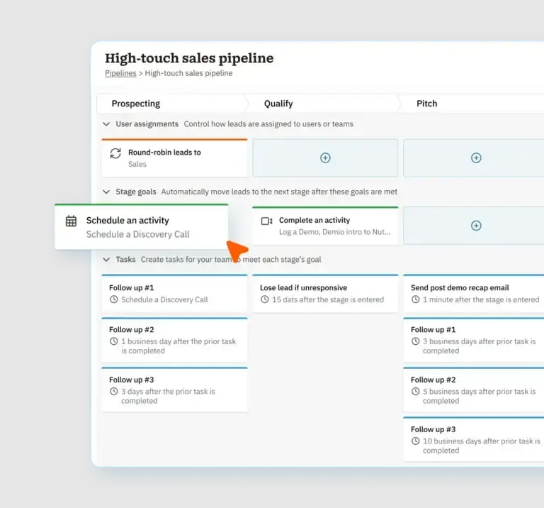
Set stage goals (Growth plan and up) so leads advance on meetings, emails and fields Nutshell records, and lead assignment rules to hand out new leads. Bid invitations, addenda and award results posted on general contractors' platforms still reach Nutshell by hand; an AI agent such as WebRun can read those platforms in a browser and log them.
 Written by
Nikhil Bhatt
Automation strategist
Written by
Nikhil Bhatt
Automation strategist
 Reviewed by
Clara Bennett
Revenue operations
Reviewed by
Clara Bennett
Revenue operations
A subcontractor's Nutshell pipeline is a bid board
A commercial painting contractor prices far more jobs than it wins, and each one starts as an invitation to bid from a general contractor. Nutshell, an all-in-one CRM and email marketing platform for B2B sales teams, has industry pages for contractors, roofers, construction firms and building materials suppliers.
For the contractor, the pipeline is a bid board. Each lead is a job someone invited them to price, moving through stages from takeoff to bid submitted to awarded. With the Proposals & Invoices add-on, the estimate that wins becomes the job and then the invoice.
The estimator works in it all week, and the owner checks the board on Fridays. Out on site, people update records on their phones in Nutshell's app, which works offline and syncs once they have signal again.
Bid invitations and results live on the general contractor's platform
A general contractor sends its invitation to bid from its own bid management platform, and the plans, the bid date and every addendum stay on that platform, where the subcontractor's estimator signs in to see them. The estimator reads each invitation, creates the lead in Nutshell, types in the project name, the bid date and the scope, and sets a reminder.
Addenda arrive as notification emails among dozens of others, and the estimator opens each platform to see what changed. When the award is announced, the result sits on the GC's platform or in a public bid tabulation, and the lead stays at bid submitted until the owner asks what happened.
A building materials supplier watches the same platforms for a different reason. The list of contractors bidding a project tells the rep who to call about materials, and that list is copied across by hand as well.
Stage goals move a Nutshell lead on what Nutshell records
When a stage goal is met, Nutshell marks the stage's remaining tasks skipped and moves the lead on. Goals, from the Growth plan, cover a lead's contact details or value, an activity scheduled or completed, an email sent, received or clicked, and a custom field filled in.
Growth also brings lead assignment rules, with round-robin for new leads, and Pro adds sales automation, the meeting scheduler, AI lead recaps with next steps and up to five pipelines. Follow-through can start when a lead is won, lost or cancelled. Every plan has the form builder and landing pages, and Nutshell connects with more than 100 tools, Gmail, Outlook and Slack among them. Nutshell IQ, a prospecting add-on, finds new leads with their contact details.
A general contractor's award notice is none of those events. It sits on the GC's platform, or in a public tabulation, until the estimator signs in and reads it, and the lead waits at bid submitted. The list of who is bidding a project sits there too, which is why the supplier's rep copies it.
Each invitation to bid becomes a lead the day it arrives
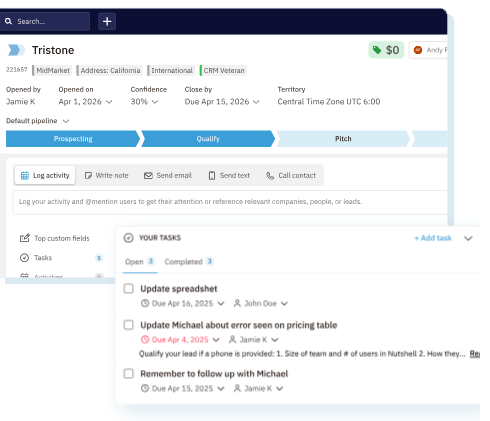
Every new invitation from the bid platforms shows up in Nutshell as a lead with the project, the bid date, the scope and the GC as the contact, plus a reminder a few days before the deadline.
Each open bid carries its addenda as notes with the issue date and a link, so the estimator prices from the current set even when an addendum lands on a Friday afternoon. After the bid date, the lead shows who won and at what number, from the posted results or the public tabulation, and the owner closes it as won or lost.
On a project a building materials supplier is tracking, the lead lists every contractor bidding it as a contact, and the rep calls each about materials. A project the company lost that comes back out to bid reopens its old lead with the new date.
WebRun keeps the bid board in step with the GC platforms
Every general contractor picks its own bid platform, so a busy subcontractor keeps a login on several. WebRun is an AI agent that works a real Chrome browser, signed in as you, and the company's existing logins take it into each platform, where it reads the invitations and results and adds the lead, the note or the contact in Nutshell.
The estimator and the owner price the job and submit the bid, and a question to a GC about a result goes to the owner as a draft, unsent.
For the owner's Friday check of the board, a ready-made job exports the week's won and lost leads to Google Sheets and posts a short summary in Notion.
Questions people ask
Two general contractors invited us to the same project. What happens?
It creates one lead per general contractor, as your estimator would, because each is a separate customer with its own bid date. The note on each lead names the other GCs you are pricing the same project for.
Which bid platforms can it read?
The ones your estimator signs in to today, with the same logins. It reads each platform's own screens, so it does not depend on the platform offering an export or a Nutshell integration.
Can it track public bids as well as private invitations?
Yes. It reads the tabulations a city or agency posts on its procurement site too, and notes on the lead where the result was published.
Sources
- Nutshell llms.txt Nutshell's own summary as an all-in-one CRM and email marketing platform for B2B sales teams, with integrations to 100+ business tools including Gmail, Outlook and Slack, and Nutshell IQ for prospecting.
- Nutshell pricing Foundation, Growth, Pro, Business and Enterprise plans: custom stage goals and lead assignment rules from Growth; sales automation, the meeting scheduler and AI lead recaps and next steps from Pro; Proposals & Invoices and Nutshell IQ as add-ons; the form builder and landing pages in every plan.
- Pipeline management | Nutshell Describes stages with automated task lists, round-robin distribution, follow-through after a lead is won, lost or cancelled, and up to five pipelines on Pro.
- Pipeline automation: automating lead progress | Nutshell Help Center Lists the stage goal types, from contact details and activities to emails and custom fields, states that stage goals are on Growth and above, and that the stage's tasks are marked skipped when the goal is met.
- CRM for contractors | Nutshell Explains tracking bids from first inquiry to signed contract, converting estimates to jobs and invoices, and a mobile app that works offline.
- CRM for building materials suppliers | Nutshell Nutshell's page for suppliers managing contractor accounts, with quotes sent from the CRM and tracking of when a contractor opens a quote.
1 ready-made Nutshell workflows
Each one names the apps it touches and the exact steps it takes. Open one to read what it will do, then turn it on.
Want one of these running on your own Nutshell?
Show WebRun the process once and it will run it on schedule, in your own private browser environment.