How to Automate FieldRoutes
Most FieldRoutes automation is a Trigger Rule firing on a status, date or balance: a reminder before the visit, a text when an appointment is completed. An AI agent like WebRun can take the work that depends on ranking or history: a daily termite and mosquito call list, review requests that skip open complaints, and a morning route digest.
 Written by
Yara Haddad
Data operations
Written by
Yara Haddad
Data operations
 Reviewed by
Nikhil Bhatt
Automation strategist
Reviewed by
Nikhil Bhatt
Automation strategist
A FieldRoutes office runs on thousands of small subscriptions
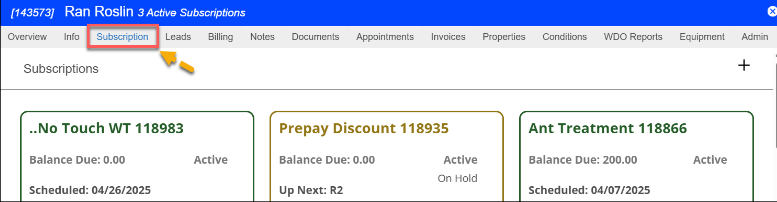
A quarterly pest control account is a small thing: four visits a year and a card charged on AutoPay. A pest control company is thousands of them, many signed at the front door by a summer sales team, and the business lives on how many renew. FieldRoutes, which began as PestRoutes and joined ServiceTitan in 2022, is operations software built for those companies, and since 2021 for lawn care companies too.
Intelligent Routing builds each technician's day around skill sets and drive time, and the office drags appointments around on the Dynamic Scheduler. Technicians run the route on their phones in the FieldRoutes app and update customer records from the truck. At the door the same app sells a new account, draws a home diagram for a termite quote and takes the signature on the agreement.
Customers pay by AutoPay or online, and each one can check their payment history in their own Customer Portal.
The customer list holds termite and mosquito sales nobody has called about
A homeowner who has paid for quarterly general pest service for three years has never been asked about mosquito treatment or a termite inspection. The sales manager knows there are hundreds like them in FieldRoutes, but picking the right ones to call out of the customer list takes an afternoon nobody has in May.
By four o'clock the day's completed services are the customers most likely to leave a review. The office manager would ask them, though not the customer who rang on Tuesday about ants coming back, and not one who was asked last month.
Reminders go out two days before each appointment, and the CSRs still want to know who has not confirmed before the routes are set. At 6:30 the dispatcher wants every technician's stops on one screen, with the gate codes and the dog warnings, before the trucks pull out.
Trigger Rules fire on statuses, dates and balances
Trigger Rules send appointment reminders a fixed number of days before the visit or when the technician checks in, by text, email or voice. An Appointment Status rule can text or email a customer as soon as an appointment is marked Completed, filtered by service type and appointment flag. Other rules handle renewals and past-due balances, down to late fees and holds, or raise a task for the office.
Marketing Pro, a separate ServiceTitan product that connects to FieldRoutes, builds email and direct mail campaigns and can target customers who hold one subscription and not another, such as general pest without mosquito. Replies to reminder texts collect in the Reminder Responses report.
A rule sends its message to every appointment or account that passes its filters, and a campaign goes to everyone in its segment. Ranking those customers into the ten worth calling today, by how long they have been with you and how much pest pressure their area sees, is the sales manager's work. So is checking, before a review link goes out, that the customer is not the one who complained on Tuesday, unless someone flagged that appointment. For the reminder itself a rule is enough, and the CSRs still check who has not confirmed.

Ten termite and mosquito prospects reach the sales channel each morning
The sales team works from a Slack post at eight with the ten customers most worth calling that day: recurring accounts of six months or more with no termite inspection or mosquito control, ranked by tenure, visit frequency and the pest pressure where they live, each with the add-on to offer. Anyone already called this month stays off the list, and the scoring log keeps every candidate.
The office manager approves review requests at four for the day's completed services, an email in Gmail and a Twilio text held for approval for each customer, naming the technician who did the work. Customers asked in the last 90 days, and accounts with an unresolved complaint or an open service issue, get none.
The CSRs read the next 48 hours of appointments in the ops channel at seven, unconfirmed customers first, each with a reminder drafted. Dispatch sees every technician's stops at 6:30 in one post, in drive order, with the service type, the window, the gate code and the note about the dog.
WebRun ranks the FieldRoutes customer list and drafts the messages
The upsell list starts in FieldRoutes' customer list, filtered to active recurring subscriptions, and the review check starts with the day's appointments marked Completed. WebRun is an AI agent that works a real Chrome browser, signed in as you. Its FieldRoutes login has a user profile limited to customers, subscriptions and the schedule, and it scores the candidates in the sheet before posting the ten.
The office manager releases every review request and reminder: the emails wait as Gmail drafts, the texts in Twilio's queue. In FieldRoutes it only reads, so subscriptions, balances and appointments stay as the office left them. A company heading into mosquito season might switch on the upsell list first.
Questions people ask
Will customers get two reminders if our Trigger Rules already text them?
Not unless someone approves the drafts as well. The reminder card queues its texts in Twilio and saves its emails in Gmail, so where a reminder rule already covers an appointment, leave those drafts unsent and use the Slack list of unconfirmed appointments.
Does the upsell list come from technicians' service notes?
No. It comes from each account's subscriptions and tenure: active recurring customers of six months or more with no termite inspection or mosquito control. A technician who spots mud tubes on a general pest visit still reports it the usual way.
Does any of this work for our lawn care accounts in FieldRoutes?
The review requests and the route digest do, because they read completed appointments and routes whatever the service. The upsell list looks for customers without termite or mosquito service, so it is built for pest accounts.
Which review site does the request link to?
The one you choose, such as your Google Business Profile or Yelp. The link goes into every email and text draft, beside the technician's name.
Sources
- Trigger Rules | FieldRoutes Knowledge Base Documents FieldRoutes' Trigger Rules: renewal notices with a Customer Portal link, past-due messages by SMS, email, voice and postal mail, late fees, holds, reminders by voice, email and SMS or at check-in, webhooks, and the filters each rule tests.
- Reminder Responses | FieldRoutes Knowledge Base Shows that customers' replies to SMS appointment reminders are collected in the Reminder Responses report, for staff to spot cancel and reschedule requests.
- Sales Collections Report | FieldRoutes Knowledge Base States that the FieldRoutes mobile apps do not apply payments collected by sales reps, and that the office applies them in batches from this report.
- About Us | FieldRoutes FieldRoutes' own history: PestRoutes and Lobster Marketing Group rebranded as FieldRoutes and expanded into lawn care, and ServiceTitan acquired FieldRoutes in 2022.
- Marketing Pro Integration for Email and Direct Mail Marketing Pro, a ServiceTitan product that connects to FieldRoutes: email and direct mail campaigns that can target customers who have one subscription and not another.
- Field Service Routing FieldRoutes' routing page: routes organized by technician skill set, with drive time kept down.
- FieldRoutes Mobile App The mobile app: daily routes, customer records, selling services and getting contracts signed at the door, and home diagrams for termite and WDO work.
- Payments AutoPay and online payments, and a portal where every customer can check their payment history.
- Field Service Software for Small Businesses States that FieldRoutes controls who sees what with user profiles, permissions and role-based reporting.
4 ready-made FieldRoutes workflows
Each one names the apps it touches and the exact steps it takes. Open one to read what it will do, then turn it on.



Want one of these running on your own FieldRoutes?
Show WebRun the process once and it will run it on schedule, in your own private browser environment.