How to Automate Dentrix
To automate Dentrix, work in Dentrix Ascend, the version that runs in a browser. Ascend sends reminders and posts ERA payments, and Eligibility Pro checks insurance; an AI agent such as WebRun can work the Unscheduled Treatment Report and the carrier and lab websites, drafting notes for staff. Desktop Dentrix has no browser screen to open.
 Written by
Aiko Tanabe
Product researcher
Written by
Aiko Tanabe
Product researcher
 Reviewed by
Yara Haddad
Data operations
Reviewed by
Yara Haddad
Data operations
Dentrix sits on the office server, Dentrix Ascend sits in a browser
Henry Schein One makes Dentrix for dental practices in two forms. Desktop Dentrix is installed on the office's own computers, with its database on a server the practice looks after. Dentrix Ascend is the cloud edition, opened from any location through a browser.
The hygienist charts pocket depths and books the next recare visit before the patient leaves the chair. When the doctor finds a cracked molar, the treatment coordinator presents a crown with the insurance estimate beside it, and the patient books the seat appointment or says they will think about it. The insurance coordinator sends the claim once the crown is seated.
Desktop Dentrix keeps that work in the Family File, the Appointment Book, the Patient Chart and the Ledger. Ascend opens the same records from the Calendar and each location's Overview page, and Power Reporting turns them into lists.
A diagnosed crown can sit in the chart for months without an appointment
A patient hears they need a crown, says they will check with their spouse, and leaves without booking. Six weeks on, the crown is still treatment-planned in their chart, and the insurance year that would have paid part of it is closer to renewing.
Yesterday's broken appointments need calling back before those patients drift off the books. A filling finished at ten to five on a busy Tuesday may never reach a claim, and nobody sees the gap until collections come in light at month end. A claim sent five weeks ago goes quiet, and the carrier's answer sits on its provider website, under the practice's login for that carrier.
An endodontist or oral surgeon also owes the referring dentist a letter each time a case is finished. A general practice checks the lab's website the day before a seat appointment, so the patient does not take an afternoon off for a crown that has not arrived.
Eligibility Pro phones the payers, and Power Reporting builds the call lists
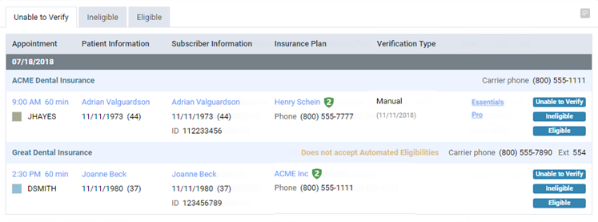
Dentrix Ascend sends appointment and recare reminders by text and email. It posts ERA payments to the ledger automatically, or with a quick post, when a remittance meets thresholds the organization sets. With Eligibility Essentials or Eligibility Pro, it checks coverage every three hours for patients booked in the coming days, on primary insurance only. Eligibility Pro, part of the Ascend Pro and Accelerate packages, also searches payer portals for frequency limitations, and since June 2026 SuperDial's AI voice agents phone payers for whatever the portals leave out.
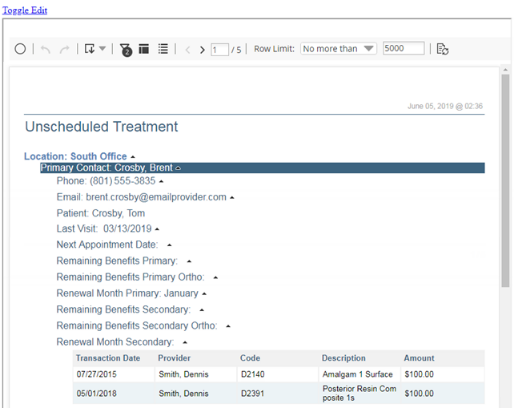
The Unscheduled Treatment Report lists each patient's planned procedures with the last visit, the insurance renewal month and the benefits remaining. The Outstanding Claims Report flags a claim once it passes the cut-off set for its carrier, and the Unattached Procedures box on a location's Overview page counts unsent claims and their charges. On desktop, the Treatment Manager prints Quick Letters to patients with unscheduled treatment.
Henry Schein One's MCP layer for Ascend, opened in April 2026, lists pre-built agents for recall gaps and automated patient follow-up, offered to select customers first. Where those are not running, each report ends at names and phone numbers, and the calls and claims are staff work. A quiet claim's explanation sits on the carrier's provider website, and a crown's progress on the lab's site.
Patients whose benefits renew next month go to the top of the unscheduled list
The treatment coordinator works the Unscheduled Treatment Report from the top, and the top is the patients whose benefits renew next month with money still unspent. Next to each name is a draft note naming the crown or bridge still planned and the date of the last visit, for the coordinator to edit and send from the practice.
The front desk calls back the Broken/No Show List with each patient's missed-appointment history in view, so a patient who missed once and a patient on a third broken appointment this year get different messages.
The insurance coordinator closes the day by creating claims for the unattached procedures, patient by patient. For each claim past its carrier's cut-off, the coordinator has the carrier's status from its provider website, read that afternoon, and phones only about the claims still stuck.
An endodontist's office sends each referring dentist a letter when the case closes, drafted from the treatment notes for the doctor to sign. The front desk reschedules tomorrow's seat appointments for any crown the lab has not shipped.
An Ascend user role sets which screens WebRun can open
The renewal-month sort and the carrier website lookups are jobs for WebRun. WebRun is an AI agent that works a real Chrome browser, signed in as you. In Dentrix Ascend the office creates a user role for it, and that role's security rights decide which screens appear; without the Review Insurance right, the Unattached Procedures box stays hidden.
A note about a patient's crown goes out only when the treatment coordinator sends it from the practice's email, and the doctor signs each referral letter. WebRun creates no claims and posts no payments. Desktop Dentrix has no browser screen for it to open, so there it covers only the carrier and lab websites.
For an Ascend office whose longest list is unscheduled treatment, the treatment follow-up workflow is the one to start with.
Questions people ask
Henry Schein One is adding its own follow-up agents to Ascend. Should we wait for them?
Use them if your organization has them. Henry Schein One's April 2026 announcement lists pre-built agents for recall gaps and automated patient follow-up, offered to select customers first. Referral letters and lab case checks are not on that list, and WebRun can take those on alongside them.
Are the Power Reporting lists up to the minute?
No. Power Reporting syncs from the practice database and shows the time of the last sync on the Data as of button, so a crown booked after that sync can still appear as unscheduled. Each list WebRun prepares can carry that time.
Does Eligibility Pro check secondary insurance?
Not automatically. Ascend's help pages say its automatic eligibility checks cover primary plans only, so for tomorrow's patients with a second plan WebRun can read the secondary carrier's provider website, with the practice's own login there, and list those benefits for the front office before the patients arrive.
Will a patient get a message about their treatment plan without anyone reading it first?
No. The treatment coordinator reads and sends every note about unscheduled treatment from the practice's email; WebRun only writes the draft.
Sources
- Dentrix vs Dentrix Ascend | Dentrix Henry Schein One's comparison: Dentrix is installed locally on office computers with practice-managed servers and no native remote access, while Dentrix Ascend is used in a web browser with built-in texting, email, online scheduling and reminders.
- Unscheduled Treatment Report | Dentrix Ascend Help Lists patients with treatment-planned procedures not yet scheduled, with the last visit, insurance renewal month, remaining benefits, providers and fees, and shows the Data as of sync time.
- Verifying eligibility statuses | Dentrix Ascend Help Automatic batch eligibility checks every three hours for upcoming appointments with Eligibility Essentials and Pro, for primary insurance plans only, sorted onto Unable to Verify, Ineligible and Eligible tabs.
- Processing unattached procedures | Dentrix Ascend Help The Unattached Procedures box on a location's Overview page shows unsent insurance claims and their charges, appears only for user roles with the Review Insurance security right, and leads to a list of patients whose procedures can be turned into claims.
- Outstanding Claims Report | Dentrix Ascend Help Shows unresolved claims and their aged totals; a claim counts as overdue once it is older than the cut-off set for its carrier, from 1 to 360 days.
- Managing ERA payment options | Dentrix Ascend Help ERA payments can be quick posted or posted automatically when they meet percentage and dollar thresholds set for all locations in the organization.
- New Dentrix Ascend Packages for DSOs | Henry Schein One March 2026: Ascend Essentials, Ascend Pro and Ascend Accelerate; Pro adds Eligibility Pro checks and multi-location management, Accelerate adds more Eligibility Pro checks and AI capabilities.
- Dentrix Ascend Launches at ADSO 2026 | Henry Schein One June 2026: Eligibility Pro adds a partnership with SuperDial, whose AI voice agents retrieve remaining eligibility data directly from payers and write it back into Ascend.
- Dentrix Ascend Opens Its MCP Layer, Bringing AI Agents and a Custom Build Platform to Dental Practices | Henry Schein One 28 April 2026: Ask, Orchestrate and Build tiers; Orchestrate lists pre-built agents including Eligibility Pro, Image Verify, claims reconciliation, recall gap management and automated patient follow-up, available to select customers first.
5 ready-made Dentrix workflows
Each one names the apps it touches and the exact steps it takes. Open one to read what it will do, then turn it on.



Want one of these running on your own Dentrix?
Show WebRun the process once and it will run it on schedule, in your own private browser environment.