How to Automate Coupa
For Coupa, the work to automate sits mostly outside it: supplier replies in the buyer's inbox, deliveries nobody received in Coupa, and requests that start in other systems. Inside, switch on approval reminders and escalation and let three-way matching and Supplier Actionable Notifications run. An AI agent such as WebRun can check the outside work each morning.
 Written by
Sofia Marchetti
Marketing operations
Written by
Sofia Marchetti
Marketing operations
 Reviewed by
Grace Okafor
Healthcare operations
Reviewed by
Grace Okafor
Healthcare operations
Every purchase in a Coupa company starts as a requisition
In a company that runs purchasing on Coupa, buying anything starts with a requisition. Coupa builds its approval chain from the requester's approval limit and next approver, then adds any custom chains the administrators have set by account, supplier or commodity. Once the last approver signs, the requisition becomes a purchase order and goes to the supplier.
Suppliers answer through the Coupa Supplier Portal, which is free for them, or straight from the PO email through Supplier Actionable Notifications, with no portal account at all. The invoice comes back the same way or as an e-invoice, and accounts payable matches it against the PO and, for goods, the receipt. Coupa also runs sourcing, contracts, expenses and payments, and hands the results to the ERP that keeps the ledger, such as SAP or Oracle.
Requesters and approvers pass through for minutes at a time. Procurement analysts and AP specialists work in it all day, and suppliers log in from outside.
A delivery can arrive on Tuesday and never be received in Coupa
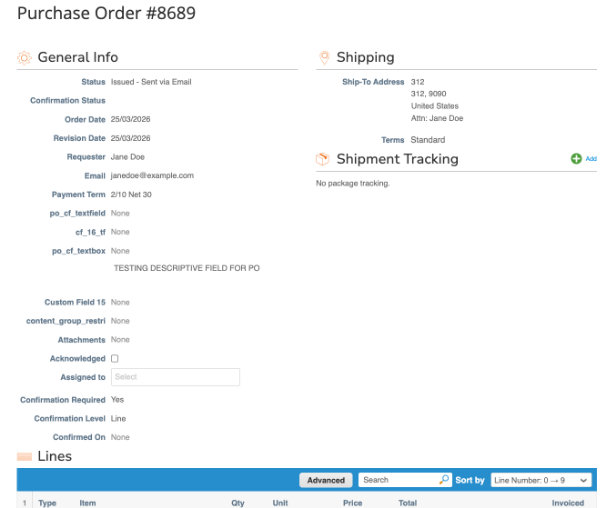
A purchase order goes to a supplier who neither logs in to the portal nor presses the buttons in the PO email. The ship date and a revised unit price come back as a reply to the buyer, who types them in, or forgets to.
Accounts payable meets the result when the invoice arrives. The invoice sits at Pending Receipt because nobody entered the delivery, although the pallet arrived on Tuesday, or lands on Tolerance Hold because the price moved by more than the company allows without approval. A week later the supplier emails to ask why it has not been paid, and the AP specialist spends the morning working out who ordered it and whether it came.
Requests begin outside Coupa too. A spare part drops below its reorder point in the maintenance system, and a team keeps its wish list on a shared spreadsheet until somebody turns it into requisitions.
Coupa reminds and escalates approvers on a schedule
In its approval settings, Coupa emails each approver a reminder every set number of hours, or on its benchmark of a third of the average cycle time. It can also escalate past an approver who sits on a requisition, PO or invoice longer than the cycle time, though never past the final approver.
On invoices, two-way and three-way matching compare each line with the PO and the receipt, and an invoice enters an approval chain only when it breaks a tolerance, fails the matching rules or meets a supplier setting that requires approval. Supplier Actionable Notifications let a supplier acknowledge a PO, or invoice from it, without a portal account. Intake & Orchestration accepts requests from Slack, Teams, email or forms and routes each to the right approvers; it is built on Tonkean, which has since joined Coupa.
A supplier who replies to the buyer's own email has acknowledged nothing in Coupa, and the ship date sits in the buyer's inbox. The proof that a delivery came is on a carrier's tracking page or the dock's paperwork, and the invoice waits at Pending Receipt until the requester enters the receipt. A part's reorder point sits in the maintenance system, where a planner has to notice it.
Pending Receipt invoices that come with their proof of delivery
For the buyer, every PO past its acknowledgement deadline could arrive matched to the supplier's last email, with the ship date or revised price ready to enter, or with a polite chaser in Gmail drafts where the supplier has said nothing.
An AP specialist could see each invoice at Pending Receipt with the carrier's proof of delivery attached, while the requester gets a note naming the PO and asking them to receive it in Coupa so the match runs. An invoice on Tolerance Hold could come with the email in which the buyer agreed the new price.
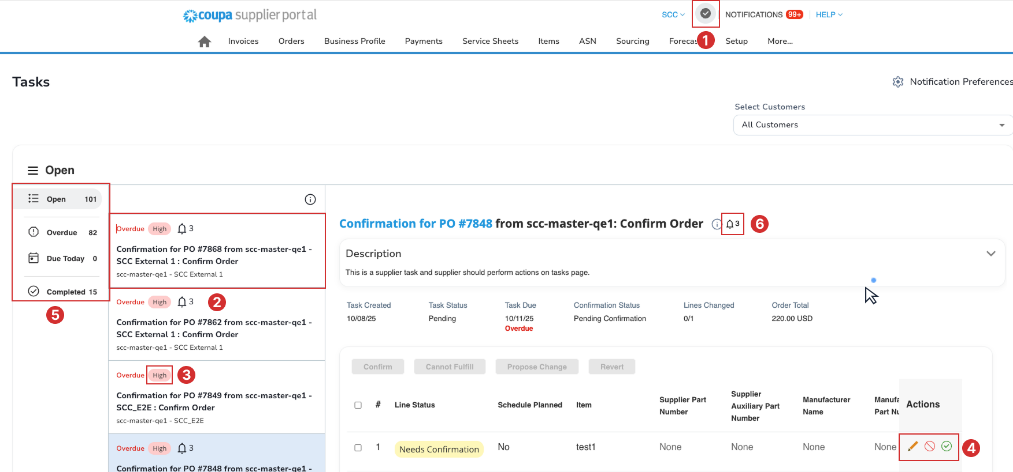
A planner could check and submit requisitions drafted from the maintenance system's reorder points, and a team lead could send one requisition per supplier instead of a dozen from that spreadsheet. For an approver whose queue outlasts Coupa's reminders, the procurement lead could put a twenty-minute clearing slot in their Google Calendar.
A planner submits every requisition WebRun prepares in Coupa
Matching open POs to the buyer's inbox, and Pending Receipt invoices to carrier tracking pages, means reading Coupa and several outside sites every morning. WebRun is an AI agent that works a real Chrome browser, and your Coupa administrator sets up the user it works under.
A requisition it prepares is left unsubmitted for the planner to check, and the buyer decides which supplier chasers go out. Give its user no approval limit and leave it out of every approval chain, so only the people in Coupa's chains can approve.
A buyer with a long list of open POs gets the most from the confirmation chaser, which checks each one past its deadline and leaves a chaser in Gmail. The contract renewal countdown reads the contract list every Monday.
Questions people ask
Should we switch on Coupa's approval reminders first?
Yes. Under Setup, Company Information, Approvals, Coupa can email approvers every set number of hours and escalate past one who waits longer than the cycle time, never past the final approver. With those on, the agent has little to add to the approval queue and more to add on purchase orders, receipts and supplier replies.
Will requisitions it prepares go straight to approval?
No. They stay unsubmitted until a planner checks and submits them, and its Coupa user should carry no approval limit and sit in no approval chain.
Can suppliers on the Coupa Supplier Portal use it?
Yes. The portal is free for suppliers and shows each customer's purchase orders and invoice statuses, and the agent can check for new POs each morning, flag invoices at Tolerance Hold or Pending Receipt, and prepare invoices from POs as drafts for your accounts receivable clerk to submit.
Where does Intake & Orchestration stop and the agent start?
At the channel. Intake & Orchestration takes requests from Slack, Teams, email or forms and routes them to approvers in Coupa. The agent covers requests that start somewhere else, such as a maintenance system's reorder screen, and the purchase orders and invoices that follow approval.
Sources
- AI-Native Total Spend Management Software | Coupa Coupa's product areas from sourcing to payments, and its Coupa Navi agents, including a supplier assistance agent for the Coupa Supplier Portal.
- Procurement Software | Coupa Describes email and mobile approvals with requisition status visible to everyone in the approval chain, budget meters, contracted pricing at the time of purchase, and suppliers confirming availability by order line.
- AI-Powered Accounts Payable Automation Software | Coupa Covers AI-powered OCR on invoices, two-way and three-way matching, touchless processing for invoices within tolerance, and integrations with SAP, Oracle, NetSuite and Microsoft Dynamics.
- Contract Lifecycle Management Software | Coupa Describes automated contract milestone alerts and dashboards for tracking important contract dates.
- Approvals | Coupa Coupa's approval configuration guide: management hierarchy and custom approval chains, email reminders to approvers every set number of hours or on Coupa's benchmark, automatic escalation that never passes the final approver, and invoice approval chains triggered only by tolerance, supplier settings or unmet matching.
- Supplier Actionable Notifications (SAN) | Coupa Compass States that suppliers can acknowledge, invoice from or comment on a PO directly from the notification email, without a Coupa Supplier Portal account.
- Invoices FAQ | Coupa Compass Defines the Tolerance Hold and Pending Receipt invoice statuses and describes draft invoices in the supplier portal.
- Getting Started with the Coupa Supplier Portal | Coupa Compass Describes the Coupa Supplier Portal as a free tool for suppliers to view purchase orders, send invoices and check the status of transactions with each customer.
- Coupa Intake Orchestration | Tonkean Describes intake that can start from Slack, Teams, email or forms and routes requests to the right approvers in Coupa.
- Coupa acquires Tonkean | Tonkean Announces that Tonkean is joining Coupa, bringing its intake and orchestration to Coupa's platform.
5 ready-made Coupa workflows
Each one names the apps it touches and the exact steps it takes. Open one to read what it will do, then turn it on.




Want one of these running on your own Coupa?
Show WebRun the process once and it will run it on schedule, in your own private browser environment.