How to Automate Cloud9 Ortho
Cloud 9 runs its new patient protocol reminders, text and email appointment reminders, auto-pay and receipts on its own. Staff still read orthodontic benefits on payer portals and aligner plans on the manufacturer's doctor site, and write each personal follow-up to pending consults and recall lists. An AI agent such as WebRun can check those sites and draft the follow-ups.
 Written by
Nora Whitfield
Editorial lead
Written by
Nora Whitfield
Editorial lead
 Reviewed by
Priya Raghavan
Solutions lead
Reviewed by
Priya Raghavan
Solutions lead
Cloud 9 follows an ortho patient from the first phone call to the retainer check
Cloud 9 is the orthodontic practice management system many practices still call Cloud9 Ortho, and it now belongs to Planet DDS, the company behind Denticon. It is fully cloud-based, sold to orthodontic practices, groups and OSOs, and pediatric practices use it as well.
In an ortho office it holds the new patient pipeline, the adjustment schedule, the treatment contract and its payment plan, the insurance claims and the texts to families. The treatment coordinator watches consults turn into starts. The front desk keeps the chairs full, the financial coordinator sets up down payments and auto-pay, and the doctor checks a patient's standing before walking into the bay.
Many patients are teenagers, so the texts often go to a parent and the payments come from a responsible party with a card on file.
Pending consults go cold while the coordinator is in the next consult
The new patient pipeline in Cloud 9 holds families who came in for a consult, liked what they heard and never signed. Each one deserves a call that mentions what was discussed, such as the phase one plan or the payment option the parent asked about. The coordinator makes those calls between new consults, so the oldest ones are the first to go cold.
The recall lists sit beside it. Children on observation, too young to start, are due back in six months; patients who missed an adjustment have nothing booked; debonded patients are due a retainer check. For next week's consults, the financial coordinator opens each payer's portal to read the orthodontic lifetime maximum and how much of it is already used.
The rest waits for a quiet hour. An update to each referring dentist on their patients' starts takes an afternoon to put together. The best moment to ask for a review is the day the braces come off, and on a busy debond day it is the first thing forgotten.
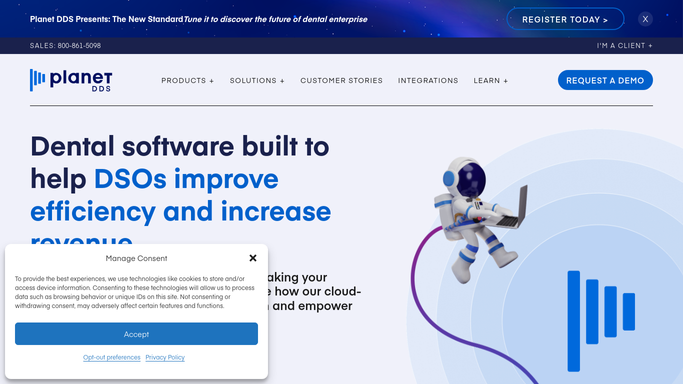
Auto-pay, reminders and the claims queue all run inside Cloud 9
The new patient protocol in Cloud 9 can be customized with automatic reminders for phone calls, letters and emails at each step, and the emails can go straight out of Cloud 9. Text and email appointment reminders carry links to digital forms and the patient portal.
The Financial Arrangements tool sets the fee schedule, insurance benefits and down payment, and puts the account on auto-pay with a primary and a secondary payment method. The Automation Suite then runs the pending payments and posts an NSF fee when an ACH payment comes back. Rejected claims sit in the claims queue until staff correct them for resubmission.
Staff add the insurance benefits to a financial arrangement themselves, from whatever the payer's portal showed when someone last looked. An Invisalign case's ClinCheck plan waits for the doctor's approval on the Invisalign Doctor Site. And the protocol reminder tells the coordinator which family to call; the call itself, with that family's questions in mind, is still the coordinator's to make.
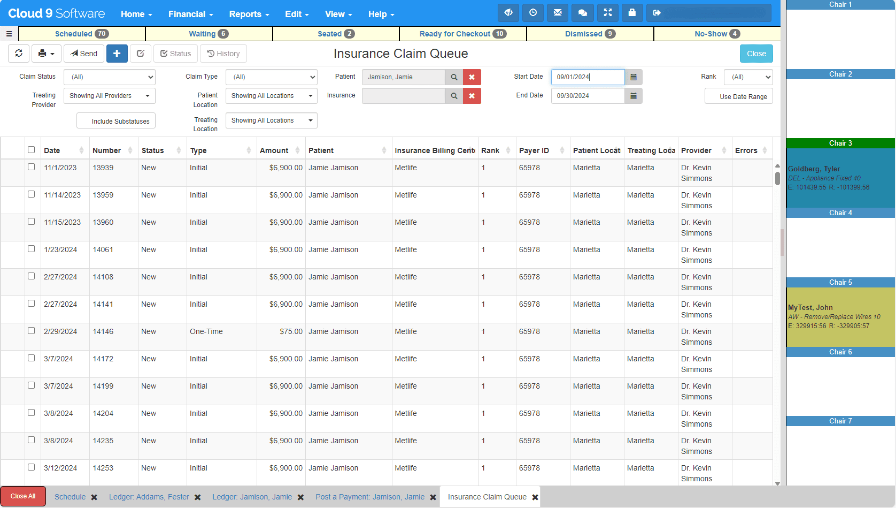
Each pending consult gets a follow-up written from its consult notes
For every recent consult with no signed contract, the treatment coordinator edits and sends a draft written from the consult notes that names what that family asked about: the aligner option, the payment plan, the second opinion.
Before tomorrow's financial presentations, the financial coordinator has each consult's orthodontic benefit from the payer's portal: the lifetime maximum, what has been used and any age limit.
The doctor opens the Invisalign Doctor Site already knowing which ClinCheck plans are waiting for approval and which of those patients are booked this week.
The front desk reviews a drafted recall text for each family, whether an observation patient is due back, an adjustment was missed with nothing booked, or a retainer check is due. A review request for each debond is ready the same evening, and once a month the doctor signs an update to each referring dentist.
The coordinator and the front desk send every message to a family
What the coordinator would read for each of those drafts is spread over Cloud 9, the payer portals and the Invisalign Doctor Site. WebRun is an AI agent that works a real Chrome browser, signed in as you. The practice gives the agent a separate login on each of those sites; it reads them and writes the drafts.
The treatment coordinator sends each consult follow-up and the front desk each recall text, so a family never hears from the agent directly. Referring-dentist updates wait for the doctor's signature. Once the agent's typing in Cloud 9 is disabled, only the financial coordinator and the doctor change a financial arrangement or a treatment plan.
Each Cloud 9 workflow below names the message it drafts and the person who approves it.
Questions people ask
Is Cloud 9 the same software as Cloud9 Ortho?
Yes. Cloud9 Ortho is the name many practices knew it by; the product is now called Cloud 9 and sold by Planet DDS, which acquired Cloud 9 Software and also makes Denticon. The workflows here work with it under either name.
Which aligner sites can it read?
Any doctor site your staff already sign in to, such as the Invisalign Doctor Site, where each patient's ClinCheck plan is listed. The doctor hears which plans are still waiting for approval. Approving a plan, which starts manufacturing, stays with the doctor.
Can it fill in the insurance benefits on a financial arrangement?
Only if the practice lets it type in Cloud 9. Otherwise the financial coordinator enters the lifetime maximum and the amount used from a note left beside the consult.
Sources
- Cloud 9: Orthodontic Cloud-Based Practice Management Software | Planet DDS Vendor page describing Cloud 9 as fully cloud-based for orthodontic practices, groups and OSOs, with new patient protocol reminders for calls, letters and emails, text and email reminders linking to digital forms and the patient portal, the Financial Arrangements tool (fee schedule, insurance benefits, down payments, auto-pay with primary and secondary methods), the claims queue, and the Automation Suite that processes payments, sends receipts and posts NSF fees.
- Planet DDS Announces Its Acquisition of Cloud 9 Planet DDS's own announcement that it acquired Cloud 9 Software to serve orthodontic and pediatric practices, alongside its Denticon practice management platform.
- ClinCheck | Invisalign Provider Align's provider page: doctors open a patient's ClinCheck plan on the Invisalign Doctor Site and approve it there, and approval starts manufacturing of the aligners.
7 ready-made Cloud9 Ortho workflows
Each one names the apps it touches and the exact steps it takes. Open one to read what it will do, then turn it on.


Want one of these running on your own Cloud9 Ortho?
Show WebRun the process once and it will run it on schedule, in your own private browser environment.