How to Automate ChamberMaster
Welcome notes, ribbon cutting dates, calls to quiet members before renewal and the monthly board report are what a chamber automates around ChamberMaster, because batch invoices, renewal reminders and online payments run inside it already. WebRun, an AI agent, drafts them weekly from ChamberMaster for staff to send.
 Written by
Priya Raghavan
Solutions lead
Written by
Priya Raghavan
Solutions lead
 Reviewed by
Julian Adeniyi
Retail operations
Reviewed by
Julian Adeniyi
Retail operations
ChamberMaster feeds a chamber's website directory from its member roll
When a member business edits its listing in ChamberMaster's Member Information Center, the chamber's website directory shows the change at once. ChamberMaster is GrowthZone's membership software built for chambers of commerce, and in a chamber with two staff and a volunteer board it holds the roll of local businesses that pay dues each year.
Each listing in that directory carries the member's business categories, Hot Deals and job postings, and a member with several locations can list each one.
Dues, event registrations and sponsorships all sit on each member's record. Staff build events such as the monthly mixer in ChamberMaster, and members register and pay online. Before a board meeting, the executive director reads renewals and non-dues revenue there rather than in three separate files.
Each new member starts a chain of welcome calls and ribbon cuttings
A new member means a welcome email from the membership director, then a ribbon cutting on the chamber's shared calendar, booked around the owner, the ambassadors and whoever from city hall likes to attend. The business also needs a line in the next newsletter. After each monthly mixer, the membership director thanks the host business and writes to the guests who came without being members, if there is time before the next event.
Renewals add calls of their own. Before the reminder goes out, the executive director would like to call the members who have not been to a single event this year, and each call starts with opening that member's record. Members who lapsed last year sit in the roll with nobody assigned to ask them back.
Each month the executive director pulls renewals, new members and event income into a report for the board, copying the figures from ChamberMaster into the treasurer's spreadsheet and formatting them again.
ChamberMaster bills dues in batches by renewal month
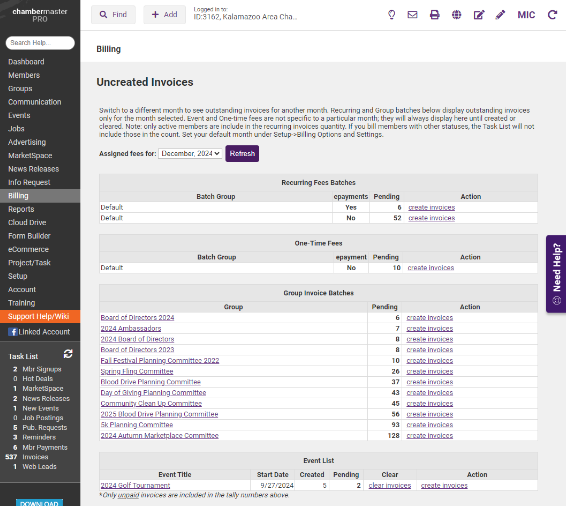
ChamberMaster builds recurring dues invoices in batches from each member's fee item and renewal month, and staff run the batch when that month comes round. Automatic renewal reminders and online payments come with billing, and the financial reports show sales, past-due payments and cash flow at a glance.
Events take registration and payment and handle mobile check-in at the door. The Member Engagement (At Risk) report scores every member on events attended and sponsored, Hot Jobs, Deals, referrals, logins and past dues over a chosen date range, with weights the chamber can adjust, and the lowest totals mark the members most likely to drop. SmartMail sends email campaigns and syncs with Outlook or Gmail, and staff track each sponsorship package through fulfillment and report its return to the sponsor.
The At Risk and past-due reports wait in ChamberMaster's Reports module until a staff member runs them, and the calls and notes that follow, to quiet members before renewal and to last year's lapsed members, fall to staff. Much of a chamber's week also happens outside ChamberMaster: the shared calendar where ribbon cuttings are booked, the city's list of newly licensed businesses, the spreadsheet the treasurer prefers.
New ChamberMaster members get ribbon cutting dates the day after they join
A welcome in the chamber's voice and an email offering the owner two or three ribbon cutting dates, each already held tentatively on the shared calendar, go to the membership director for approval the day after a business joins. Once the owner picks a date, the paragraph announcing the ribbon cutting is ready for the next newsletter.
A month before renewals, the executive director calls the members among next month's renewals that the At Risk report scores lowest, knowing the level each one joined at and the last event each came to before dialing. The membership director reads a short note to each member who lapsed last year, asking them back, and sends the ones that sound right.
Each week the ambassadors receive the city's newly licensed businesses that are not yet on the member roll, and the guests who registered for last Thursday's mixer without being members, with the business name each one gave. On the first Monday of the month, the treasurer opens the board spreadsheet with last month's figures already in it, laid out the way the board likes it.

Chamber staff approve every message a member receives
Monday's reading takes in ChamberMaster's new members, next month's renewals and the event registrations, then the shared calendar and the city's license page. WebRun is an AI agent that works a real Chrome browser, signed in as you. The chamber gives it a ChamberMaster staff login for the welcome, ribbon cutting and renewal jobs.
The membership director sends each welcome and win-back note from the chamber's own email. Ribbon cutting holds stay tentative until the owner picks a date and staff confirm it. Invoices and directory listings are off limits to the agent: they belong to billing staff and to the members themselves.
Questions people ask
Does this duplicate ChamberMaster's renewal reminders?
No. Keep the reminders and invoice batches running as they are. The personal notes go to the members who need more than a reminder, the ones who have gone quiet or lapsed last year, and staff send them.
Is GrowthZone AMS the same product as ChamberMaster?
No. GrowthZone sells ChamberMaster for chambers of commerce, GrowthZone AMS for mid-sized associations and MemberSuite for enterprise organizations, each with its own screens. A chamber moving to GrowthZone AMS needs the agent's steps matched to the new screens before they run.
Will the agent see members' stored card details?
No. The renewal calls and the board figures need renewal and invoice status, not card numbers, so its ChamberMaster work stays on member and invoice records and never opens a stored card.
Sources
- ChamberMaster | Chamber Management Software by GrowthZone GrowthZone's page for ChamberMaster, sold alongside MemberSuite AMS and GrowthZone AMS: automated invoicing, renewal reminders and online payments; directory profiles with business categories, Hot Deals, job postings and multi-location listings; member profile changes that appear instantly on the website; events with mobile check-in; SmartMail; sponsorship fulfillment tracking; and financial reports for sales, past-due payments and cash flow.
- Create Recurring Member Invoices ChamberMaster help centre: recurring member invoices are generated in batches from each member's fee item and renewal month, and staff run those batches monthly, quarterly or annually.
- Update Company Information via the MIC For Your Members ChamberMaster help centre: members sign in to the Member Information Center to update contact and billing details, directory information, employees and business categories.
- Member Engagement (At Risk) ChamberMaster help centre: the report weighs engagement factors (events attended and sponsored, Hot Jobs, Deals, referrals, logins, past dues) over a chosen date range, with weights the chamber can adjust; the lower a member's Factor Total, the higher the risk of the member dropping.
8 ready-made ChamberMaster workflows
Each one names the apps it touches and the exact steps it takes. Open one to read what it will do, then turn it on.




Want one of these running on your own ChamberMaster?
Show WebRun the process once and it will run it on schedule, in your own private browser environment.