How to Automate Caterease
Caterease's Kitchen Display shows the kitchen each day's items and recent changes, and Horizon Hub reports can reach the team on a schedule. For chasing estimated counts and unpaid deposits, drafting rental orders and posting BEO and allergen notes to Slack and Google Sheets, use an AI agent such as WebRun, which leaves every email as a Gmail draft.
 Written by
Aiko Tanabe
Product researcher
Written by
Aiko Tanabe
Product researcher
 Reviewed by
Owen Hartley
Workflow engineer
Reviewed by
Owen Hartley
Workflow engineer
One booked event in Caterease prints for the client and the kitchen
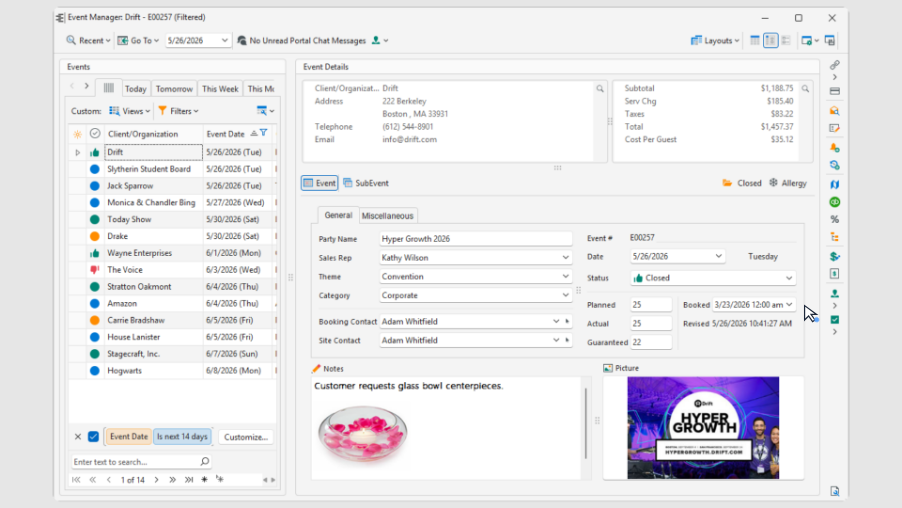
Caterease, also written CaterEase, is booking and event software for off-site caterers and full-service venues, and for the catering teams of hotels, hospitals and universities. Offices run it as Caterease Desktop on their own computers, or log in to Caterease Connect, the hosted version, through Azure or Citrix. Every plan also includes the Horizon Hub, which has a web sign-in of its own to the same live data.
A salesperson books each event through a wizard set up for that kind of event, so a plated wedding and a boxed-lunch drop-off ask for different details. The menu comes from the item library. On the Standard and Professional plans each item carries a recipe and a packing list, and Caterease compiles and quantifies both as the menu grows. The finished event prints for each reader: the proposal and contract for the client, the BEO and back-of-house sheets for the kitchen and the event staff.
The catering office spends Thursday chasing counts and deposits
Much of the office's week goes on what clients have not sent yet. A wedding twelve days out still shows the estimated 150 from the proposal, and the chef orders on the final number. The salesperson writes to that couple, then to the family planning a bar mitzvah, then to the company that booked lunch for about 40. Over the weekend two deposits passed their scheduled dates, and each client needs an email with the amount and how to pay.
The sous chef opens every BEO for the coming three days and copies every nut allergy and gluten-free request onto one sheet for the line. The catering manager reads the tables, linens, chafing dishes and AV off the week's BEOs and types them into a single order for the rental company, by delivery date. When a count changes on Thursday, the copy on the kitchen clipboard is wrong until someone prints the BEO again.
Caterease reminds the office and shows the kitchen what changed
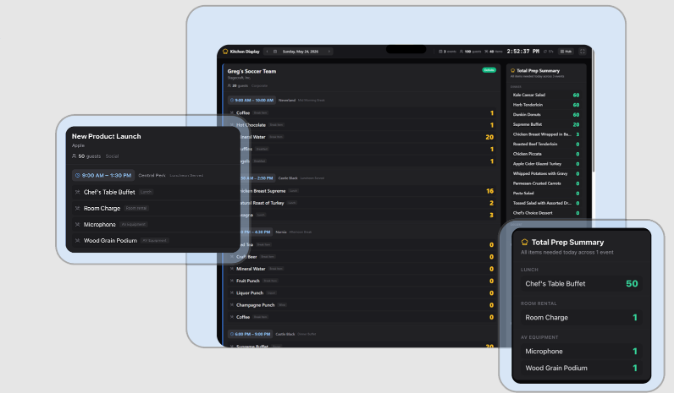
The Horizon Hub's Kitchen Display lists every item the day's events need and highlights recent changes, so a revised count stands out on the kitchen's screen. Event Portals show staff any event's full details from anywhere, the office can schedule a custom report to reach the team automatically, and Cai, the Hub's AI assistant, fields questions about the business from whoever asks.
In the office, Task Management puts pop-up reminders, history notes and checklists on an event. Mosaic takes the payments: a payment link set to Deposits Due bills the event's past-due deposits, and with Send Automatic Email ticked, the link goes to the client the moment the coordinator clicks OK. On Professional, merge emails go out in batch.
Those office tools start from a person with an event open. A pop-up reminder prompts the salesperson to call, and a payment link leaves when the coordinator makes it. The captains talk in a Slack channel, the sous chef keeps the allergen list in Google Sheets, and the rental company takes its orders by email. A BEO's details reach each of those places when a coordinator puts them there, event by event.
The kitchen's Slack channel carries the next three days of BEOs
The salesperson opens Gmail to a draft for every event in the next fourteen days that is still on an estimated count, each addressed to the client with the event date, the venue and a deadline set by the kitchen's prep window. A Slack post lists the same events nearest first, each linked to its draft. The coordinator has the same for unpaid deposits on confirmed bookings: a draft per client naming the amount and the deadline, and a Slack list of how many days each one is overdue.
In the kitchen's Slack channel, the head chef reads a summary of each finalised BEO for the next three days, tagged to acknowledge it, while the captains have the setup and service notes in the event staff's channel and a row per event on the shared run sheet, a Google Sheet. For the line, the sous chef opens an allergen sheet already filled in for the next 72 hours, with the number of guests on each diet and nuts and shellfish in red.
The catering manager reviews one draft order to the rental company for the coming week's events whose BEOs list tables, linens, serving equipment or AV with no supplier confirmation noted, grouped by delivery date with each venue's address.
WebRun works from the Horizon Hub and leaves client emails in Gmail
The daily pass through the Caterease calendar, two weeks out for counts and three days out for BEOs, is what WebRun takes over. WebRun is an AI agent that works a real Chrome browser, signed in as you. In Caterease it uses the Horizon Hub, the web sign-in every plan includes, and its results go to Gmail drafts, the Slack channels you name and your Google Sheets.
The salesperson and the coordinator send count and deposit emails from their own drafts, and the catering manager sends the rental order. In Caterease the agent opens events and BEOs and changes none of them.
The kitchen's two jobs are set to run at seven and the office's three at eight, each a separate workflow the office can switch on alone.
Questions people ask
Does this work if we run Caterease Desktop on our own server?
It works through the Horizon Hub, whose web login comes with every Caterease plan and opens the same live events. The server and the computers running Desktop need nothing installed.
Which BEOs go to the kitchen's Slack channel?
Finalised ones, for events within three days. Each summary carries the venue, the confirmed count, the menu and the service notes, and tags the head chef or event lead to acknowledge it. A BEO not yet marked finalised is left out of the post until it is.
Can it send the deposit request with a Mosaic payment link?
It drafts the request, and the coordinator sends it. The email names the amount and the deadline and includes the payment link or instructions your office already uses. The agent makes no Mosaic link and charges no tokenized card.
Will a dietary request that came in by email reach the allergen sheet?
Once someone types it into the event. The sheet reads the allergy and diet notes on each BEO in the next 72 hours, lists every requirement, such as nut-free, gluten-free, vegan or halal, with the number of guests for each, and marks nuts and shellfish in red.
Sources
- Features | Caterease Caterease's own feature list: event booking wizards, recipes and packing lists compiled and quantified automatically, shift conflict tracking, pop-up reminders and checklists, and the Horizon Hub's Event Portals, scheduled reports, Kitchen Display and Sign & Send.
- Pricing | Caterease Plan contents, including automatic equipment packing lists on Standard, batch merge emails on Professional, and Mosaic Payment Processing and the Horizon Hub on every plan.
- Caterease | Advanced Catering & Event Management Software Introduces Cai, the AI assistant in the Horizon Hub, and Mosaic payment processing with payment requests, shareable payment links and tokenized cards.
- Resources - Caterease Support Caterease's help centre, listing requirements for Caterease Desktop and setup guides for the hosted Caterease Connect, including Citrix and Azure login instructions.
- Login | Caterease Caterease's login page, with the customer login for Caterease Connect and a separate web sign-in for the Horizon Hub.
- Creating and Sending Payment Links - Mosaic Support How a Mosaic payment link is made from Caterease: the Deposits Due amount for scheduled deposits past their dates, and the Send Automatic Email box that sends the link as soon as the user clicks OK.
5 ready-made Caterease workflows
Each one names the apps it touches and the exact steps it takes. Open one to read what it will do, then turn it on.


Want one of these running on your own Caterease?
Show WebRun the process once and it will run it on schedule, in your own private browser environment.