How to Automate Amplitude
Joining each account's usage to its renewal date, last invoice and open tickets is what a customer success team needs from Amplitude. Custom Agents, dashboard subscriptions and anomaly digests run the checks inside Amplitude and the tools it connects to; for systems with no connector, an AI agent such as WebRun reads them in a browser.
 Written by
Owen Hartley
Workflow engineer
Written by
Owen Hartley
Workflow engineer
 Reviewed by
Rosa Lindqvist
Operations editor
Reviewed by
Rosa Lindqvist
Operations editor
Usage by account turns Amplitude into a customer success tool
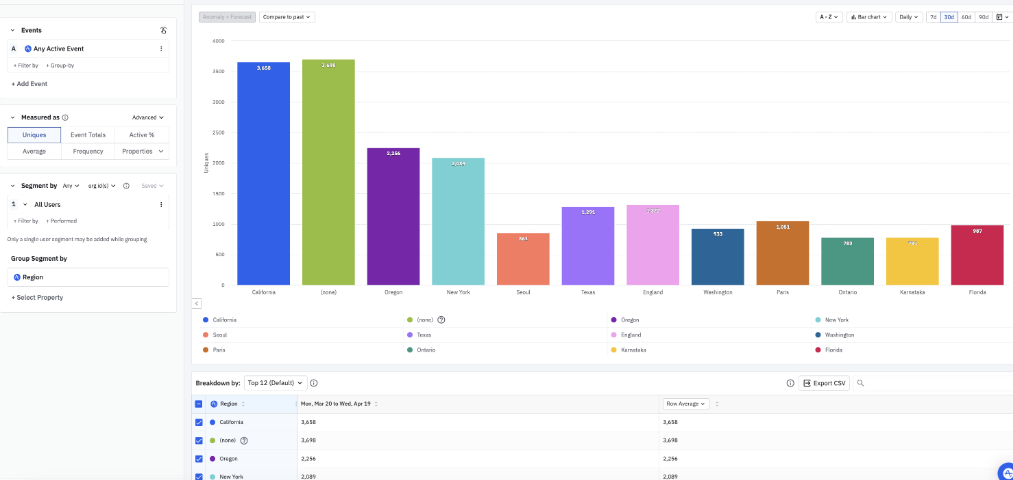
With the Accounts package, sold on the Growth and Enterprise plans, Amplitude counts usage by customer company instead of by person: how many people at one account logged in this week, whether its admins still build reports, which features a new team adopted after onboarding. Account properties such as plan type or account manager describe each company as a whole.
Underneath, every event from the web or mobile app becomes charts, cohorts and dashboards, with Session Replay, Heatmaps, experiments and in-product Guides and Surveys in the same product. Product managers use it for funnels and experiments.
The account view belongs to customer success: the CSM with a book of sixty accounts, and the head of customer success who wants the at-risk ones on one page every Monday.
The usage drop is in Amplitude, and the renewal date is in the CRM
Weekly active users at one customer have fallen by a third over a month. Before the CSM can call it a risk, she opens the CRM for the renewal date and contract value, the billing portal for the status of the last invoice, and the support queue for open tickets from the same company.
Some drops are a customer's quiet season and some a champion who left, and telling them apart means reading that account's recent tickets and emails. By Monday afternoon the head of customer success has an at-risk list, built in a spreadsheet from four tabs per customer.
Quarterly business reviews repeat it in more detail: usage charts screenshotted from Amplitude, seat counts from billing, the ticket history from the help desk, all pasted into a deck the evening before.
Amplitude's own agents reach the tools that have a connector
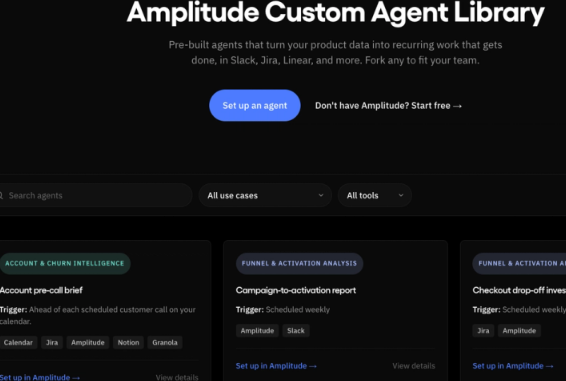
Custom Agents, generally available on every plan, run by themselves at times the team sets, with their own instructions, and a churn-monitoring template is among the starting points. They and Global Agent read Amplitude alongside connected tools: Jira and Confluence, GitHub, Granola, Linear, Notion, Sentry and Slack, plus custom connectors an admin adds for any tool with an MCP server.
Data can come in as well. The Salesforce integration writes account properties such as renewal date into Amplitude, the Stripe source imports revenue events once a webhook is configured, and AI Feedback turns tickets from Zendesk, Intercom or Freshdesk, Gong calls and app reviews into feedback events.
Dashboard subscriptions send a dashboard's first eight charts by email or Slack on every plan, and Anomaly + Forecast, on Growth and Enterprise, emails a digest of a project's unusual moves. Scheduled cohort syncs to HubSpot and other destinations need Growth or Enterprise; Free and Plus get one-time syncs.
A team whose renewals sit in Salesforce and whose billing runs on Stripe should try that route first. Amplitude's HubSpot source brings in email campaign events, not deals, and a billing tool with no source or connector, or a contract kept as a PDF, gets opened by the CSM account by account.
The at-risk list ranks accounts by days to renewal
Accounts whose active users fell week on week go onto one list, each with its renewal date and contract value from the CRM, the last invoice from the billing portal and the open tickets from the help desk, ranked by days to renewal. The head of customer success runs Monday's meeting from it, and each account's owner edits a note drafted in the CRM with the Amplitude chart linked.
The day before each quarterly business review, the CSM edits a pack laid into the team's deck template: the account's usage charts from Amplitude, seat count from billing and ticket history from the help desk.
Expansion signals work the other way. The account executive sees accounts whose active users are close to the seats they pay for, with both numbers next to each other and the date the contract next comes up, early enough to talk about more seats before the renewal quote goes out.
The account round leaves Amplitude for the CRM, billing and the help desk
A CSM with sixty accounts makes two hundred and forty page visits before the Monday meeting: Amplitude, the CRM, the billing portal and the help desk for each one. WebRun is an AI agent that works a real Chrome browser, signed in as you. Amplitude itself needs to grant it nothing beyond the Viewer role new users get by default.
Customers never see its output: the list goes to the head of customer success, the notes sit in the CRM for each account's owner, and the CSM decides which customers get a call.
Of the Amplitude workflows here, the usage decline alert is the one built for customer success, with the owner and renewal date checked in HubSpot before the ranked list goes to Slack.
Questions people ask
Can we see usage by account without the Accounts package?
Only user by user. Account-level reporting needs the Accounts package, available on Growth and Enterprise. Without it, the weekly check runs on user-level charts and cohorts, grouped into companies by a user property or email domain.
Does Amplitude's HubSpot source bring renewal dates in?
No. It imports events from HubSpot email campaigns, not deals or companies, so a renewal date kept on a HubSpot deal stays in HubSpot, where the agent reads it. Salesforce works differently: its integration can write account properties such as renewal date into Amplitude.
What can a Viewer login change in Amplitude?
Only its own undiscoverable charts, dashboards and cohorts. Viewer is the role Amplitude gives new users by default, and it cannot save anything the rest of the organization can find, so shared dashboards and cohorts are untouched.
Will the QBR figures go into our own deck template?
Yes: usage charts from Amplitude, seat count from billing and ticket history from the help desk go into your own template. The CSM writes the story around them and presents it.
Sources
- MCP Connectors for Global Agent | Amplitude Docs Lists the Atlassian, GitHub, Granola, Linear, Notion, Sentry and Slack connectors for Global Agent, and custom connectors for other tools with an MCP server.
- Account-level reporting in Amplitude | Amplitude Docs Explains group-level reporting by account, group properties such as renewal date set through the Group Identify API or the Salesforce integration, and that the Accounts add-on is available for certain tiers.
- Anomaly + Forecast: Find anomalies in your data | Amplitude Docs States that Anomaly + Forecast is on the Growth and Enterprise plans and describes the automated project alert digest.
- Subscribe to a dashboard | Amplitude Docs Describes scheduled dashboard subscriptions by email or Slack on every plan, carrying images of the first eight charts.
- Amplitude pricing Accounts (Group) available for Growth and Enterprise; scheduled syncs not included on Free and Plus; dashboard subscriptions on every plan.
- Custom Agents | Amplitude Changelog Custom Agents are generally available on all plans, run on a schedule, connect to Jira, Linear, Slack, Granola and Sentry, and include a churn-monitoring template.
- Stripe | Amplitude Docs Imports revenue events from Stripe once a webhook is configured, and only events after that point.
- HubSpot (source) | Amplitude Docs The HubSpot source sends events generated by HubSpot email campaigns to Amplitude.
- User roles and permissions | Amplitude Docs New users get the Viewer role by default; Viewers can create undiscoverable charts, dashboards and cohorts only.
3 ready-made Amplitude workflows
Each one names the apps it touches and the exact steps it takes. Open one to read what it will do, then turn it on.


Want one of these running on your own Amplitude?
Show WebRun the process once and it will run it on schedule, in your own private browser environment.