How to Automate Aesthetic Record
Aesthetic Record sends reminders, care instructions after checkout, surveys and membership decline notices by itself. Automating the rest means catching what those rules miss each day: visits never checked out, charts waiting on the medical director, abandoned bookings and open icons on tomorrow's cards. An AI agent such as WebRun can read those screens and list them for staff.
 Written by
Marta Ellison
Automation strategist
Written by
Marta Ellison
Automation strategist
 Reviewed by
Dimitri Vasilev
Logistics analyst
Reviewed by
Dimitri Vasilev
Logistics analyst
Aesthetic Record charts the units on a face map and checks the patient out
An injector finishing a neurotoxin appointment charts the units on a face map, takes the after photos and checks the patient out, all without leaving Aesthetic Record. It is EMR and practice management software built for aesthetic and wellness practices, from a solo injector's studio to groups with several locations, and patients book online and sign their consents before they arrive.
The schedule holds the rooms and lasers along with the cancellation policy and deposits. Memberships bill every month, and the patient wallet keeps banked treatments and credits. Providers sign charts and pass them to the medical director in the same system, and from the appointment card a receptionist can request a good faith exam through Qualiphy.
Essentials costs $15 per user a month and covers charting, photos, reminders, memberships and the wallet. Accelerator, at $19, adds two-way texting and the Leads tab for online bookings that were started and never finished.
A skipped checkout leaves a patient without aftercare instructions
An appointment that was never checked out leaves the patient without their post-treatment email. A chart signed by the injector sits in the medical director's room for a week. Someone started booking a lip filler consult online, verified their phone number, and never finished.
Tomorrow's schedule has loose ends of its own: a filler patient whose good faith exam has not come back, a first-timer with paperwork still incomplete, a two-hour laser block booked without a deposit. Each shows as an icon on the appointment card, visible to whoever opens that card. Yesterday's no-shows are waiting for a decision on the cancellation fee, charge or waive.
When a cancellation opens a slot, the waitlist holds the patients who asked for that provider and service, and someone at the front desk works down it by phone between check-ins.
Post-treatment instructions leave Aesthetic Record only after checkout
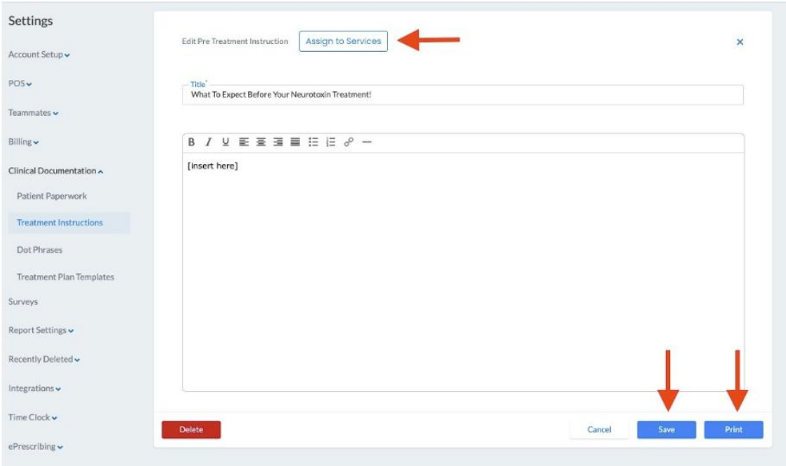
Pre-treatment instructions go by email, and into the patient portal, as soon as a service is booked. Post-treatment instructions follow by email once the appointment has gone through checkout and the procedure is linked to the service. Appointment reminders reach patients as texts or emails at times the practice sets. A survey attached to a service goes out at a chosen time after the visit and ends on a thank-you page with a Create Appointment button, and practices use it as an automatic prompt to rebook, asking a wrinkle relaxer patient whether the next visit is booked yet.
When a membership card declines, the patient gets an optional email and text, Aesthetic Record retries for two more days, and after the third failure the membership cancels. ChartSmart AI, a charting assistant, costs extra from $30 a month, and LeadAR, a CRM from $97 a month that connects on Accelerator, is sold the same way.
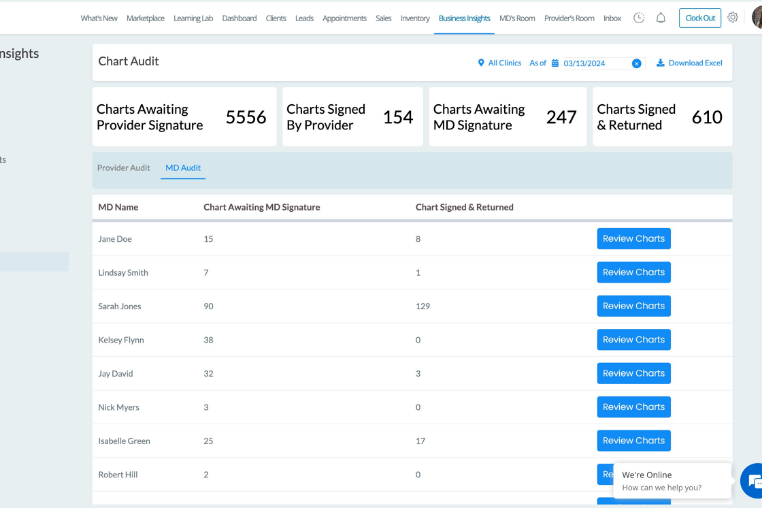
Each of those runs on an event Aesthetic Record recorded. A visit nobody checked out sends no aftercare, and staff send it by hand from the patient's procedure. The Chart Audit report in Business Insights rolls up chart statuses for every provider and medical director, for whoever opens it. Abandoned online bookings collect in the Leads tab, and the icons on tomorrow's cards show to whoever opens each card.
Pending good faith exams and missing deposits get a call the evening before
One message in the front-desk inbox names every card on tomorrow's calendar that still shows a pending good faith exam, incomplete paperwork or a long laser block without a deposit, and the calls happen that evening rather than at check-in.
Yesterday's visits that never reached checkout come to the front desk each morning with the patient and the service, and a receptionist sends the post-treatment instructions by hand from the procedure. The medical director signs from a list of charts waiting in the MD room, oldest first, taken from the Chart Audit report, and each provider clears their own unsigned charts from a matching list.
When a cancellation opens a slot, the front desk texts the waitlisted patients who asked for that provider and service, from drafts that name the open time. Abandoned bookings in the Leads tab each have a short text drafted for a receptionist to send, rewrite or skip.
Aesthetic Record's calendar and Chart Audit report are WebRun's daily reading
Tomorrow's cards, yesterday's checkouts and the chart rooms all need opening one by one, every day. WebRun is an AI agent that works a real Chrome browser, signed in as you. In Aesthetic Record it works as a separate user under Teammates, with only the privileges ticked for it, such as View Chart Audit.
Providers and the medical director sign the charts, staff charge or waive cancellation fees on the appointment card, and staff at the desk send every text to a patient.
The pre- and post-care workflow drafts each treatment's instructions from the appointment and queues them for staff to approve before anything reaches a patient.
Questions people ask
Are our rebooking surveys still worth sending?
Yes. A survey with a Create Appointment button reaches every patient after a service at no extra effort. WebRun's notes are for the patients that prompt did not move, written from their last service and how long ago it was.
Will it check out appointments that staff forgot?
No. Checkout takes the payment and closes the visit, so a receptionist does it. WebRun lists the visits still open each morning with the service, which is also how the missing aftercare gets sent.
We run three locations. Can the chart list come back per clinic?
Yes. The Chart Audit report filters to one clinic or all of them, so the list of charts waiting can come back per location or combined for the owner.
Is the Leads tab on our plan?
Only on Accelerator and Enterprise. On Essentials, online bookings that were started and never finished do not collect in a Leads tab, so the abandoned-booking follow-up needs Accelerator.
Sources
- Manage Pre and Post Treatment Instructions | Aesthetic Record Learning Hub Pre-treatment instructions send on booking and post-treatment instructions after the appointment ends, but only when the visit is checked out and the procedure is linked; they can also be sent by hand.
- Chart Audit Report for Provider & MD Rooms | Aesthetic Record Learning Hub The Chart Audit report in Business Insights shows chart statuses by provider and medical director, filters by clinic, and is granted through user privileges.
- Utilizing the Leads Tab to Manage Abandoned Bookings | Aesthetic Record Learning Hub Abandoned online bookings appear in the Leads tab once the phone number is verified, a feature of the AR Accelerator plan.
- Smart Scheduling | Aesthetic Record The appointment card shows deposit and cancellation policy icons, paperwork status and a good faith exam request through Qualiphy that turns green when complete.
- Pricing | Aesthetic Record Essentials at $15 per user a month and Accelerator at $19, which adds two-way texting, external leads and the LeadAR integration; Enterprise on request; LeadAR from $97 a month and ChartSmart AI from $30 a month as add-ons.
- Enroll, Edit, Cancel, or Put the Membership on Hold | Aesthetic Record Learning Hub A declined membership payment triggers an optional email and text to the patient, is retried for two more days, and after three failed attempts the membership is cancelled.
- Surveys: Sending out automated future service reminders | Aesthetic Record Learning Hub A survey attached to a service sends at a chosen time after the visit and can ask whether the next appointment is booked, ending on a thank-you page with a Create Appointment button.
4 ready-made Aesthetic Record workflows
Each one names the apps it touches and the exact steps it takes. Open one to read what it will do, then turn it on.


Want one of these running on your own Aesthetic Record?
Show WebRun the process once and it will run it on schedule, in your own private browser environment.