How to Automate SugarAI
Use SugarBPM (every Sugar Sell edition but Essentials) and Smart Guides for processes that start from a Sugar record, and Sugar Predict for alerts from ERP history. RFQs in customers' procurement portals and sell-through in distributors' portals are retyped into Sugar today, or opened as records by WebRun, an AI agent that reads those portals.
 Written by
Priya Raghavan
Solutions lead
Written by
Priya Raghavan
Solutions lead
 Reviewed by
Hannah Vogel
Finance operations
Reviewed by
Hannah Vogel
Finance operations
One Sugar account record holds the sale and the ERP history
An account manager at a distributor may look after hundreds of accounts buying from a catalogue of thousands of parts, and most of the selling is reorders, substitutions and quotes rather than new logos. SugarAI, called SugarCRM until April 2026, is a CRM for that kind of business: manufacturers, wholesalers and distributors with long buying cycles and deep customer relationships.
The product names stayed the same. Sugar Sell holds accounts, opportunities, quotes and forecasts; Sugar Serve covers customer service; Sugar Market runs campaigns; and Sugar Predict, formerly sales-i, reads sales history from the ERP, with more than 180 ERP integrations, for buying patterns and gaps.
Behind it there is usually a CRM administrator who configures the layouts, roles and processes, so inside sales, field reps and customer service work from the same account record. On Sugar Sell Premier and Enterprise+, Sugar Maps puts accounts on a map, with directions between them, for planning a week of visits.
Requests for quotation arrive in the customer's procurement portal
A large customer posts requests for quotation in its procurement portal, and the inside sales rep copies each one into Sugar as an opportunity, retyping part numbers and quantities. A manufacturer selling through distributors logs in to each distributor's portal to download sell-through figures, then pastes them onto the accounts they came from.
After a trade show, the marketing coordinator exports badge scans from the organiser's lead retrieval site and imports them by hand. The pricing manager checks the surcharge a supplier posts on its portal each month before the next quote goes out.
Order history needs none of this, because it syncs from the ERP. The account manager on the road opens an account in the mobile app, and the RFQ that customer posted this morning is not there until the rep has typed it in.
SugarBPM starts every process from a record already in Sugar
A SugarBPM process definition always starts from a record in its target module, created or changed. From there it can route the record to a user for approval or rejection, create or update other records, send a message, wait, or split at a gateway. SugarBPM is in every Sugar Sell edition except Essentials.
Smart Guides lay a process out in coloured stages of calls, meetings and tasks, and a SugarBPM process can start one when a record meets its conditions. They come with Sugar Automate, included in Sugar Sell Premier and Enterprise+ and sold as an add-on for Advanced, Serve and Enterprise.
Closing an opportunity as won generates purchase records from its revenue line items, scheduled reports arrive by email as PDF or CSV at the interval each user chooses, and Sugar Predict raises alerts on cross-sell gaps and declining accounts. For other systems, Sugar's web service APIs let a developer connect anything that offers an API of its own.
A customer's procurement portal shows a new RFQ to the supplier's rep who signs in, and the opportunity, with any process it would start, waits until that rep copies it across.
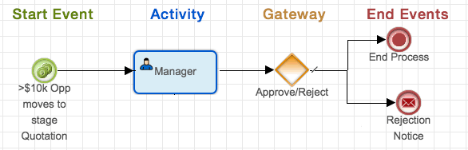
New RFQs land as opportunities with their part numbers
Each RFQ posted overnight in a customer's procurement portal is an opportunity on the right account by the time the inside sales rep looks. The part numbers, quantities and response deadline are filled in, and a draft quote built from the product catalogue waits for the rep to check it. When the portal later shows the RFQ awarded to another supplier, the opportunity carries a note saying so, and the rep closes it as lost, with the reason, the same day.
A manufacturer's account managers read each distributor's monthly sell-through on the matching account, next to the ERP history Sugar Predict already uses, so a drop at one distributor shows up before the quarter's orders do.
The marketing coordinator's trade show leads arrive in Sugar the morning after the show, tagged with the event, with no import to run. The pricing manager gets the supplier's new surcharge by email when the month turns, before the first quote goes out.
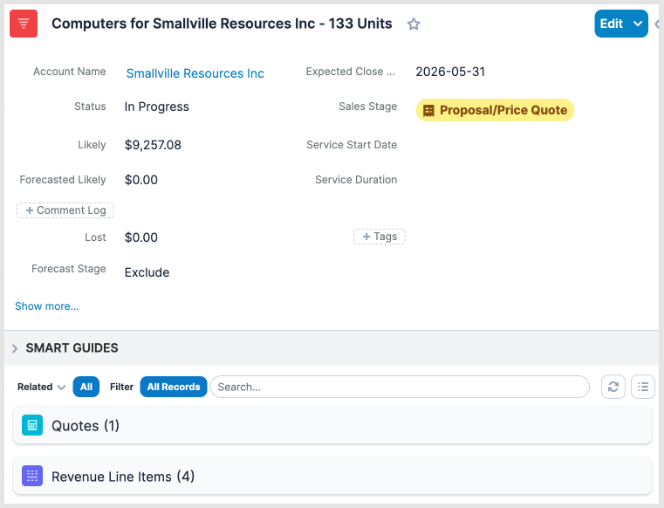
An AI agent copies the RFQs while inside sales quotes
Each customer's procurement portal has its own sign-in and lays out an RFQ its own way. WebRun is an AI agent that works a real Chrome browser, signed in as you, so it reads each portal's screens as they are, then creates the opportunity, the lead or the account update in Sugar Sell.
It writes to Sugar Sell records only. The ERP, and the sync that feeds Sugar Predict, are not on its list of sites.
Inside Sugar itself, a Monday review lists each rep's opportunities with past close dates or stale stages in Airtable, and a lead marked qualified gets a Trello card and a WhatsApp text to its new account executive within the hour.
Questions people ask
Is SugarAI the same product as SugarCRM?
Yes. SugarCRM took the name SugarAI in April 2026, and Sugar Sell, Sugar Serve, Sugar Market and Sugar Predict kept their names, so anything written about automating SugarCRM applies to the same product.
Will it answer an RFQ in the customer's portal?
No. It reads the request and drafts the quote in Sugar. Submitting a price in a customer's portal is a commercial decision, and a rep makes it.
Can it reach an on-premise Sugar instance?
Yes, if the browser it uses can reach the instance's web address. It works in Sugar's web interface, which is the same on SugarCloud and on your own servers.
Can an opportunity it creates start a Smart Guide?
Yes. To SugarBPM it is an opportunity like any other, so a process set to start a Smart Guide when an opportunity meets its conditions starts it. Smart Guides need Sugar Automate: included in Premier and Enterprise+, an add-on elsewhere.
Sources
- SugarCRM Unveils New Brand Identity as SugarAI The 13 April 2026 announcement of the SugarAI name, confirming that Sugar Sell, Sugar Predict, Sugar Market and Sugar Serve keep their names and that the company targets manufacturing, wholesale and distribution.
- SugarBPM | Sugar Sell 26.1 Administration Guide Process definitions whose start event is always a record in the target module, activities for approval or rejection, actions that create or update records, gateways, message and wait events; not available in Sugar Sell Essentials.
- Sugar Automate | Sugar Sell 26.1 Administration Guide Smart Guides in colour-coded stages of calls, meetings and tasks, which SugarBPM can start; Sugar Automate included with Sugar Sell Premier and Enterprise+ and an add-on for Advanced, Serve and Enterprise.
- Sugar Predict | SugarAI Sugar Predict, formerly sales-i, connects to the ERP to highlight buying patterns and gaps, alerts on cross-sell gaps and declining accounts, and lists 180+ ERP integrations.
- Generating Purchases From Revenue Line Items | Sugar Support Purchases are generated when a revenue line item and its opportunity are Closed Won and the item's Generate Purchase field is Yes.
- Reports | Sugar Sell Application Guide The Report Schedules module emails reports as PDF or CSV attachments, starting on a chosen date and repeating at a chosen interval.
- Sugar Maps | Sugar Sell Application Guide Sugar Maps is included with Sugar Sell Premier and Enterprise+: records on a map, directions between records, and proximity filters.
- Integration | Sugar Developer Guide 25.2 How to integrate with Sugar through its web service APIs.
2 ready-made SugarAI workflows
Each one names the apps it touches and the exact steps it takes. Open one to read what it will do, then turn it on.


Want one of these running on your own SugarAI?
Show WebRun the process once and it will run it on schedule, in your own private browser environment.