How to Automate SingleOps
Which SingleOps plan you are on decides how much is automated: Plus sends proposal and invoice-due follow-ups, Premier adds visit, deposit and overdue notices, and Essential sends none. Beyond that, an AI agent like WebRun can work from SingleOps' screens, since its API only creates leads: drafting proposal follow-ups in Gmail, checking removal permits and totaling last week's revenue.
 Written by
Grace Okafor
Healthcare operations
Written by
Grace Okafor
Healthcare operations
 Reviewed by
Elliot Nakamura
Platform writer
Reviewed by
Elliot Nakamura
Platform writer
Tree work is sold on a walk around the client's yard
A tree job is priced standing under the canopy. The sales arborist walks the property and writes up what they see: a crown reduction over the roof, two dead ash to come down, a stump to grind, a soil injection for the oak by the drive. SingleOps, made by Granum, is built around that walk.
In Tree Inventory the arborist drops a pin on each tree on the satellite map and records its species, DBH and health score. Line items hang on the tree itself, and its history keeps every proposal and visit. The proposal reaches the client by email or text, and the client approves it in the Client Portal. On Plus and Premier it can also carry optional items for the client to add.
Once approved, the office puts the job on the crew calendar, and the finished visit becomes an invoice, with a two-way sync to QuickBooks.
Two of Tuesday's four proposals are still unanswered on Thursday
The arborist sends four proposals on a Tuesday and spends Wednesday in a bucket truck. By Thursday two clients have not answered, and on the Essential plan no reminder goes out unless the office manager writes one.
One of the sold jobs is a removal the town will not allow without a permit. The office manager applied ten days ago, keeps the status in a spreadsheet and rings the town as the crew date gets close.
The owner's Monday question is last week in numbers: what was billed and what came in, split between removals, pruning, plant health care and stump grinding. The office manager pulls the figures from SingleOps' reports and copies them into a message. In the yard, the chipper's next service is due by hours logged in a sheet the shop updates when it remembers, and every crew leader wants the stops for the day in order before the trucks leave.
The SingleOps API creates leads and nothing else
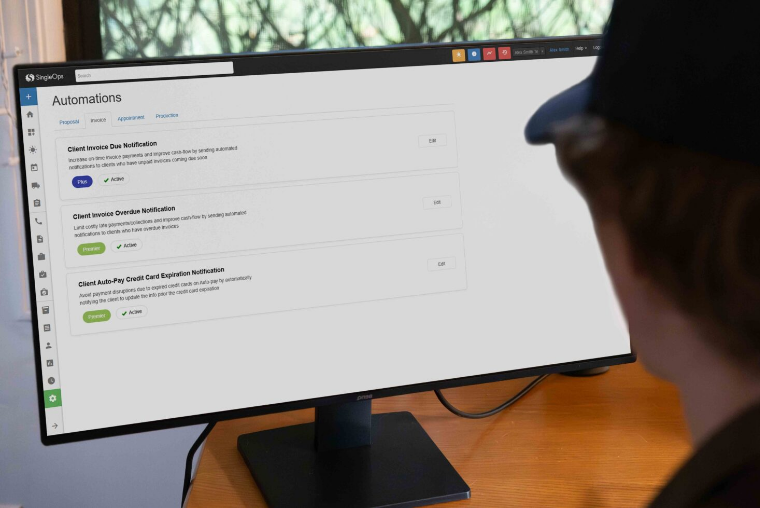
Client Proposal Followup, under Setup > Automated Messaging, emails any client whose proposal is still unanswered, and Client Invoice Due Notification reminds them before an invoice is due. Both need Plus or Premier. Premier adds notices for unpaid deposits, overdue invoices, upcoming and rescheduled visits, a crew arriving soon and finished work, and Essential sends none of them automatically.
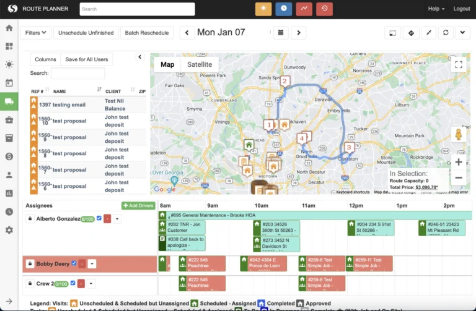
The Invoices Report totals what was billed and what is still open, and Sales by Operation sets each service line's revenue against last year and the prior period. Premier adds Business Insights, a pivot-style builder over the detail reports. For crews, the calendar can email or print a day's schedule, and on Plus and Premier it can feed Google Calendar.
The reports and the calendar both wait for a person at the screen. The office manager clicks Email or Print on the calendar every morning and opens Sales by Operation on Monday to read the week. The only API creates leads, and SingleOps' help says there is no native Zapier integration, so no figure or schedule reaches Slack or a sheet by itself. Clicking Email on the calendar is one button, and a one-crew company may be content to keep pressing it.
An unapproved removal permit surfaces two weeks before the crew date
Every removal in the next 14 days whose permit the town has not approved goes up on the operations channel at 7:30, along with any application waiting more than ten business days, each with its address and crew date, so the operations lead can ring the town that morning.
Office staff open a reminder for every proposal that went out more than 48 hours ago without an answer, each one restating the job's scope and price, and send each from the office's Gmail once the wording is right. Those older than five days head the Slack summary at eight.
The management channel carries last week's figures for the owner at seven on Monday: jobs completed, revenue invoiced and collected, the balance still open and the split by service line, with a flag on any week that falls more than 20 percent short of the four before it.
Each crew's own Slack channel carries its stops at 6:30 in route order, with the address, job type, time window and access notes, and the crew leader tagged. On Mondays the shop foreman reads which chippers and bucket trucks are near or past their service interval, with hours estimated from the jobs each has worked in SingleOps.
An Operator login gives WebRun the proposals, the calendar and the reports
The office manager builds every one of those messages by reading down a SingleOps list: proposals still waiting on an answer, last week's completed jobs, today's calendar by crew. WebRun is an AI agent that works a real Chrome browser, signed in as you. Its Operator login opens proposals, the calendar and most reports, but not Setup, and it reads those lists on each job's schedule, 6:30 for crew routes and Monday morning for revenue and equipment.
SingleOps has no read-only role, so the limit comes from WebRun's policy: nothing in these jobs changes a SingleOps record, and its writing stops at the permit, revenue, route and maintenance sheets. The office manager is the one who sends each reminder. On Essential, which sends no automated follow-ups at all, start with the 48-hour proposal check.
Questions people ask
Will the proposal follow-ups work on SingleOps Essential?
Yes. Essential sends no automated follow-ups, so WebRun drafts one in Gmail for each proposal still unanswered after 48 hours. On Plus and Premier, Client Proposal Followup already emails clients; keep it on and use the drafts where a personal note is worth sending, such as a proposal five days old.
Will the revenue summary show each crew's numbers?
Yes, if your SingleOps jobs record which crew did the work. By default the summary splits revenue by service line, including emergency work, and shows invoiced and collected revenue separately so the open balance is plain.
Who keeps the permit sheet up to date?
Your office does, and SingleOps supplies the removal dates. WebRun marks the rows at risk and adds the date it last checked each one, while every application and approval is still recorded by the office.
Can each crew see only its own route?
Yes. Each crew's stops go to that crew's own Slack channel, with the crew leader mentioned, so nobody reads another crew's day. On Plus and Premier the Google Calendar integration also shows the SingleOps schedule in Google.
Sources
- Automations | SingleOps Help Center Lists SingleOps' automated proposal, invoice, appointment and production emails with their plan tiers, says replies go back to the user who last emailed the client, and that automations do not apply to Proposal Groups, roll-ups or combined billing.
- Lead Entry API | SingleOps Help Center States that SingleOps' API is scoped to creating leads, is not a general-purpose read/write API, and has no native Zapier integration.
- Overdue Invoices | SingleOps Help Center Shows overdue invoices are found by filtering the Invoices page, and says SingleOps has no true A/R aging report, recommending QuickBooks for one.
- Role Permissions | SingleOps Help Center Describes the Admin, Operator, Crew, Supply Manager and Vendor roles and states that SingleOps does not offer a dedicated read-only role.
- SingleOps Plans & Pricing The plan comparison: Tree Inventory, the Client Portal and QuickBooks Online on every plan; Options-Based Proposals, Google Calendar and proposal and invoice-due automations from Plus; the remaining automations and Business Insights Reporting on Premier.
- Sales by Operation The report of revenue billed by operation, compared with last year and the prior period.
- Summary Data for Business Insights The pivot-style builder over the Jobs, Visits, Invoices, Line Item and Payment Records reports, available on the Premier tier only.
- Email or Print Schedules From Calendar A text schedule for a day, a week or a crew, sent or printed when a user clicks Email or Print on the calendar.
- Tree Inventory Mapping trees on a client's property with species, DBH and a health score, attaching items to each tree and keeping its work history.
5 ready-made SingleOps workflows
Each one names the apps it touches and the exact steps it takes. Open one to read what it will do, then turn it on.



Want one of these running on your own SingleOps?
Show WebRun the process once and it will run it on schedule, in your own private browser environment.