How to Automate Prowly
Prowly times the routine parts of a PR campaign: follow-ups grouped by engagement, scheduled publication in the newsroom, and monitoring digests that feed PR Reports. The embargo sheet, coverage beyond online news and each client's weekly update sit outside it, and WebRun, an AI agent, can check the sheet against Prowly, file that coverage and draft each update.
 Written by
Hannah Vogel
Finance operations
Written by
Hannah Vogel
Finance operations
 Reviewed by
Samuel Adeyemi
Integrations writer
Reviewed by
Samuel Adeyemi
Integrations writer
A Prowly campaign starts in Press Release Creator and ends in a PR report
Prowly is PR software built around the campaign: the press release written in its Press Release Creator, the newsroom where it is published, the media list it is pitched to, the tracked email that goes out and the coverage that comes back into a PR report. Its homepage now says Prowly is the Semrush AI PR Toolkit, and existing users still log in to Prowly.
The people using it run several launches at once: a software company's communications manager three weeks from a product launch, or the account executive at a small agency with six clients, each set up as its own brand in PR Reports.
On the Professional plan, a Writer role made for content creators can create and update press releases and see sent emails, but cannot send any or see the contacts. The Essential plan has only two roles, Owner and Admin.
The embargo date lives in a spreadsheet, not in Prowly
The account executive opens each sent pitch's Statistics tab to see who opened it and who clicked through to the newsroom, then decides who gets a follow-up. Replies arrive in her own inbox, and she forwards the promising ones to the client. The embargo date sits in a shared spreadsheet, and moving the release out of Draft before 9:00 on launch day falls to whoever remembers.
Coverage takes hours of its own. A trade magazine runs the story behind a paywall and a regional radio show mentions it on air; someone finds each one, screenshots it and adds it to the client's report.
On Friday every client gets a status email covering what went out, who opened it, what ran and what happens next. For six clients that is six emails, each pieced together from Prowly and the spreadsheet.

Prowly's monitoring covers online news, blogs and forums
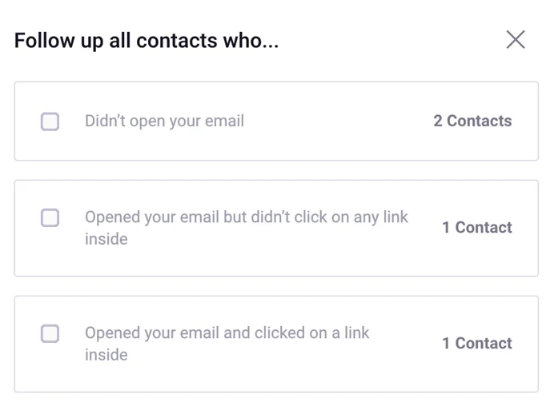
After a pitch goes out, Create follow-up offers recipients grouped by how they engaged, such as those who never opened it or those who clicked; the follow-up stays in the same thread, sent at once or scheduled. Each email's Statistics, Recipients and Replies tabs track the result, and a connected inbox lets the team send and receive from each contact's card. Prowly's AI also drafts pitch emails and press releases.
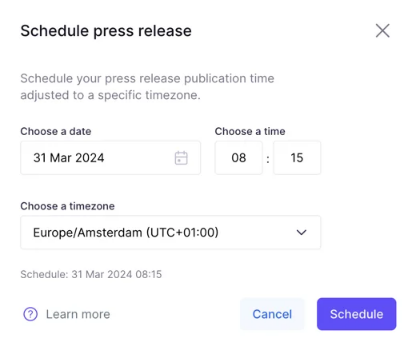
A release moves from Draft to Scheduled with a date and time in a chosen timezone, and goes public in the newsroom at that moment. Media Monitoring sends daily, weekly or monthly digests, plus alerts for new mentions, negative sentiment, unusual spikes and Tier 1 publications, and it can add the clippings it finds to a PR report.
Prowly's homepage describes that monitoring as covering online news, blogs and forums. A print feature or a radio mention goes into a report as a pasted link or a row in an imported XLS file, typed in by a person. The embargo tracker, the award deadlines and the client's approvals live in spreadsheets and inboxes outside the account, and each client's Friday email starts from a blank page.
A release still in Draft the day before its embargo gets flagged
A release whose embargo lifts tomorrow but still shows Draft in Prowly goes to the account executive that morning, with its media list and pitch email named beside it. A launch the client moved in the sheet shows up as a clash with the release's scheduled time, before anything goes live early.
After a send, the follow-up groups come with context: the journalists who opened the pitch twice and clicked through to the newsroom, beside anything they have published on the subject since, with a follow-up drafted in Prowly for each group and left unsent.
The account lead also confirms clippings for coverage the monitor cannot see, each waiting in the client's PR report with where it was found: the trade title's story on its own site, the mention in a podcast's episode notes. On Friday, each client's status email waits in Gmail as a draft built from Prowly's statistics and the sheet.
The account lead sends every pitch and publishes every release
Six clients' embargo sheets, sent emails and PR reports make a morning of reading before the first pitch of the day goes out. WebRun is an AI agent that works a real Chrome browser, signed in as you. It writes only to Gmail, as drafts, and to the PR reports.
No journalist receives anything from it, and nothing goes public: follow-ups and client emails wait as drafts, releases stay in Draft until a person schedules them, and clippings wait for the account lead to confirm. For release checks alone, a Writer login on the Professional plan keeps it out of the contacts entirely. Award and speaking deadlines get the same treatment in a workflow of their own, checked against the draft entries in Prowly every Monday.
Questions people ask
Is it still Prowly, or the Semrush AI PR Toolkit now?
Both. Prowly's homepage says Prowly is now the Semrush AI PR Toolkit and sends new sign-ups there, while a link on the same page still lets existing Prowly users log in.
Does Prowly's Media Monitoring pick up print and podcast coverage?
Not by Prowly's own description: its homepage lists online news, blogs and forums. Print, broadcast and podcast mentions go into a PR report as pasted links, one per line and HTTPS only, or as rows in an imported XLS or XLSX file.
Who in our Prowly account can see the contacts?
Owners, Admins and Publishers can work with saved contacts, and only Owners and Admins can export them. A Writer cannot see contacts, and a Viewer has read-only access to emails and press releases. Those roles come with the Professional plan; Media Monitoring ignores roles, so every user has full access to it.
How are PR reports organised for an agency with several clients?
By brand. Reports sit inside brands under Reporting, so an agency can keep one brand per client, and a private brand is visible only to Owners, Admins and the people invited to it. A report stays in Draft, not public, until someone publishes it.
Sources
- Prowly - PR & Media Relations Software Prowly's homepage, which states that Prowly is now the Semrush AI PR Toolkit, lists monitoring of online news, blogs and forums, and keeps a login for existing Prowly users.
- How to send a follow-up email to your recipients | Prowly Help Center Describes Create follow-up, which groups recipients by their engagement with the first email and keeps the follow-up in the same thread, sent at once or scheduled.
- How to set up email notifications in Media Monitoring | Prowly Help Center Lists the daily, weekly and monthly digests and the new mention, negative sentiment, unusual spike and Tier 1 publication alerts.
- What are user roles | Prowly Help Center Sets out the Owner, Admin, Publisher, Writer and Viewer roles, that the Essential plan has only Owner and Admin, that a Writer cannot send emails or see contacts, and that Media Monitoring ignores roles.
- How to schedule the publication of a press release | Prowly Help Center A press release moves from Draft to Scheduled with a date, time and timezone and goes public in the newsroom at that time.
- Adding clippings to a report | Prowly Help Center Clippings are added to a PR report as pasted links or imported from an XLS or XLSX file, or automatically through Media Monitoring.
- How to manage PR reports | Prowly Help Center PR reports are organised by brand under Reporting, with Draft, Published and Unpublished statuses.
- Track the effectiveness of your email pitches | Prowly Help Center Each sent email has Statistics, Recipients and Replies tabs covering engagement, delivery and replies.
- How to draft an email with AI? | Prowly Help Center Prowly's AI feature drafts email pitches.
4 ready-made Prowly workflows
Each one names the apps it touches and the exact steps it takes. Open one to read what it will do, then turn it on.

Want one of these running on your own Prowly?
Show WebRun the process once and it will run it on schedule, in your own private browser environment.