How to Automate Pipedrive
Each Pipedrive deal can react to changes made inside Pipedrive through workflow automation and Sequences, on the Growth plan and up, and can show a Stripe invoice's status through a Marketplace app. A supplier's new delivery date or a finished course module is typed in by a rep, or fetched by WebRun, an AI agent working in a browser.
 Written by
Elliot Nakamura
Platform writer
Written by
Elliot Nakamura
Platform writer
 Reviewed by
Sofia Marchetti
Marketing operations
Reviewed by
Sofia Marchetti
Marketing operations
Pipedrive organises selling around the next activity on each deal
Pipedrive is a sales CRM built by salespeople for small and medium-sized companies. Most users spend the day in the pipeline view: a column for each stage of the sale and a card for each deal, dragged to the right as the sale moves.
The unit of work is the activity, meaning the call or meeting a rep books against a deal for a given day. Pipedrive's page on activities says a rep cannot control the outcome of a deal, only the actions that push it to close, and the app asks for the next activity each time one is marked done.
At a design agency the board belongs to the two partners, who chase new business between client projects; at a distributor it is a two-person inside sales desk quoting from stock. On Monday the founder goes through the board and asks about every card that has not moved.
Most of the news that moves a deal arrives outside Pipedrive
A deal moves when the customer does something, and customers rarely do it inside your CRM. The client agrees on a call, then sends the signed order form from a personal address. A prospect on a free trial finishes the first module on a training provider's course platform. A deposit lands in the payment portal. The supplier pushes back the delivery date on stock the distributor has already quoted.
Each of those reaches Pipedrive when a rep carries it there: reads the email, finds the deal, drags the card, writes the note, books the follow-up. Preparing Monday's review, the founder opens deal after deal to work out whether the red ones are stuck or just not updated.
The board the founder reads on Monday can show a red tile on a deal the customer signed on Friday, and no call booked for the learner who finished a module that morning.
Rotting counts the days since anyone touched the deal in Pipedrive
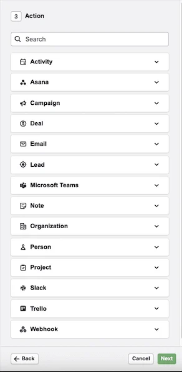
Workflow automation, on the Growth plan and above, runs if-then rules when a record such as a deal or lead is added, updated or deleted, or when a date comes round. A rule can update fields, create an activity, post to Microsoft Teams or Slack, or send an email from the deal owner's synced mailbox. Sequences, also from Growth, chain up to ten emails and tasks on a deal or lead.
Rotting is set stage by stage: once a deal sits idle for the number of days chosen for its stage, its tile turns red. The count restarts when someone touches the deal: adds a note or file, sends an email, marks an activity done or edits a field.
For news held in other software, the nearest route is a Marketplace app. The payments collection includes QuickBooks and a third-party Stripe app that shows a customer's invoices, and their status, on the deal.
The supplier's new delivery date sits on its trade portal until the distributor's rep reads it there and types it onto the deal. When a contact answers a Sequence through another channel, Pipedrive's help page has the rep stop or complete it by hand. And a red tile means nobody touched the deal in Pipedrive for that many days, whether or not the customer paid or signed somewhere else.
A finished module or a supplier's new date can move the deal
A deal that turned red even though the deposit arrived on Thursday gets a note saying what was paid and where, and moves to the right stage; the note restarts the count, so the tile goes back to normal. Deals with nothing new anywhere stay red and appear in the sales channel in Slack: Monday's agenda for the founder, rep by rep.
A training provider can work its trial learners as deals. The course platform shows who finished the first module and who never logged in. The first group turns into a call on a rep's activity list for tomorrow, the second into a check-in email the rep reads before sending.
At a distributor, the inside sales rep quotes against the delivery date the supplier's portal shows that morning, already in a field on the deal. Enquiries from a trade directory or an events platform reach the Leads Inbox with their source in the note, instead of sitting in somebody's email until Friday.
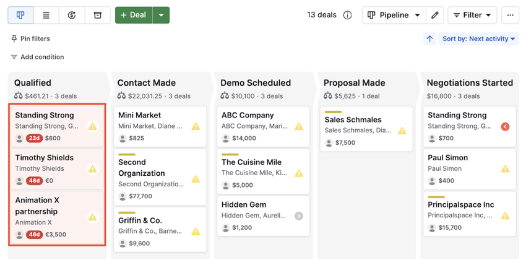
A browser agent can carry the customer's news onto the deal
A red tile needs a look at the payment portal, the shared inbox and the booking page, then a note on the deal or a line on the Slack list. WebRun is an AI agent that works a real Chrome browser; the Pipedrive admin adds it as a user, and it makes that round for every rotting deal before the review.
Won and lost stay a rep's click, since they feed your reports, and a follow-up email waits unsent for the rep who owns the deal. A deal the agent cannot match to a payment or a learner goes on the Slack list with a question rather than a guess.
The quiet-deal list is a job already set up for Pipedrive, and so is a stage check that tells each owner, before a forecast, which deals sit in the wrong stage or lack a required field.
Questions people ask
Will its notes reset the rotting count on a deal?
Yes, any note does. Pipedrive restarts the rotting count when a note or file is added, so the agent writes to a deal only when it found real news there. A deal with nothing new stays red and goes on the Slack list for Monday.
Can its user be limited to one pipeline?
On Premium and Ultimate, yes: put that user in a visibility group that sees only the pipeline it works on, and give it a custom permission set if you also want to block deletes or exports. Lite and Growth have one default visibility group, so a pipeline hidden from the agent is hidden from every non-admin user.
Do our workflow automations fire on its changes?
Yes. A stage change it makes is an ordinary update by a Pipedrive user, so an automation keyed to that stage runs as it would after a rep dragged the card.
Can it add event sign-ups to the Leads Inbox?
Yes. It reads the attendee list on the events platform, checks each person against Pipedrive so nobody is added twice, and creates a lead for each new one with the event named in the note.
Sources
- Workflow automation | Pipedrive Knowledge Base Event triggers on deals, people, organisations, leads, activities and projects, date triggers on deals, people, organisations and activities, the actions including Slack and Microsoft Teams, and that the feature is only on Growth and higher plans.
- Send emails with automations | Pipedrive Knowledge Base Automated emails need email sync, which with automations is on Growth and higher plans; the sender can be the automation owner, the item owner, the triggering user or a Team Inbox.
- The rotting feature | Pipedrive Knowledge Base The Rotting in (days) setting per pipeline stage, the red deal tile, the actions that restart the count (done activities, notes and files, emails, field edits) and that the next activity date is disregarded.
- Sequences | Pipedrive Knowledge Base Describes Sequences of emails and follow-up activities with up to 10 steps on deals or leads, on Growth and higher plans, and stopping or completing a sequence manually when a contact replies through another channel.
- Activities & Goals Management | Pipedrive Pipedrive's activities page: you can't control the outcome of deals, only the actions that push deals to close; the app prompts for the next activity as scheduled ones are completed.
- Payment & Tracking Tools | Pipedrive Marketplace The Marketplace collection for payments and tracking, listing QuickBooks, a Xero connector by SyncQ and Stripe for Pipedrive among its apps.
- Stripe for Pipedrive | Pipedrive Marketplace A third-party app by Ulgebra that syncs Stripe customers, invoices and payments and shows them, with updated invoice statuses, in panels on deal, person and organisation details.
- Pipeline visibility | Pipedrive Knowledge Base Pipeline access is set per visibility group, and plans with a single default visibility group apply a change to every non-admin user.
- Visibility groups | Pipedrive Knowledge Base Lite and Growth have one default group with item owner or all users visibility; Premium, Ultimate and Enterprise allow 15, 25 and 150 custom groups.
- Sales automation | Pipedrive Pipedrive's product page naming workflow automation, Sequences, the Leads Inbox and the AI Sales Assistant, which surfaces priority deals, predicts win probability and recommends next steps.
- Our Story | Pipedrive Pipedrive's co-founders were salespeople who needed more from a CRM than the software on the market offered; the company describes the product as a CRM for small and medium-sized companies.
2 ready-made Pipedrive workflows
Each one names the apps it touches and the exact steps it takes. Open one to read what it will do, then turn it on.

Want one of these running on your own Pipedrive?
Show WebRun the process once and it will run it on schedule, in your own private browser environment.