How to Automate NICE CXone
The CXone work to automate is delivery and cross-checking: yesterday's queue results in each team lead's channel, each new hire's skills and team checked before a first shift, and abandoned callers matched to CRM records. Scheduled reports, SCIM and Auto Score already run inside CXone. WebRun, an AI agent working in a browser, handles that part.
 Written by
Dimitri Vasilev
Logistics analyst
Written by
Dimitri Vasilev
Logistics analyst
 Reviewed by
Clara Bennett
Revenue operations
Reviewed by
Clara Bennett
Revenue operations
NiCE CXone routes each contact and scores it afterwards
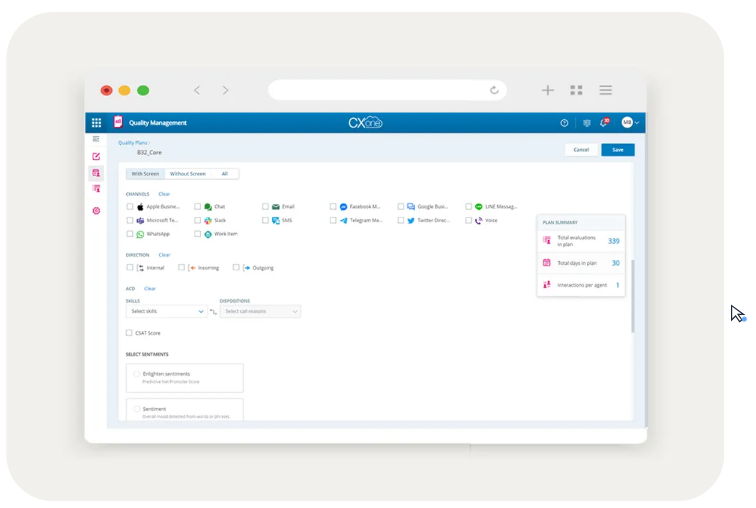
Before the phones open, CXone's Workforce Management has forecast the day and built the schedule, and by the next morning Quality Management's Auto Score can have evaluated every interaction. NiCE, as the company now writes its name, sells CXone as its enterprise customer experience AI platform. The older inContact name survives in niceincontact.com, which forwards to nice.com.
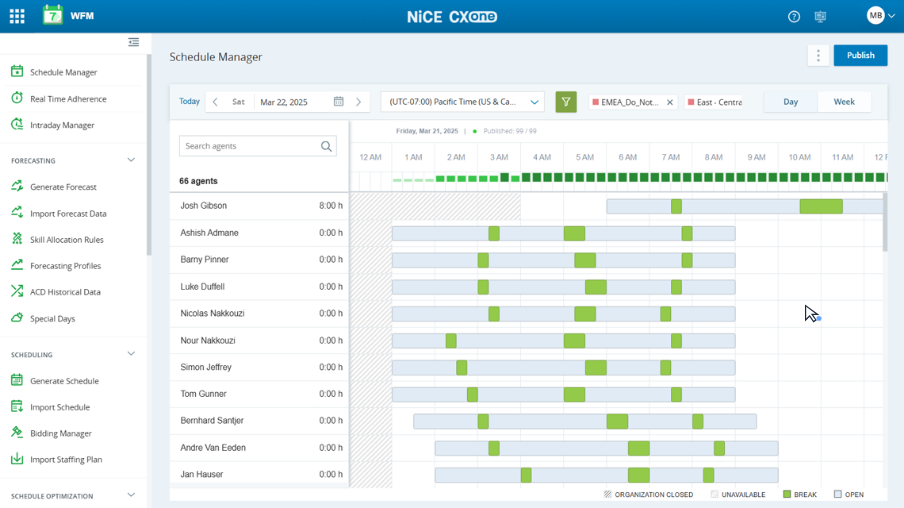
Omnichannel routing and the IVR decide which agent gets each call, chat or email, and agents work from one agent workspace with Copilot for Agents offering real-time guidance and summaries. Workforce Management forecasts, schedules, tracks adherence and reforecasts through the day, and agents can pick up shifts through self-scheduling and shift bidding. CXone also records the interactions and runs Interaction Analytics on them, and in Quality Management agents see their own scorecards.
The first hour of a supervisor's shift goes on assembling yesterday
Before the phones open, a supervisor pulls yesterday's service level, abandon rate and handle time by queue and pastes them into the message the operations director reads. Team leads each want their own agents' quality scores and handling numbers on Monday, in their own format. The WFM analyst compares tonight's forecast with tomorrow's schedule and writes an overtime request when the two do not meet. Once a month an analyst retypes the same queue and quality figures into each program's slides for the business review.
A new hire arrives in CXone from the identity provider with the default role, and a missing skill or team shows up on that agent's first shift. Yesterday's abandoned callers sit in a report, while the account notes that would make a callback useful sit in the CRM.
CXone emails scheduled reports and can auto-score every call
A custom report in CXone can run once or on a recurring schedule and go by email to CXone users or to outside addresses. Employee templates fill in a new profile's team, primary and secondary roles, WEM skills and active ACD skills, and SCIM creates, updates and deactivates users from an identity provider such as Okta.
Workforce Management reforecasts through the day, and Copilot for Workforce Managers takes on shift change approvals and intraday adjustments. Auto Score can evaluate every interaction. For anything custom, NiCE's developer portal lists hundreds of APIs and SDKs.
A scheduled report lands in each inbox whole, and helps only the leads who open it before stand-up. A user provisioned from the identity provider gets the Agent role unless an admin has set another default, so each new hire's skills and team need checking. An abandoned caller's account history sits in the CRM, and a supervisor looks it up before calling back. The APIs close those gaps only for a contact center with developers free to build against them.
Team leads get their own agents' CXone numbers without running a report
Yesterday's results for every queue are in the operations channel in Microsoft Teams before the operations director sits down, and the shift lead gets a direct message when abandon ran over the threshold. On Monday, each team lead opens a Google Drive folder holding last week's quality scores and handling numbers for their own agents, with the names worth a coaching session at the top.
The CXone admin sees each employee added the day before with any missing skill, team or role called out, ahead of that agent's first shift. Each night the WFM analyst has tomorrow's short half-hours measured against the forecast and an overtime offer written, ready to send. Before the monthly business review, each program's service level and quality scores are already in the operations director's slide template. Every abandoned caller from yesterday has a callback card in Trello with the CRM account notes on it, so the person who calls back knows the account.
Supervisors make the callbacks and the WFM analyst sends the overtime offers
By half past six, yesterday's numbers are sitting in CXone's reporting screens and the new hires are in the employee list. WebRun is an AI agent that works a real Chrome browser, signed in as you. WebRun then opens those screens and the WFM schedule under a CXone login, and carries the results to Microsoft Teams, Google Drive, the slide template or the CRM.
The WFM analyst decides which overtime offers go out, and a supervisor makes each callback with the account notes in front of them. CXone admins and analysts keep sole charge of routing, skills, schedules and QA scores. Each job opens on a CXone report or the WFM schedule before it touches Teams, Drive or the CRM.
Questions people ask
Could team leads be added to CXone's scheduled report emails instead?
You can, and for some leads that is enough. CXone sends each recipient the whole report, generated in English, attached up to 30 MB and as a download link above that. Cutting it down to one lead's agents and posting it where that lead works is the extra step.
Would the CXone APIs be a better route for a team with developers?
For deep, permanent integrations, yes. NiCE's developer portal lists hundreds of APIs and SDKs, including reporting and admin APIs. The browser route suits the jobs nobody has had time to build, and anything that ends in a tool with no API.
Can an outsourcer keep each client program's numbers separate?
Yes, if the CXone login can see each program. Each program's morning results go to that program's own channel, so every client lead reads only their own numbers.
Could WebRun change routing or skills in CXone by mistake?
Its jobs never open the routing or skills settings. WebRun works from reports, the employee list and the WFM schedule, and a CXone admin makes every change it flags, such as a new hire's missing skill.
Sources
- AI workforce management software for contact centers | NiCE Describes NiCE Workforce Management as part of the NiCE CXone platform: forecasting, scheduling, adherence tracking, intraday reforecasting, self-scheduling and shift bidding, with Copilot for Workforce Managers reducing tasks such as shift change approvals and intraday adjustments.
- AI CX Quality Management | NiCE Describes Auto Score for evaluating every interaction, AI evaluation summaries for supervisors, and personal scorecards and dashboards for agents.
- Custom Reporting Schedules NICE CXone help: custom reports can run once or on a recurring schedule and go by email to CXone users or external addresses, attached up to 30 MB and as a download link above that; scheduled reports generate in English and up to 12 can be queued.
- Provision Employee Accounts with SCIM NICE CXone help: SCIM creates, updates and deactivates CXone users from an identity provider such as Okta, Azure Active Directory or Google Workspace, and users created this way get the Agent role unless a different default is enabled.
- Employee Templates (NICE CXone help) NICE CXone help: an employee template fills a new profile's team, primary and secondary roles, WEM skills and active ACD skills when an admin selects Populate Template.
- CXone Developer Portal NiCE's developer portal for CXone: hundreds of APIs and SDKs, including admin, agent and reporting APIs, with the Agent SDK on NPM and GitHub.
6 ready-made NICE CXone workflows
Each one names the apps it touches and the exact steps it takes. Open one to read what it will do, then turn it on.





Want one of these running on your own NICE CXone?
Show WebRun the process once and it will run it on schedule, in your own private browser environment.