How to Automate Linear
Linear routes new issues through Triage: on Business and Enterprise, Triage Rules and Triage Intelligence set their team and assignee, Asks turns Slack messages and emails into issues, and Intercom, Zendesk, Front and Salesforce attach customer requests. Feedback from channels with no integration, and nudges for stalled work, need a person or WebRun, an AI agent.
 Written by
Tom Kessler
Field operations analyst
Written by
Tom Kessler
Field operations analyst
 Reviewed by
Marta Ellison
Automation strategist
Reviewed by
Marta Ellison
Automation strategist
Every bug and feature a product team plans sits in Linear
A product team using Linear keeps every bug and feature request in it, along with the work it has planned. Work is split into teams, each with its own issues, a Triage inbox for anything that arrives from outside the team, and cycles: time-boxed runs of one to eight weeks that Linear can create automatically, with open issues rolling into the next one. With GitHub connected, an issue moves to In Progress when its pull request opens and to Done when it merges.
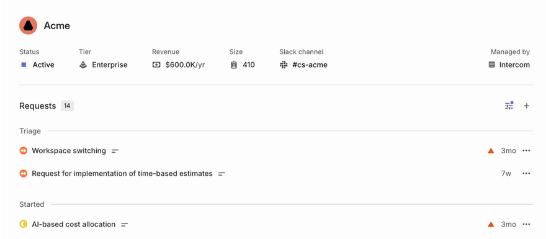
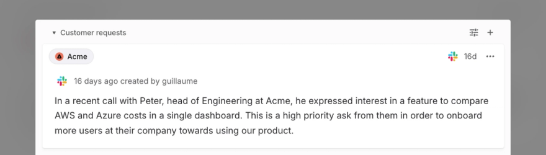
Above the issues sit projects with milestones, and initiatives that group projects, each with health updates that can post to a Slack channel. Customer requests tie issues to the companies that asked for them, quoting the original message and linking back to where it came from.
The product manager plans from it and engineers work in it between pull requests; support and sales mostly see it through integrations. Many of the people whose feedback shapes the roadmap never open it at all.
Feedback arrives everywhere except Linear
The requests that should shape the roadmap come in through channels nobody wired up. An app store review asks for an offline mode, and a community forum thread has collected twenty votes for a CSV export. The help desk the support team chose years ago has no Linear integration and holds a dozen tickets asking for the same export.
The product manager reads them, searches Linear for the matching issue, and adds each one as a customer request by hand, or files a new issue in Triage. In a busy week the product manager never gets to some of them.
Progress going out is copied by hand too. A client on a retainer wants to see it without a Linear seat, so someone keeps a Trello board in step. An issue sits In Progress for nine days with no comment, and nobody asks its owner why until the cycle closes and it rolls into the next one.
Customer requests arrive on their own only from Linear's integrations
Business and Enterprise plans get Triage Rules, which act on issues as they enter Triage, setting the team, status, assignee, labels, project and priority, and Triage Intelligence suggests assignees and labels and surfaces likely duplicates. SLAs, on the same plans, put deadlines on issues that match a rule and warn 24 hours before a breach. Auto-close shuts issues nobody has updated, and project leads get reminders to post updates, with a follow-up nudge a working day later.
Intercom, Zendesk, Front, Salesforce and Slack can create issues with customer requests attached, and with Business or Enterprise the Linear agent inside Intercom and Zendesk files issues straight from a support conversation. Linear Asks, also Business and up, turns Slack messages, emails and web form submissions into issues in Triage. A client can join one team as a guest on those plans, billed as a regular member, and the GraphQL API and webhooks serve anyone who writes code.
An app store review, a forum thread or a ticket in an unsupported help desk becomes a customer request only when someone adds it by hand, which is what Linear's documentation describes for channels with no integration. Auto-close deals with a stale issue by closing it, and a client who is not a guest sees none of the project.
Every request counts on the customer page, whichever channel it came through
The product manager's customer pages stop missing the companies that asked through an app store or a forum. Each review or thread turns up on the Linear issue it describes as a customer request, with the original text and a link back, and the ones with no match arrive as new issues in Triage, where the team's own rules take over. Feature requests buried in closed tickets from the unsupported help desk reach the right issues too, so the request count on each one reflects everyone who asked.
The client on a retainer follows a Trello board that picks up new Triage issues every hour, each with a suggested team and priority, while the on-duty engineer gets a message in Microsoft Teams. Before stand-up, a Slack direct message goes to the owner of any issue that has sat In Progress for three days without an update, and the leads see the full list on Telegram.
For a team halfway through a move from Jira, one Monday report ranks the issues untouched for weeks in both backlogs side by side.
The product manager's weekly matching moves to WebRun
Each forum thread costs a search for the matching Linear issue and a request added in its Customers section, dozens of times a week. WebRun is an AI agent that works a real Chrome browser, signed in as you. The outside sources come first and Linear last, opened with an account that belongs only to the teams a job needs.
The agent adds customer requests and files new issues into Triage, and the team assigns and closes issues as before. Jobs for Linear cover triage routing, stalled-issue chasing and the feature requests buried in closed tickets.
Questions people ask
How are requests matched to the right customer?
By what the source gives, such as a company name or an email address. Linear itself maps customers by email domain, and anything the agent cannot match with confidence is left for a person to confirm.
Will issues it files go through our Triage Rules?
Yes, if you are on Business or Enterprise. Triage Rules act on issues as they enter Triage, so an issue the agent files there gets the same team, assignee, label and priority changes as one that came in through Asks or Intercom.
Can a client follow progress without joining our Linear workspace?
Yes, through a tool they already use, such as a Trello board the agent keeps in step. The other route is a guest account on one team, available on Business and Enterprise and billed as a regular member.
Will it close stale issues for us?
It leaves them open: stalled issues go on a list and their owners get a nudge. If you want untouched issues closed automatically, turn on Linear's auto-close in that team's workflow settings.
Sources
- Triage Triage collects issues from integrations and other teams; Triage Rules, Triage Intelligence and Triage Responsibility are on Business and Enterprise, and Triage Rules act as issues enter Triage, setting team, status, assignee, label, project and priority.
- Customer Requests Intercom, Zendesk, Front, Salesforce, Asks and Slack create customer requests; requests from channels without an integration are added by hand, and customers are mapped by email domain.
- Linear Asks Asks turns Slack messages, emails and web form submissions into issues that start in the team's Triage, on Business and Enterprise plans.
- Linear agent for Intercom, Zendesk, Gong The Linear agent parses support conversations and files issues; included with the Intercom and Zendesk integrations on Business and Enterprise, and with Gong on Enterprise.
- SLAs SLAs on Business and Enterprise apply deadlines to issues matching a rule and notify subscribers 24 hours before a breach.
- Configuring workflows Auto-close closes issues that have not been updated in a set period, and auto-archive archives them and notifies the creator.
- Members and roles Guest accounts, on Business and Enterprise, reach only the teams they are added to and are billed as regular members.
- Use cycles Cycles last one to eight weeks, Linear can create upcoming cycles automatically, and open issues generally roll over.
- GitHub integration By default, linked issues move to In Progress when a pull request opens and to Done when it merges; the automation is set per team.
- Initiative and Project updates Update reminders go to project leads and initiative owners on a set schedule, with follow-up nudges one and two working days later.
6 ready-made Linear workflows
Each one names the apps it touches and the exact steps it takes. Open one to read what it will do, then turn it on.






Want one of these running on your own Linear?
Show WebRun the process once and it will run it on schedule, in your own private browser environment.