How to Automate GitLab
Most GitLab automation is CI/CD: pipelines defined in .gitlab-ci.yml that run on pushes and merge requests, on a cron schedule, or when another system calls the API with a trigger token. Hosting panels and status pages make no such call, so reading them and raising issues falls to a person or an AI agent like WebRun.
 Written by
Grace Okafor
Healthcare operations
Written by
Grace Okafor
Healthcare operations
 Reviewed by
Dimitri Vasilev
Logistics analyst
Reviewed by
Dimitri Vasilev
Logistics analyst
GitLab keeps the plan, the code and the pipeline in one application
On GitLab, a team keeps the issue, the merge request, the pipeline that tests the change and the deploy that ships it in one application, which GitLab markets as a platform for DevSecOps. It runs on GitLab.com, or on a company's own servers as GitLab Self-Managed for teams that have to keep their code in-house.
The working unit is the merge request. It carries the diff, the review threads and the approvals, and every push to it runs the pipeline defined in the project's .gitlab-ci.yml file.
Groups hold projects, and a milestone gathers the issues and merge requests meant for one release. A product manager can work at the Planner role, which GitLab describes as creating and managing issues, epics, milestones and iterations while viewing the code changes. On Tuesday the release manager reads the milestone to decide whether Thursday's release still goes.
Release week runs on a checklist kept by hand
The release manager spends Monday counting the open issues and merge requests on each milestone due soon and posting the numbers in the team channel. On Wednesday the same person works out which merge requests still wait on an approver, and whether that approver is on leave.
The nightly scheduled pipeline fails at three in the morning, and the first to notice is the developer whose branch is now blocked. The cause often showed up somewhere else first, as a disk filling on the server the review apps run on, or a maintenance window on the hosting provider's status page. The on-call engineer opens those pages after the failure, to find out why it happened.
Pipelines start from GitLab events, a cron line or a trigger token
Pipelines run on every push and merge request. Scheduled pipelines take a cron pattern on every tier, Free included, and run with the permissions of whoever owns the schedule. Auto-merge, once called merge when pipeline succeeds, merges a merge request as soon as its required checks pass, and on Premium and Ultimate, burndown and burnup charts track the open issues on a milestone.
An outside system can start a pipeline only by calling GitLab, with an API request carrying a pipeline trigger token or a webhook URL that has the token in it. A hosting panel or a provider's status page makes no such call, so its warning waits for a person. A CI job could log into the panel instead, but the password would sit in the project's CI/CD variables and the script would break whenever the page changed.
Chasing reviews is manual too. Re-requesting a review gives the reviewer a new to-do item and an email, but only when the author thinks to do it, and automatic merge request reminders are still an open feature request. A schedule belongs to one person: if its owner is blocked or removed from the project, it turns inactive until someone takes it over.
The infrastructure project hears about a full disk before the pipeline does
On the day the server behind the review apps passes ninety percent disk, the operations team could already have an issue for it in the infrastructure project, with the server name and the figure from the hosting panel, days before the nightly pipeline fails on it. With the provider's maintenance window for Thursday night filed in the same project, the release manager books the deploy for Wednesday.
Each approver who still has a merge request open against the release milestone gets a text two days before the date, naming it. Anyone in the team's Microsoft Teams channel can read, every Monday, how many issues and merge requests are still open on each milestone due soon, and the due dates sit on the team calendar.
In a regulated team, the auditor can open the quarter's audit folder and read the approvals and the pipeline result behind each production deploy, gathered as the deploy happened, without a trigger token or one more scheduled job for someone to own.
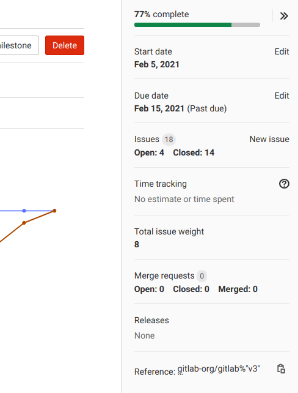
Reporter access lets the agent file issues without pushing code
On the GitLab side, those jobs need only what a Reporter can do: view pipelines and merge requests, comment, and create issues. WebRun is an AI agent that works a real Chrome browser, signed in as you. In the same run it reads the hosting panel and the provider's status page, which never call GitLab, and files what it finds in the infrastructure project.
At the Reporter role it cannot push code, and texts to approvers sit in a queue for the release manager to send. The cards further down cover overnight pipeline failures, merge requests waiting on review and the Monday milestone count.
Questions people ask
Can GitLab Duo's agents read our hosting panel?
Only through an MCP server that someone connects for it. Duo Agent Platform's agents and flows work inside GitLab, on Premium and Ultimate or with GitLab Credits on Free, and reach outside services through MCP servers. WebRun works in a browser, so it reads a panel that has no API or MCP server at all, and a team can use both.
Can it rerun a failed pipeline?
Not at the Reporter role. Running, rerunning or retrying a pipeline or job takes the Developer role, which can also push code, so an agent kept at Reporter names the failed job and a developer retries it.
What happens if the person who set it up leaves?
Its runs stop if the GitLab account it signs in with is blocked or removed, the same way a scheduled pipeline goes inactive when its owner leaves the project. A dedicated account for the agent, owned by the team rather than one person, avoids that. A GitLab service account will not do, because service accounts cannot sign in through the browser.
Could it approve a merge request?
Not unless someone sets that up on purpose. On GitLab Free, approving takes the Developer role. On Premium and Ultimate, a Reporter can approve only through a group that has been shared with the project and given approval rights explicitly, so an agent account outside those groups never counts toward an approval.
Sources
- Scheduled pipelines Scheduled pipelines take a cron pattern on the Free, Premium and Ultimate tiers, run with the owner's permissions, and become inactive when the owner is blocked or removed from the project.
- Trigger pipelines by using the API An outside system starts a pipeline by calling the API with a pipeline trigger token, or through a webhook URL carrying one.
- Roles and permissions A Reporter can view pipelines and merge requests, comment and create issues but cannot push code; running, rerunning or retrying a pipeline or job takes the Developer role.
- GitLab Duo Agent Platform GitLab's own agents and flows, available on Premium and Ultimate or with GitLab Credits on Free, with outside services reached through MCP servers.
- Auto-merge On every tier, a merge request set to auto-merge merges when all required checks complete; the feature was formerly called merge when pipeline succeeds.
- Burndown and burnup charts Milestone burndown and burnup charts are available on Premium and Ultimate.
- Merge request reviews Re-requesting a review creates a new to-do item for the reviewer and sends a notification email; the page describes no automatic reminder.
- Merge request reminders (gitlab-org/gitlab#26353) GitLab's own feature request for merge request reminders, still open.
- Approval rules Premium and Ultimate: users with the Planner or Reporter role can approve only through a shared group with approval rights explicitly enabled.
- Service accounts Service accounts represent non-human entities, authenticate with personal access tokens and cannot sign in to GitLab through the UI.
3 ready-made GitLab workflows
Each one names the apps it touches and the exact steps it takes. Open one to read what it will do, then turn it on.




Want one of these running on your own GitLab?
Show WebRun the process once and it will run it on schedule, in your own private browser environment.