How to Automate FreshBooks
FreshBooks can send recurring invoices, charge a card on file, remind a client up to three times and add late fees without help. Following up a quiet estimate, matching hours from another time tracker and checking a client's supplier portal are still done by hand, and a browser agent such as WebRun can take those on.
 Written by
Elliot Nakamura
Platform writer
Written by
Elliot Nakamura
Platform writer
 Reviewed by
Rosa Lindqvist
Operations editor
Reviewed by
Rosa Lindqvist
Operations editor
Freelancers and small agencies bill their hours out of FreshBooks
FreshBooks is built around an invoice with a pay button on it. Around that invoice sit estimates and proposals a client accepts online, projects that collect tracked time and expenses, retainers and recurring invoices, and the accounting, payroll and bill pay the invoices feed.
It is sold to freelancers, solo consultants and small firms with a handful of employees or contractors: marketing and creative agencies, builders, IT shops, consulting and law practices. In a business that size the person sending the invoices often does the work too, so FreshBooks gets opened between jobs rather than by a finance department. On the Plus, Premium and Select plans an outside accountant can be invited at no extra cost, and sees the Chart of Accounts and journal entries but not the estimates or projects.
The client sees it from the other end: an email with a link to the estimate and an Accept button, then an invoice they can pay by card or bank transfer.
Estimates go quiet and tracked hours never reach an invoice
An estimate goes out on Monday, FreshBooks shows it as viewed on Tuesday, and then nothing happens. The owner means to follow up, a site visit or a deadline gets in first, and by the next week it feels awkward to ask.
Hours logged against a project sit unbilled until the owner generates the invoice, and hours tracked in the project tool or on a phone timer never reach FreshBooks at all. Materials bought on the card for a client's job come in through the bank connection and wait for the owner to assign them to that client so they can be billed.
A large client pays through its own supplier portal, where the invoice has to be uploaded again, this time carrying a purchase order number, before anyone there will schedule it. The overdue reminder goes to an accounts inbox nobody reads, and the owner only notices while doing the books at the weekend.
FreshBooks chases an overdue invoice up to three times, then stops
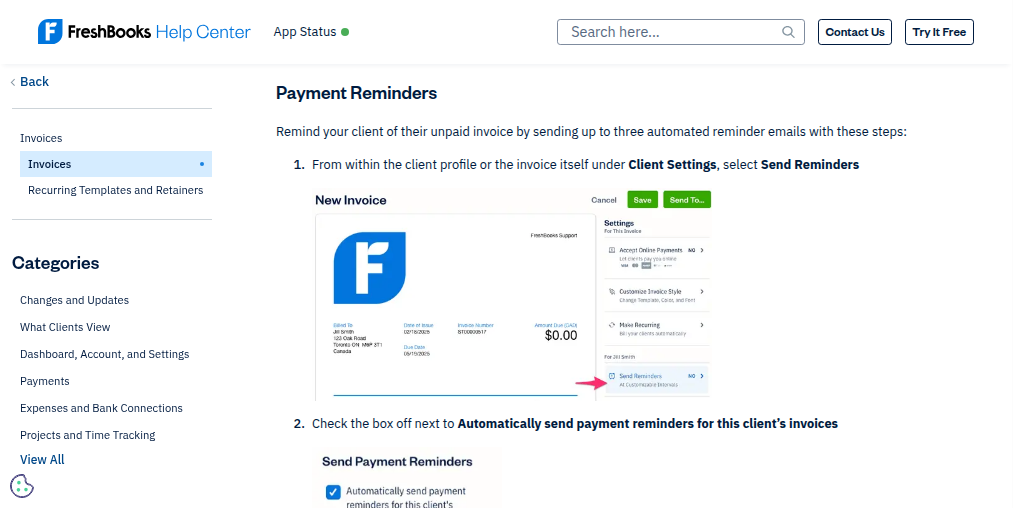
Payment reminders email a client up to three times, ahead of the due date or once it has passed. Late fees can be a flat fee or a percentage of the invoice or of the outstanding balance, added however many days after the due date the owner chooses.
Recurring invoices go out on schedule, and a client who saved a card is charged without anyone pressing send. Estimates can ask for a deposit, and an estimate the client has accepted becomes an invoice through Convert to Invoice. Generating an invoice pulls a project's unbilled hours and expenses onto it and marks the time billed, up to 400 time entries at a time.
FreshBooks notifies the owner when a client still hasn't viewed an estimate or an invoice, and when an invoice goes overdue. The following up is left to the owner, and after the third reminder the chasing stops. FreshBooks cannot see an invoice rejected in a client's supplier portal, or hours sitting in another time tracker.
Unanswered estimates and unbilled hours can surface every Friday
A week after a client views an estimate without accepting it, the owner could get the follow-up already written in the channel that client answers: a text for a homeowner, an email for a marketing director. An accepted estimate could reach the board the team plans work from as a card the same day.
On Fridays the owner could compare each client's unbilled time and expenses with the hours in the project tool, client by client. A week of work nobody logged would turn up before the invoice goes out.
Before the third reminder goes to a large client, the owner could know what that client's supplier portal says about the invoice: approved, on hold for a missing purchase order, or never received. Where the portal is waiting on a purchase order number, the owner could send the reply with the number already in it. A retainer client who takes their saved card off a recurring invoice could get a note asking for a new one before the next billing date, ready in the owner's drafts.
The owner still sends every estimate follow-up and portal upload
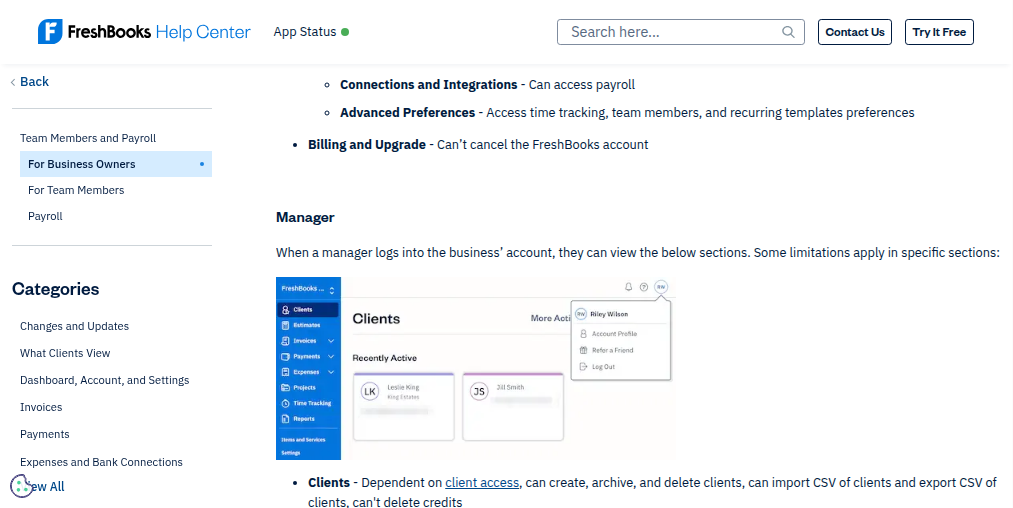
FreshBooks lets the owner invite a team member as a Manager, a seat that reaches invoices, estimates and projects but not Accounting, Payroll or Bank Connections, and that seat is enough for the agent. WebRun is an AI agent that works a real Chrome browser, signed in as you. Each Friday it compares what FreshBooks shows with the project tool and each large client's supplier portal, using the owner's logins there. Then it emails the owner each quiet estimate by number, the hours missing from each project and what each portal says about each overdue invoice, with a draft attached wherever a message is needed.
Only the owner sends an invoice, voids one or records a payment, and the drafts sit unsent in the owner's mailbox, already addressed to the client. Every card further down opens on a FreshBooks estimate, project or invoice.
Questions people ask
My biggest client makes me upload invoices to their portal. Can it help?
Yes. It checks the portal for each invoice's status and fills in what is missing, such as the purchase order number the portal asks for. Uploading is a submission into another company's system, so the agent stops before the portal's final submit and leaves that click to you.
Will a late fee apply to invoices I have already sent?
No. FreshBooks adds late fees to new invoices only. Payment reminders work differently: switched on for a client, they cover that client's existing invoices too.
Can someone else at the client accept my estimate?
Only the primary client can accept an estimate when viewing it, so an estimate forwarded to a colleague can sit unaccepted.
Can it add hours from our other time tracker into FreshBooks?
It lists the hours missing from FreshBooks for each client and week, and creates time entries only after you approve them.
Sources
- What are payment reminders and late fees? FreshBooks support: up to three payment reminders per client, sent before or after the due date, and late fees as a percentage or flat fee a set number of days after it, on new invoices only.
- How do I generate an invoice? Explains that generating an invoice pulls unbilled time from one or more projects onto it, can add unbilled expenses, and marks the time entries as billed, with a 400 time-entry limit.
- How do I create an estimate? The client receives an email with a link and an Accept button, only the primary client can accept, and an accepted estimate becomes an invoice through More Actions, Convert to Invoice.
- What are notifications? Lists the notifications FreshBooks sends the owner, including estimate or proposal not viewed, estimate accepted and invoice overdue.
- What permissions can I assign to my team member? Role by role: a Manager can manage clients, estimates, invoices and projects but cannot access the Dashboard, Payroll, Accounting, Apps or Bank Connections.
- Invoicing software FreshBooks' invoicing page, describing recurring invoices, card-on-file payments, reminders, late fees, retainers and deposits on estimates.
3 ready-made FreshBooks workflows
Each one names the apps it touches and the exact steps it takes. Open one to read what it will do, then turn it on.




Want one of these running on your own FreshBooks?
Show WebRun the process once and it will run it on schedule, in your own private browser environment.