How to Automate Braze
Branches and delays inside a Canvas decide each Braze send, approvals gate the launch, and promotion code lists warn as they run low. Checking each send against the sale calendar, the commerce platform's promotion and the landing page is a pre-flight that an AI agent such as WebRun can run before launch.
 Written by
Elliot Nakamura
Platform writer
Written by
Elliot Nakamura
Platform writer
 Reviewed by
Julian Adeniyi
Retail operations
Reviewed by
Julian Adeniyi
Retail operations
Canvases in Braze decide what each customer hears next
Abandon a basket in a retail app, and an hour later a push arrives, then an email the next morning if the push goes unopened. Braze, a customer engagement platform, is built to run sequences like that: it keeps a profile for each customer and sends across push, email, SMS, in-app messages and Content Cards.
Campaigns are one-off or recurring sends, and Canvases are journeys with branches and delays. Segments decide who qualifies, catalogs hold product data for messages, and Liquid personalises each one, down to a unique promotion code per customer.
A lifecycle or CRM manager builds the campaigns and Canvases, and a CRM operations lead looks after send settings and approvals. The merchandising team decides what goes on sale, and when, in a calendar of its own. A larger brand may run several Braze workspaces, one per country or brand.
A sale moved by merchandising is still scheduled in Braze
The spring sale moves from Thursday to Saturday in the merchandising calendar, a shared spreadsheet. The Canvas in Braze still enters customers on Thursday at 10:00, and unless someone on the CRM team spots the change, the first message announces a sale that has not started.
Promotion codes need the same care. The codes in Braze were generated in the commerce platform and uploaded as a CSV file, so when the promotions team shortens the offer there, Braze keeps handing out codes that fail at checkout, and the complaints reach customer service first.
A message announcing a new feature is only right for people on the app version that shipped it. Which version that was is written in the release notes, and the CRM manager looks it up before setting the audience.
Before a big send, the CRM manager also opens the landing page and taps the deep link on a test phone, in case either has changed since the copy was written.
Braze guards a send from the inside, but the offer lives in the shop
With the approval workflow switched on in Settings, which applies per workspace, a campaign cannot launch until four sections are approved: messages, delivery, target audience and conversion events. A Canvas needs five: conversion events, entry schedule, target audience, send settings and the build itself.
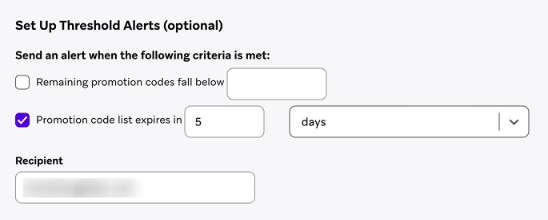
Promotion code lists email their chosen recipients once a day when codes run low or the list nears its expiry date. Connected Content pulls live data into a message at send time and can abort the message when what comes back is unusable.
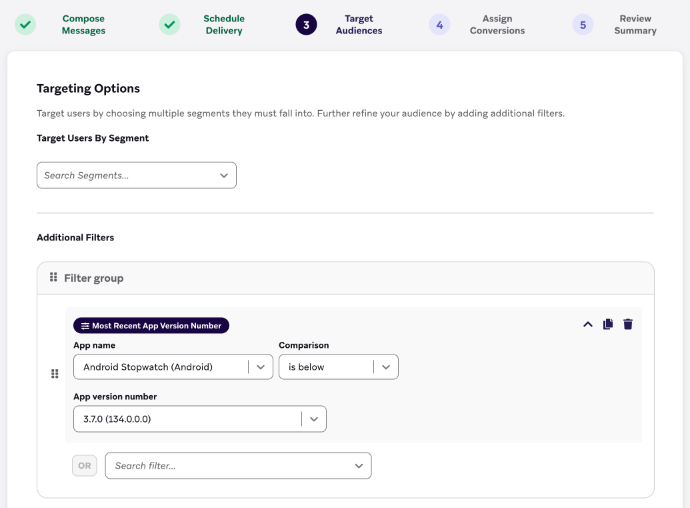
For a feature announcement, the App Version Number filter targets people whose app is below, above or equal to a given version. BrazeAI Operator, the assistant in the dashboard, drafts campaigns and Canvases from a description, and shows each change it proposes as an action card to approve.
Braze's documentation says it does not manage code creation or redemption, so whether a code still works is settled in the commerce platform. The merchandising calendar holds the sale date, the release notes the shipped version and the website the landing page, and someone on the CRM team reads each of them before the send.
Each scheduled send gets a pre-flight against the calendar and the shop
A Canvas entering customers on Thursday for a sale that moved to Saturday shows up on Monday's pre-flight list, with both dates, the Canvas's segment and its entry time. The CRM manager moves the entry schedule, and the approver signs off the new date.
For a send that carries codes, the list says whether the promotion is still active in the commerce platform, whether it ends after the campaign does, and whether it gives the discount the copy promises. The CRM manager sees a shortened offer there, days before any customer tries a code at checkout.
Each in-app message about a new feature sits on the list beside the version the release notes give for it, so a mismatch with its App Version Number filter is plain to see. The landing page and deep link from every message are on the list too, with any that now return an error at the top.
One browser session reads Braze, the sale calendar and the commerce admin
The pre-flight starts in the Braze dashboard, with the week's campaigns, Canvases and promotion code lists, and then needs the merchandising calendar, the commerce admin and every landing page linked from those sends. WebRun is an AI agent that works a real Chrome browser, signed in as you. Its policy names those sites and no others.
What it writes is the pre-flight list in Slack and, for anything odd, a Gmail draft that the CRM manager can send or delete. Whether a Canvas pauses or moves after a failed check is the CRM manager's decision, made in Braze.
The pre-flight is the Braze job to schedule first, since it is the one that has to finish before a send rather than after it.
Questions people ask
Does the pre-flight login need edit rights in Braze?
No. View Campaigns, View Canvases and View Promotion Codes cover everything the pre-flight reads. Braze lists Edit, Launch, Archive and Approve and Deny as separate permissions for campaigns and for Canvases, so a login without them can open every scheduled send and change none of them.
What happens when a promotion code list expires?
Braze deletes its codes, and any message that uses the list stops sending. Every code in a list shares one expiry date, at most six months after the list was created or last edited, so the pre-flight flags a scheduled send whose code list expires before the send date.
How does it know which app version has the feature?
From wherever your team records it: the release notes, the App Store's version history or the ticket that shipped the feature. You tell it where to look, and the pre-flight puts that number beside the message's App Version Number filter.
Sources
- Approvals for campaigns and Canvases | Braze Docs Describes the approval workflow, off by default and switched on per workspace in Settings, the sections that must be approved before a campaign or Canvas launches, and the Approve and Deny permissions.
- Create a promotion code list | Braze Docs States that Braze does not manage code creation or redemption, describes daily threshold alerts for lists running low or near expiry, and the six-month expiry after which codes are deleted and messages using the list are not sent.
- Abort Connected Content | Braze Docs Explains using Liquid conditions to abort a message when Connected Content returns unusable data.
- Permissions | Braze Docs Lists separate permissions such as View Campaigns, Edit Campaigns, Launch Campaigns, Approve and Deny Campaigns, the same set for Canvases, and View Promotion Codes.
- Feature Awareness and New App Version | Braze Docs The App Version Number filter targets users whose app is less than, greater than or equal to a given version.
- BrazeAI Operator | Braze Docs Operator is a page-aware assistant in the dashboard; each change it proposes is presented as an action card to review and approve.
3 ready-made Braze workflows
Each one names the apps it touches and the exact steps it takes. Open one to read what it will do, then turn it on.


Want one of these running on your own Braze?
Show WebRun the process once and it will run it on schedule, in your own private browser environment.