How to Automate SimplePractice
In SimplePractice, billing automations, AutoPay and reminders take care of invoices, superbills, card charges and appointment messages once they are switched on. Claims stuck at Accepted and reduced fees due for review need a payer's website or a clinician's decision; an AI agent such as WebRun can read those screens and prepare the follow-up for the practice.
 Written by
Marta Ellison
Automation strategist
Written by
Marta Ellison
Automation strategist
 Reviewed by
Ben Kirkwood
Solutions engineer
Reviewed by
Ben Kirkwood
Solutions engineer
Solo therapists and group practices run their caseloads in SimplePractice
SimplePractice is the EHR and practice management system that private-practice clinicians run their work on: therapists and counselors above all, and also speech-language pathologists, occupational therapists and psychiatrists. Clinicians use it from any browser or from its mobile app.
New clients find the clinician through Therapy Finder, SimplePractice's directory, or through the practice's own website, and a clinician who is not the right fit passes them on with Clinician Referrals. The client books and fills in intake documents in the Client Portal and leaves a card there for AutoPay. After each session the clinician writes the progress note and bills insurance or self-pay, giving out-of-network clients a superbill to send to their insurer.
On the Plus plan, a group practice adds team members such as a practice biller or a practice scheduler, each with a role that limits what they see. The account owner or a practice manager can set each clinician's target caseload: the clients and weekly sessions they aim to carry over the next six months.
Billing follow-up in SimplePractice waits for the gaps between sessions
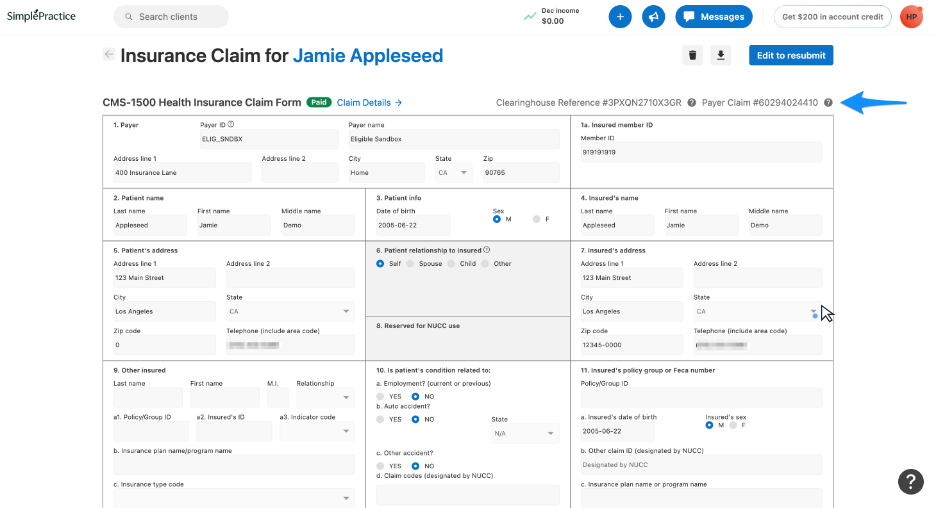
A claim sent in August still shows Accepted in October. SimplePractice's guidance after thirty days without an update is to contact the payer and quote the payer's claim number, which means a provider portal login or a long hold. Without a Payment Report enrollment for that payer, the claim will never show more than Received or Accepted.
A client's card is declined three nights running, AutoPay switches off for that client, and the notice waits in the Notifications tab. Another client started on a reduced fee eighteen months ago and is still paying it. A new client's intake documents still show Pending with the first session the day after tomorrow.
In a group practice, an inquiry that arrives overnight needs a clinician with room, and the scheduler has to find that clinician before replying.
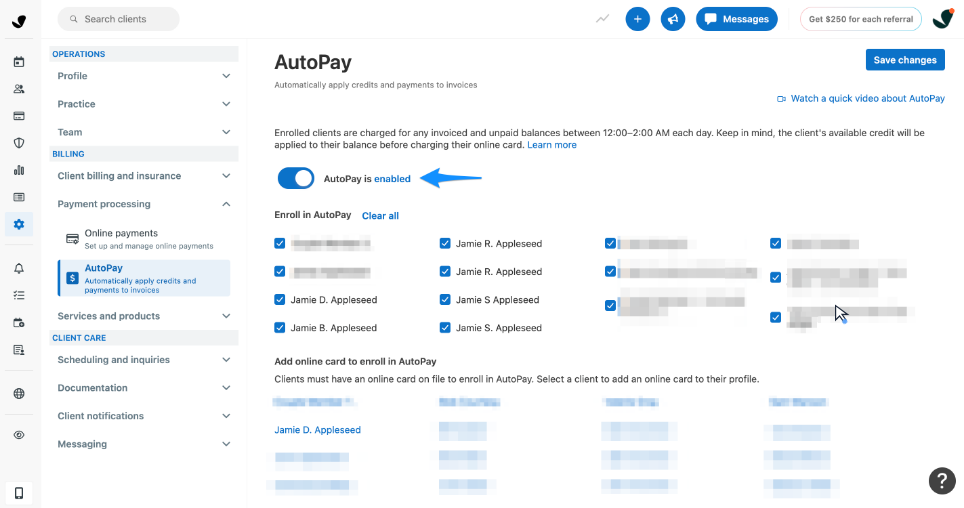
AutoPay retries a declined card for three nights before switching off
AutoPay charges the card on file overnight once an invoice exists. When a card is declined it tries again on the next two nights, then switches off for that client and notifies the account owner, the practice biller and the primary clinician. Billing automations create invoices daily or monthly and statements and superbills on a set day of the following month, and can email a client once an invoice is past due.
On the Essential and Plus plans, appointment reminders go out by email, text or voice, and a clinician can switch on automatic reminders about incomplete intake documents for each client. On Plus, the clearinghouse also runs automatic insurance status checks on primary plans ahead of appointments. When a practice manager sets a target caseload, SimplePractice shows the gap between that clinician's current caseload and the target.
SimplePractice's managed billing service handles in-network insurance billing, including rejections, denials, appeals and resubmissions. Insurance Navigator, an upgrade opened in October 2026 at $1.79 per claim, adds a Claim Assistant that catches errors and phone access to Insurance Specialists. A practice that does its own billing contacts the payer about a stalled claim itself. How long a client has paid a reduced fee is in their billing history, for the clinician to look up.
Claims stuck at Accepted arrive with the payer's portal status and claim number
The practice biller's claims list carries two extra columns: what each payer's portal shows for claims stuck at Accepted or Received past thirty days, and the payer's claim number, which SimplePractice tells billers to quote. The biller phones only about the claims the portal cannot explain.
Each month the clinician raises the fee at the next session with any client who has paid a reduced rate for a year or more, working from a list sorted oldest first by the start date in billing history. The note asking a client for an updated card goes out the morning after AutoPay switches off, written for the clinician to read over and send, rather than whenever someone next opens the Notifications tab.
In a group practice, the scheduler answers an overnight inquiry from a weekly table of each clinician's active clients against their target caseload. Two days before a first session, the front desk calls any new client whose intake documents still show Pending after the automatic reminders.
Claims that stay at Accepted send WebRun to the payer's portal
Portal checks for claims past thirty days, and the billing-history reading behind the fee list, are WebRun's part. WebRun is an AI agent that works a real Chrome browser, signed in as you. The payer portals it reads are ones where the practice already holds a provider login, named one by one in its policy.
Notes about cards and intake reach clients only after the clinician sends them. Only the clinician and the biller change a fee, re-enroll a card in AutoPay or edit a claim.
Once a month, the sliding-scale fee review does that billing-history reading and leaves each fee note as a Gmail draft for the clinician.
Questions people ask
Does managed billing make this unnecessary?
For in-network claims, largely. SimplePractice's managed billing handles in-network insurance billing, including rejections, denials, appeals and resubmissions, so stuck in-network claims become its team's job. Reduced fees, declined cards and pending intake documents are not claims, and they stay with the practice.
Which claims count as stuck?
Claims that have shown Accepted or Received for 30 days with no Payment Report or Explanation of Benefits, which is SimplePractice's own point for contacting the payer. If the practice has no Payment Report enrollment with a payer, those statuses are the last ones SimplePractice shows for its claims, so enrolling shortens the list.
What can WebRun see in a client's profile?
Whatever its login can see. On the Plus plan it can have its own practice biller seat, which SimplePractice does not charge for; administrative team members see client profiles within the limits of their role, and a group practice can narrow that from the client's Privacy tab. Starter and Essential have no team members, so it works under the clinician's own login.
Sources
- Setting up automations for billing documents | SimplePractice Support Invoices created daily or monthly, statements and superbills created on a chosen day of the following month, and optional automatic emails when an invoice goes past due.
- Getting started with AutoPay | SimplePractice Support AutoPay charges the card on file overnight, tries three nights in a row, then switches off for that client and notifies the account owner, biller and primary clinician.
- Handling claims stuck in the Accepted or Received status | SimplePractice Support SimplePractice's advice to contact the payer when a claim has had no update for thirty days, referencing the payer's claim number.
- Administrative roles available for team members | SimplePractice Support Team members are a Plus plan feature; practice billers and schedulers have limited access to client profiles, and those roles carry no extra charge.
- Insurance Navigator | SimplePractice Insurance Navigator adds priority access to live Insurance Specialists, a Claim Assistant that catches errors and suggests fixes, and automatic benefits verification to Insurance Essentials, at $1.79 per claim against $0.39.
5 ready-made SimplePractice workflows
Each one names the apps it touches and the exact steps it takes. Open one to read what it will do, then turn it on.



Want one of these running on your own SimplePractice?
Show WebRun the process once and it will run it on schedule, in your own private browser environment.