How to Automate Next Gear DASH
Each DASH job file stays current through the Compliance Manager's task lists, intake notifications and notes synced from Claims Connect and XactAnalysis. Around it, an AI agent like WebRun can route each new loss to the on-call crew lead, draft adjuster follow-ups after three quiet days, and post the daily job board and Monday WIP report.
 Written by
Marta Ellison
Automation strategist
Written by
Marta Ellison
Automation strategist
 Reviewed by
Hannah Vogel
Finance operations
Reviewed by
Hannah Vogel
Finance operations
A DASH job file follows a loss from first call to certificate of satisfaction
A water loss involves three parties before the first air mover is switched on: the homeowner with the wet floor, the carrier or third-party administrator paying for it, and the restoration company doing the work. DASH is the job management system on the contractor's side of that triangle. It comes from Next Gear Solutions, a CoreLogic company whose restoration products now carry the Cotality name.
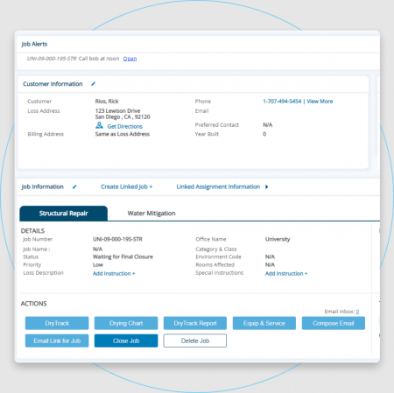
A loss goes in through DASH's intake form and becomes a job file holding the work authorization, photos, estimates, notes and, at the end, a signed certificate of satisfaction. The Compliance Manager gives each job type an automated task list, the Equipment Manager tracks every dehumidifier out on a job, and the Job Calendar shows project work beside employee availability. Technicians document drying in Mitigate, which replaces the MICA app and satisfies carriers that require MICA.
With the Engage add-on, homeowners follow the job through a web portal, and accounting flows to QuickBooks or Sage.
Losses arrive at 2 a.m. and estimates wait weeks for an adjuster
A supply line lets go under a kitchen sink at two in the morning. The call comes through the answering service, and whoever is on call works out which crew covers that ZIP code and whether it is program work with a contact deadline attached.
By Monday the estimate for last week's flooded basement has sat with the adjuster for six days, and nothing has come back. The project managers are on site from early morning, so the email to the adjuster waits for an evening.
For a company that documents losses in Encircle, the Monday production meeting needs every active job by stage from DASH beside the open documents and the equipment still out from Encircle. The operations manager builds that view by hand, one job at a time.
DASH keeps the adjuster's notes and every estimate version on the job
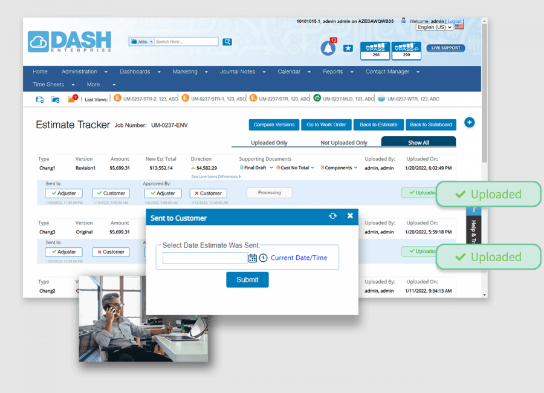
The Compliance Manager turns each job type into an automated task list, and in-app notifications tell the team when a task is done, a document is uploaded or someone needs to act. The intake form updates the job's key participants as soon as a loss is entered. Historical notes from Claims Connect and XactAnalysis sync into the job file, and the Estimate Tracker keeps every version of an estimate in one list the office can sort and send from.
The Payments Dashboard shows what each person has brought in over a period. With the Engage add-on, a technician sends an on-the-way message, and Engage requests a review from the homeowner when the job is complete.
Those tools work on DASH's own jobs and the people named on them. Which crew lead covers a ZIP code at two in the morning lives on the on-call rota, the email an adjuster needs after six quiet days is the project manager's to write, and a company that documents in Encircle keeps its equipment and photo gaps there. Where someone on call already watches the DASH queue overnight, routing adds little.
The crew lead covering that ZIP code gets the 2 a.m. loss directly
Within minutes of a loss entering DASH, the crew lead whose ZIP codes and loss types match it gets a direct Slack message with the address, the loss type, the intake notes, any carrier or TPA assignment and a link to the job. A loss that matches no rule lands in the dispatch channel for a manager to assign, and changing who is on call means editing the routing sheet.
Each Monday the project managers' channel lists every job that has sat more than three days in an adjuster-pending stage, longest first, with anything past seven days marked high priority. Beside each, an email to the adjuster quoting the claim number, the address and the days waiting is ready in the project manager's drafts.
At seven each morning the operations Slack channel shows every active job by stage, the ones that moved or stalled since yesterday, and, from Encircle, equipment past its pickup date and documents an adjuster review would miss. At 6:45 on Monday the leadership channel gets the work-in-progress report: active jobs and estimated revenue by loss type, jobs stuck in one stage for more than five days, and the open documentation and equipment items.
The routing sheet decides which crew lead WebRun messages at night
Routing a loss well takes the job's ZIP code and loss type from DASH and the on-call rota from the sheet the dispatcher keeps. WebRun is an AI agent that works a real Chrome browser, signed in as you. Its DASH login checks the queue every few minutes, day and night, and the routing sheet tells it which crew lead covers each ZIP code and loss type.
WebRun writes nowhere in DASH or Encircle: moisture readings, estimates and job stages are the team's to change. Each adjuster email leaves from the project manager's account after the project manager has read it. The routing runs all night; the adjuster follow-ups wait for Monday morning.
Questions people ask
Who decides which crew lead gets a new loss?
Your routing sheet. It maps loss types and ZIP codes to crew leads, with their Slack handles and on-call status, and WebRun reads it on every run, so an edit to the sheet changes the routing straight away.
Does it route losses that come from a TPA or carrier program?
Yes. It reads every new DASH job whatever its source, direct or through a TPA, and puts the program assignment in the alert so the crew lead knows a contact deadline may apply.
What if the adjuster has replied but DASH still shows the job as pending?
It stays on Monday's list until someone moves the stage. WebRun reads the live stage in DASH on each run, so once your team marks the adjuster's response, the job drops off.
Can we change the three-day and seven-day thresholds?
Yes. Both are settings: shorten them for a carrier program with tight response times, or lengthen them for slower desk adjusters.
Sources
- DASH: Restoration Job Management Software | CoreLogic Next Gear Next Gear's DASH page: intake form, Workflow Builder, Compliance Manager, Equipment Manager, in-app notifications, documents with e-signatures including certificates of satisfaction, and CRM tools that track referrals by contact.
- What's New in DASH | Cotality | Next Gear Lists recent DASH releases, including historical notes synced from Claims Connect and XactAnalysis, property data with year built, the Estimate Tracker and the Payments Dashboard.
- FAQs | Cotality | Next Gear States that Mitigate replaces the MICA app and satisfies carriers that require MICA, and lists DASH integrations including QuickBooks, Sage 100 and 300, Claims Connect, Matterport and DocuSketch.
- Our History | Cotality | Next Gear Next Gear's own history page, describing Next Gear Solutions as part of CoreLogic, on a site now titled Cotality.
- Engage: Restoration Communication Platform Engage, formerly ProAssist: on-the-way notifications, automated review requests when each job is complete, and a secure portal for signing authorizations and uploading photos.
- Restoration Communication Software | Cotality Engage Cotality's FAQ: Engage is not sold on its own; it is an add-on available only within the DASH and Mitigate platforms.
4 ready-made Next Gear DASH workflows
Each one names the apps it touches and the exact steps it takes. Open one to read what it will do, then turn it on.



Want one of these running on your own Next Gear DASH?
Show WebRun the process once and it will run it on schedule, in your own private browser environment.