How to Automate Help Scout
Help Scout's paid plans run the inbox's own automation: workflows tag, assign and notify, SLA policies track first-response and resolution targets, Routing hands out unassigned conversations, and AI Drafts writes replies for review on Plus and Pro. Counting the questions Docs never answers, and texting the weekend rota before a reply slips, is work for WebRun, an AI agent.
 Written by
Julian Adeniyi
Retail operations
Written by
Julian Adeniyi
Retail operations
 Reviewed by
Hannah Vogel
Finance operations
Reviewed by
Hannah Vogel
Finance operations
A small support team answers everything from Help Scout's shared inbox
Help Scout is customer service software built around a shared inbox. Email, chat and social messages arrive as conversations in an inbox for each brand or department, where a small team can assign, tag, snooze and reply, with the customer's details and earlier conversations beside each one.
Docs is its knowledge base, Beacon puts help articles, chat and AI Answers on a website or inside an app, and saved replies cover the answers that come up every day. On Plus and Pro, Messages sends in-app announcements and surveys. Paid plans connect to more than a hundred apps, Shopify among them, which bring order and account details into the sidebar.
It suits teams where the founder still answers the odd email, and the support lead is also the person who writes the help articles, keeps the saved replies current and sends the Monday numbers.
Saturday's message waits for Monday when nobody is set to Active
A small team has gaps. On a Saturday morning nobody is on shift except the person holding the phone, and a message from a customer who cannot log in sits past the first-reply target because no one opened the inbox. By Monday it has waited two days for an answer that takes two minutes.
The same questions arrive every week in different words: how to change the billing email, where the invoice went, why the export is empty. Teammates answer each one from memory or a saved reply, and the article that would stop them never gets written, because nobody has counted how many there were.
Sorting takes part of the morning too. A workflow can tag a conversation that mentions a refund, but a message about a declined card that never uses the word lands in General, and someone reads it and moves it by hand. On Monday the support lead exports the week's reports and writes three lines for the founder: volume, reply times and what customers kept asking.
Routing assigns conversations only to teammates set to Active
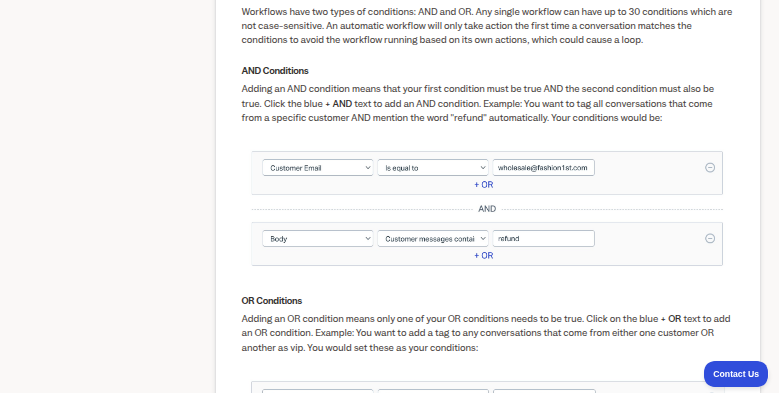
On paid plans, automatic workflows check up to 30 conditions on fields such as the subject and body, then tag, assign, notify a teammate or generate an AI draft, running once per conversation. SLA policies set first-response and resolution targets, one basic policy on Standard, two with conditions on Plus and unlimited on Pro. Routing, which the Free plan lacks, hands unassigned conversations to teammates who are Active and below their assignment limit.
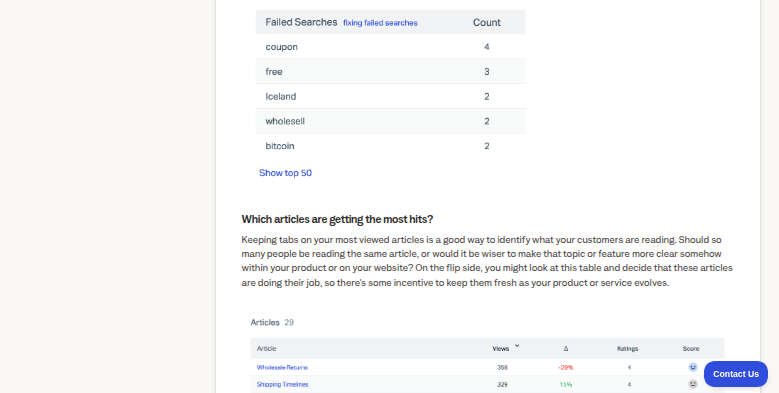
On Plus and Pro, AI Drafts writes a reply from past conversations and Docs for a teammate to review before sending. The Docs report lists failed searches, the terms customers typed on the Docs site or in Beacon and found nothing for.
With every teammate set to Away on a Saturday, Routing leaves new conversations unassigned, and workflow and SLA notifications go to Help Scout users rather than to a weekend rota kept in a calendar. The Docs report counts only people who searched, so the customer who emailed straight away never shows up in it. Workflow conditions match words in the subject and body, so the declined-card message that never says refund passes the refund rule by, and AI Drafts writes from what Help Scout holds, leaving out a fact that lives in a billing tool with no Help Scout app.
Monday's sheet names the questions Docs never answers
The support lead works from a Google Sheet that ranks the week's repeat questions, whether or not the customer searched first, with the ones that have no Docs article behind them at the top and example conversations linked. The top of the list also arrives on Telegram.
Whoever is on the weekend rota gets a text through Twilio when a conversation nears its first-reply target, and the support lead brings a Notion register of every breach, with the time, the inbox and the reason, to the monthly review.
New conversations land in Technical, Billing, Onboarding or General by what they are about, with a note in Slack when one goes somewhere unusual. When Docs already holds the answer, a teammate checks a reply drafted from that article, with the article linked, and sends it.
Weekend texts and the Docs gap sheet come from WebRun
An hourly look at the inbox, Saturdays included, and a weekly sort of conversations by topic are the two jobs the support lead hands over. WebRun is an AI agent that works a real Chrome browser, signed in as you. Help Scout knows it as a user with access to the inboxes involved, plus the Reports: View reports permission where it reads a report, and the other tools open with their own logins.
A reply goes out when a teammate presses Send on the draft in the conversation. The agent closes and deletes no conversation, and workflows and SLA policies remain the admins' to change. For Help Scout there are jobs for the Docs gap report, the reply-time alerts, routing by topic and replies drafted from Docs.
Questions people ask
Why does a conversation stay unassigned over the weekend?
Routing assigns only to teammates whose status is Active and who are below their assignment limit, so when everyone is set to Away, new conversations stay in Unassigned until someone becomes eligible again. Manual assignments and workflow assignments skip those rules.
Do SLA policies cover conversations that were already open?
No. Help Scout matches a policy only to conversations created after the policy itself, even if older ones are updated later, so a backlog from before the policy has no SLA target to sort by.
Which searches does the Docs report count?
Searches on the Docs site and in Beacon, including the failed ones. It leaves out searches made with the Docs search in the reply editor or through the API, and it never sees a customer who emailed without searching.
Sources
- Create and Manage Service Level Agreements (SLAs) SLA policies set first-response and resolution targets: one basic policy on Standard, two with conditions on Plus and unlimited on Pro, applied only to conversations created after the policy.
- Automatic Workflows Automatic workflows take up to 30 conditions and run once per conversation.
- Workflow Conditions and Actions Lists workflow conditions such as subject, body and tags, and actions including notify, forward, add a note and Generate an AI Draft.
- Use Routing to Automatically Assign Conversations Routing assigns unassigned conversations, longest-waiting first, to teammates set to Active and below their limit; with nobody eligible, conversations stay unassigned.
- Reports: Docs The Docs report shows visits, top articles and a failed searches table covering searches on the Docs site and in Beacon, not the reply editor or the API.
- AI Drafts AI Drafts generates reply drafts from previous conversations and Docs articles for review, and is available on current Plus and Pro plans.
- Help Scout pricing The Free plan has no workflows, SLAs or Routing; Messages and AI Drafts come with Plus and Pro; paid plans connect to 100+ apps.
4 ready-made Help Scout workflows
Each one names the apps it touches and the exact steps it takes. Open one to read what it will do, then turn it on.



Want one of these running on your own Help Scout?
Show WebRun the process once and it will run it on schedule, in your own private browser environment.