How to Automate Azure DevOps
Azure DevOps automates its own work through pipeline approvals and checks, team rules that move a parent work item when its children change, and service hooks that notify Teams, Slack or a webhook. For client trackers, timesheets and help desks with no hook, an AI agent like WebRun can carry the finished work across.
 Written by
Julian Adeniyi
Retail operations
 Reviewed by
Rosa Lindqvist
Operations editor
Azure DevOps ties a work item to the pull request that closed it
Azure DevOps is Microsoft's set of developer services: Azure Boards for planning, Azure Repos for code and Azure Pipelines for builds and deployments, with Test Plans and Artifacts beside them. Microsoft launched it in 2018 as the evolution of Visual Studio Team Services and renamed the on-premises Team Foundation Server as Azure DevOps Server, which is why some teams still say TFS. The cloud service lives at dev.azure.com.
Work is organised by area path and sprint. On the Agile process, Epics break into Features, Features into User Stories, and those into Tasks that people pick up from the sprint taskboard. A branch, a commit or a pull request can link back to its work item, so a change can be traced from the item itself.
The product owner orders the backlog there and the delivery lead watches the sprint burndown. A consultancy might keep one project per client in the same organization.
Work closed in Azure Boards stays open in the client's tracker
Say you deliver software for clients. Each client keeps a tracker of its own, and every Thursday the delivery lead opens it beside the board and moves lines across until the two match. For invoicing, the delivery lead totals the hours in Completed Work for each client once a month and types them into the timesheet system.
A customer reports a fault through the help desk, and it becomes Bug 4127. The fix reaches Production on Wednesday, and the ticket still reads Waiting on engineering until a support rep happens to look. Before each Production release, a developer pastes the run's work items by hand into a change request for the approval board.
Azure DevOps notifies its own members and a fixed list of services
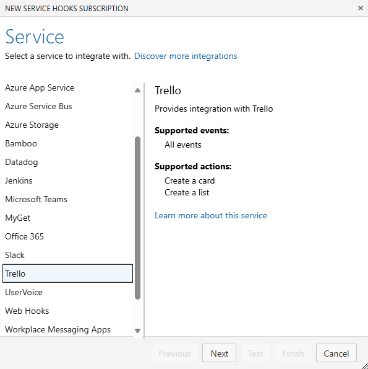
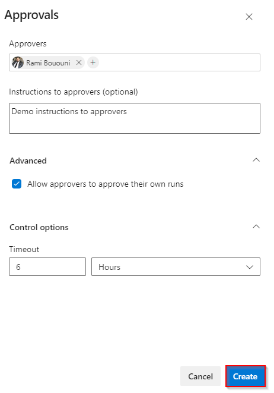
Team rules on a backlog make a User Story Active when one of its Tasks starts and close it when the last one closes; they exist only in Azure DevOps Services and act only on items of the same team. Service hooks send events to Microsoft Teams, Slack or Trello, add a private comment to a Zendesk ticket when a work item is commented on, or post to any web address. A Production environment can hold a run for named approvers, for business hours, or until a REST API answers yes.
Only project administrators can create service hook subscriptions by default, and each needs a target on Microsoft's list or an endpoint that takes a web request; Zapier, one of those targets, can pass an event on only to a tool with an API. A client's tracker or a timesheet tool with no inbound API hears nothing. Email reaches no further: a custom notification subscription accepts only addresses that belong to someone with access to the organization.
Free Stakeholder access lets any number of people view dashboards and edit work items, which suits a client willing to sign in but puts nothing in the client's own tool. Teams on ServiceNow can add a Marketplace extension whose check raises the change request when a stage starts.
The client's tracker marks a Feature done the day it closes
The client's project manager, who never opens Azure DevOps, could tell their own stakeholders a Feature is done on the day its last User Story closes, because their tracker already shows it, with the sprint recorded against it. A Feature pushed into the next sprint would already carry a note there when they look.
On Friday afternoon, the delivery lead could check and submit a timesheet draft filled in with the week's Completed Work for each client project.
When a run finishes its Production stage, support could tell customers the fix is live, because each help desk ticket named on a bug in that run already has a private note saying so. The approval board could review a change request drafted from the run's work items before the stage starts, and the product owner could publish release notes drafted from last week's closed User Stories and merged pull requests.
Board changes reach the client's tracker, the timesheet and the help desk
A saved query of closed User Stories and the run history of the Production stage hold everything the client's systems need to hear. WebRun is an AI agent that works a real Chrome browser, signed in as you. With an Azure DevOps account of its own, it reads those queries and runs, then logs in to the client's tracker, the timesheet tool or the help desk and makes the matching change there.
Timesheet entries sit in the timesheet tool's drafts for the delivery lead to submit, the change request reaches the approval board as a draft, and a Production approval stays with the users and groups named on the check. Stale pull requests, release notes and failed builds each have a card below.
Questions people ask
Does its Azure DevOps account need a paid Basic licence?
Only for workflows that read code. A free Stakeholder account can view and edit work items, run queries and use Azure Pipelines in a private project, but it has no access to Azure Repos, so anything built on pull requests needs Basic. Basic is free for the first five users in an organization.
Will its updates set off our team automation rules?
Only when it changes a state from a board, a backlog or a sprint view. Microsoft documents that the rules do not fire for state changes made from query results or the work item form, so a workflow meant to trigger them moves the card on the board.
Can hours reach the timesheet from a Scrum project?
Not from Completed Work, because Scrum tasks carry Remaining Work only; Completed Work and Original Estimate belong to the Agile and CMMI processes. A team on Scrum can add its own hours field through process customization, and the workflow reads that field instead.
Can it reach an Azure DevOps Server that sits behind our VPN?
No. The agent works in a browser in the cloud, so a server that answers only over a VPN is out of its reach. Azure DevOps Services at dev.azure.com, or a server whose web portal can be reached from outside, works.
Sources
- Integrate with service hooks Lists the services a service hook can target, among them Microsoft Teams, Slack, Trello, Zapier, Zendesk private comments and generic webhooks, and says only project administrators can create subscriptions by default.
- Set work item automation rules Team rules set a parent to Active, Resolved or Closed from its children's states, in Azure DevOps Services only, when both items belong to the same team, and only for changes made on boards, backlogs and sprint views.
- About notifications Notifications are delivered by email or service hook, and the address on a custom email subscription must belong to an identity that already has access to the organization.
- Stakeholder access quick reference Stakeholder access is free for an unlimited number of users and covers work items, queries, pipelines and dashboards, but gives no access to Azure Repos in a private project.
- Pipeline deployment approvals Checks on an environment include Approvals, Business Hours and Invoke REST API; a ServiceNow Change Management check, from a Marketplace extension, raises a change request at the start of a stage.
- Manage paid access for users Basic access is free for the first five users and paid from the sixth; Stakeholder access is free.
- Query by numeric fields Original Estimate, Remaining Work and Completed Work are on tasks in the Agile and CMMI processes; the Scrum process has Remaining Work only.
- Introducing Azure DevOps Microsoft, 10 September 2018: Azure DevOps is the evolution of Visual Studio Team Services, and the next version of Team Foundation Server is called Azure DevOps Server.
3 ready-made Azure DevOps workflows
Each one names the apps it touches and the exact steps it takes. Open one to read what it will do, then turn it on.

Want one of these running on your own Azure DevOps?
Show WebRun the process once and it will run it on schedule, in your own private browser environment.