How to Automate Basecamp
Basecamp's own automation is light: Automatic Check-ins ask the team questions on a schedule, Reports show what is overdue or unassigned when someone opens them, and emails can be forwarded into a project. Reading every project each week and sending the summary to Slack, Notion or a calendar is left to a person or an AI agent like WebRun.
 Written by
Rosa Lindqvist
Operations editor
 Reviewed by
Dimitri Vasilev
Logistics analyst
Basecamp keeps a project's talk, to-dos and files on one page
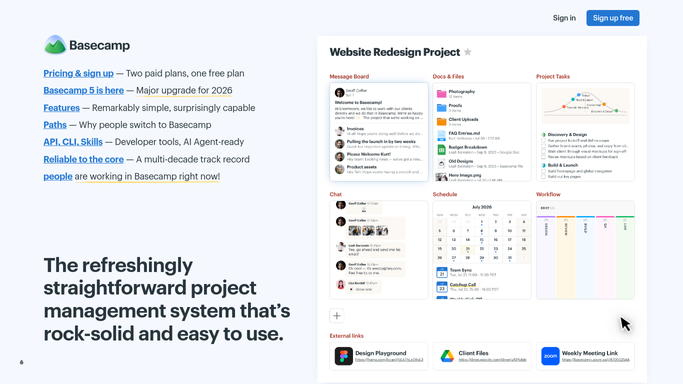
Basecamp, made by 37signals and rebuilt as Basecamp 5 for 2026, puts each project on one page: a Message Board for announcements, To-dos with assignees and due dates, Card Tables for work moving through stages, Docs & Files, a Calendar and Campfire for chat. Plans are priced by the number of active projects, from $25 a month for three to $299 a month, billed annually, for unlimited, with no per-user fees, so inviting a client's team does not raise the bill.
Client mode decides, project by project, what a client can see. Automatic Check-ins ask the team the same question on a schedule, such as what everyone is working on this week, every Monday at 9am, and keep the answers in one thread.
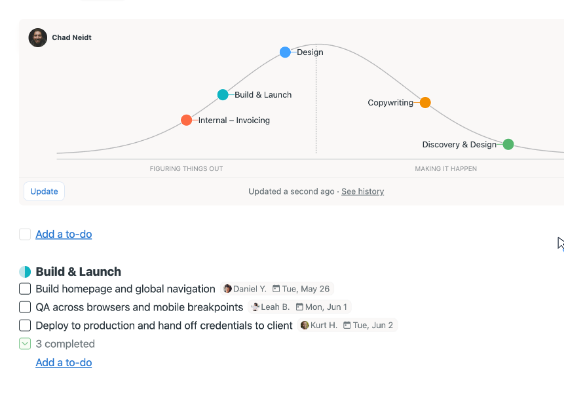
At the top of a project, the Needle shows the status its people last chose: On track, Some risk or Concerned. Hill Charts show which pieces of the work are still being figured out and which are moving on a clear plan.
A Monday status round means opening every project in turn
A project lead who wants to know how things stand opens each project, scans the to-dos for red dates, reads the latest on the Message Board and checks whether the Needle moved, then does the same for the next one. Across the ten projects a Studio plan allows, that takes most of Monday morning.
Check-ins create their own chasing. Most people answer, and the project lead notices on Thursday that two designers have written nothing since last week. The account manager rewrites the week's progress as an email because the client never logs in, and the operations lead copies new deadlines into a calendar by hand. A card can stay in one Card Table column for a fortnight without a comment, because nobody opened that project.
Basecamp's Reports show what is late only to whoever opens them
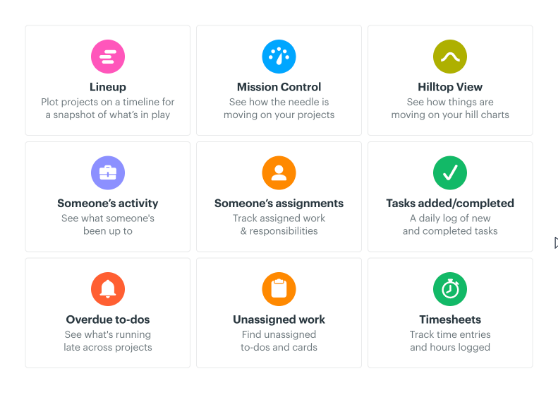
Automatic Check-ins ask their question on schedule without anyone sending a reminder. Reports gather work across projects, such as Overdue to-dos grouped by how late they are and Mission Control, which shows every project's Needle together. Email Forwards pull a conversation into a project through [email protected] or the project's own address, and Timesheet exports logged time as a CSV.
Basecamp 5 is also ready for AI agents. Its CLI connects Claude, Codex or a similar tool to the account to post messages, create and assign to-dos, reply to check-ins and pull project activity, and setting it up takes a terminal and a subscription to an AI service.
Reports are pages someone opens, and Basecamp's help describes no way to email one or send it on a schedule, so the overdue list never reaches a client who reads only email, or the calendar that should hold the deadlines. The Needle and the Hill Chart dots move only when a person moves them. Basecamp's help also warns that auto-forwarding email into a project may work but can break easily.
A line per project in Notion shows which ones slipped
Instead of the Monday round, the project lead could read one health table in Notion, a line per project: its overdue to-dos, the Needle's current setting, and whether its Message Board has gone two weeks without a post. In that line the lead also sees any scope that has stayed on the uphill side of its Hill Chart since the last review, which means the team is still working out how to do it.
The people who skipped yesterday's Automatic Check-in could get a nudge in Slack before lunch, and the whole team could have everything due today or overdue on WhatsApp, next to the newest check-in answers. The operations lead would stop copying deadlines, because each new one is already on Google Calendar.
For client work, the account manager could edit and send a plain email drafted from the week's finished to-dos, instead of writing it from nothing.
The Monday round runs on a schedule, with the Needle left to people
For a team willing to run it from a terminal with an AI subscription, Basecamp's CLI can hand this round to Claude or Codex. WebRun is an AI agent that works a real Chrome browser, signed in as you, so the same round needs no terminal. Each Monday it opens every project its account belongs to, reads the to-dos, the Needle, the Hill Charts and the check-in answers, and sends the summary where the team reads it.
It reports and reminds without changing the work: it completes no to-dos, and it leaves the Needle and the Hill Chart dots to the people on the project. Each card below takes one of these jobs: chasing check-ins, the Monday health report or the daily to-do digest.
Questions people ask
Can it answer the Automatic Check-ins for people?
It could, since Basecamp's own CLI lets agents reply to check-ins, but these workflows do not. They remind the people who have not answered, because an answer written by software tells the team nothing about that person's week.
Will clients see anything it posts?
Not unless a person posts it. Client mode decides, project by project, what clients can see, and the agent puts nothing into a client-visible part of a project. A client update reaches the account manager as a draft email to read and send.
Which Basecamp plans include Timesheet?
Pro and Unlimited. On the other plans the account owner can buy it as an upgrade in Adminland. Only the jobs about hours need it; reading to-dos, check-ins and Reports works on any plan.
Sources
- Reports Basecamp 5's reports, including Mission Control (Needle updates across projects), Hilltop View, Upcoming tasks, Overdue to-dos grouped by how overdue they are, Unassigned tasks and Timesheets; no emailing or scheduling is described.
- Using agents AI agents such as Claude and Codex connect through the Basecamp CLI to post messages, create and assign to-dos, reply to check-ins and pull activity; setup needs a terminal and an AI subscription.
- Basecamp features Lists the Message Board, To-dos, Card Tables, Campfire, Calendar, Docs & Files and Hill Charts, describes Automatic Check-ins asking questions on a schedule, and Client mode.
- Hill Charts Hill Charts show whether work is still being figured out or moving on a clear plan, and they do not update automatically: a person moves the dots.
- Basecamp pricing Plans priced by active projects with no per-user fees: Free, Freelancer $25 a month (3 projects, 20 users), Studio $59 (10 projects), Pro $99 (25 projects) and Unlimited $299 a month billed annually.
- Basecamp 5 is all new for 2026 37signals' release page for Basecamp 5, including an updated API, a new CLI and support for AI agents.
- Showing progress with The Needle The Needle's three settings are On track, Some risk and Concerned, and only people on the project can move it.
- Timesheets Timesheet is included with Pro and Unlimited and can be bought as an upgrade on other plans; timesheets download as CSV.
- Email Forwards Emails forwarded to [email protected] or a project's own address are saved in the project; auto-forwarding may work but can break easily.
3 ready-made Basecamp workflows
Each one names the apps it touches and the exact steps it takes. Open one to read what it will do, then turn it on.

Want one of these running on your own Basecamp?
Show WebRun the process once and it will run it on schedule, in your own private browser environment.