How to Automate ActiveCampaign
ActiveCampaign automations start from tags, forms, email activity, site visits and purchases, and Event Tracking takes events from other platforms through the API. A review date in an advisor CRM, a closing date in a brokerage's transaction system or a reply in an outreach tool becomes a tag by export, or by WebRun, an AI agent that reads those systems.
 Written by
Nora Whitfield
Editorial lead
 Reviewed by
Marcus Deleon
Support operations
In ActiveCampaign, a tag on a contact decides which email comes next
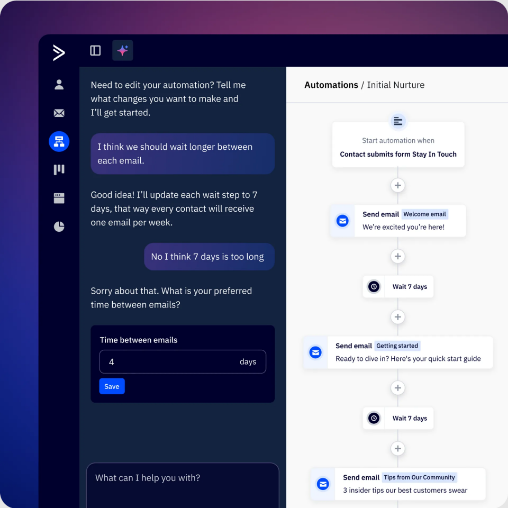
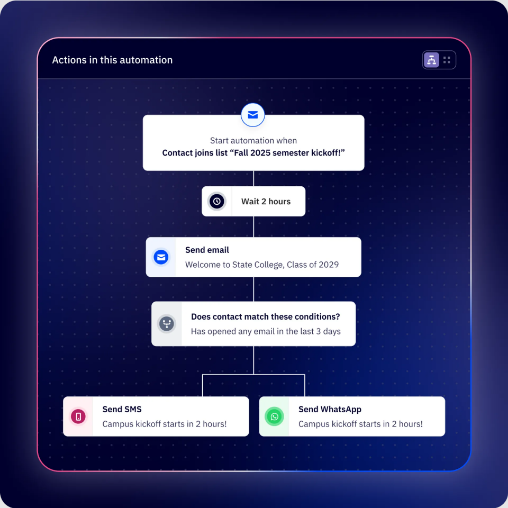
ActiveCampaign is a marketing automation platform built around email, with SMS and WhatsApp as add-ons and deals in the Pipelines add-on. Its centre is the automation builder: a trigger lets a contact in, then waits, conditions, emails and tags move them along split and branching paths.
In practice, tags do most of the work. A financial adviser's office tags clients by the service they use, a real estate brokerage tags past buyers and sellers, and a B2B firm tags prospects by the campaign that found them. Adding a tag is one of the events that can start an automation.
The person running it is often the only marketer in the building, sometimes the owner, and automations built years ago are still sending every day. Starter allows five actions per automation and one user; Plus lifts the action limit, and Pro and Enterprise include three and five users.
Advisers and brokers export a list every month to keep tags current
The facts behind the tags usually live in another system: a financial adviser's client records in an advisor CRM, a brokerage's closed transactions in its transaction system, a sales team's cold-email replies in the outreach tool.
Every month the office manager exports the clients due an annual review, tidies the spreadsheet and imports it with a tag. At the brokerage, the transaction coordinator copies last year's closing dates across so the anniversary emails go out. The SDR reads replies in the outreach tool and adds the interested ones to a nurture list by hand.
Each import is out of date the day after it runs. A late export sends the review reminder to a client who booked last week, and the anniversary email a month after the anniversary.
Events from other platforms reach ActiveCampaign through its API
Automations start on events ActiveCampaign records: a tag added, a form submitted, an email opened, clicked or replied to, a page visit picked up by Site Tracking, a purchase from a connected shop. Active Intelligence, with limits on Starter and Plus, spots upcoming moments and builds a whole campaign, runs Scheduled Tasks that send insights to your inbox, and scans data across the account and the wider market, such as industry trends and competitor moves.
More than 1,000 app integrations bring other tools in, the API and webhooks come with every plan, and Pro and Enterprise add custom objects. Event Tracking, listed on all four plans, records actions a contact takes in another platform, and those events come in through ActiveCampaign's API, so the other platform, or a developer working for you, has to send them.
An advisor CRM with no integration on that list, and nobody to wire it up, keeps its review dates until the office manager exports them. The same goes for a brokerage's transaction system and the replies in an outreach tool.
Review dates and closing anniversaries become ActiveCampaign tags
The advisory practice's booking email starts on schedule. Each week, clients whose annual review falls due within six weeks get the review tag, and clients who have already booked do not, so nobody is asked twice.
At the brokerage, each closed transaction's anniversary arrives as a tag on the day, a year after closing, and the anniversary email goes out without anyone copying dates. In the sales team, a positive reply in the outreach tool turns into a tag and a note, and the prospect is in the nurture sequence the same day.
An events business tags ticket buyers who never checked in, read from the events platform after the show, for the recording and an offer on the next date. When a client's renewal date moves in the advisor CRM, the renewal field in ActiveCampaign moves with it.
The tag arrives from the advisor CRM, and the automation does the sending
The office manager's monthly export becomes a weekly run. WebRun is an AI agent that works a real Chrome browser, signed in as you. The advisor CRM's review list, the brokerage's closings and the outreach tool's replies are where it looks, and for each match it adds the tag, fills the field or writes the note on the contact in ActiveCampaign.
Your automations do the sending, and none of them writes to a client until the tag it waits for is on that contact.
Some ActiveCampaign jobs need no outside system at all: overdue or unassigned deal tasks ranked each morning by the value at stake, a monthly list of bounced, unengaged and duplicate contacts with the clean-up drafted, and yesterday's campaign numbers logged to Google Sheets.
Questions people ask
When is Event Tracking the better route?
When the other platform can send events to ActiveCampaign's API and someone will set that up: events then arrive as they happen. The agent suits systems nobody is going to wire up, such as an advisor CRM the practice only uses through its screens.
Which login does it use on Starter or Plus?
The account's own. Starter and Plus include one user, so the agent signs in with that login; Pro and Enterprise include three and five users, so it can have a seat of its own.
Could it email our clients without anyone checking?
It sends nothing itself, and your automations do the sending. For a tag that starts a sending path, the agent can apply a holding tag that starts nothing, and a person swaps it for the real tag after checking the list.
Sources
- Automation triggers explained | ActiveCampaign Help Center Lists every automation trigger by plan, including tags, forms, email activity and page visits on all plans, field, date and event triggers from Plus, and deal triggers with the Pipelines add-on.
- An overview of Event Tracking | ActiveCampaign Help Center States that Event Tracking is an advanced feature requiring the open API and knowledge of a programming language, and that events are matched to contacts by email address.
- Active Intelligence 3.0: Wavelength | ActiveCampaign Help Center Release notes for brand and competitor monitoring, external signals such as holidays and market news, proactive drafts and scheduled tasks.
- ActiveCampaign ActiveCampaign's homepage, describing autonomous marketing, SMS and WhatsApp, and more than 1,000 app integrations.
- ActiveCampaign pricing Starter, Plus, Pro and Enterprise: five actions per automation on Starter; one user on Starter and Plus, three on Pro, five on Enterprise; custom event tracking, site tracking, the API and webhooks on all plans; custom objects on Pro and Enterprise; Active Intelligence with limits on Starter and Plus; the Pipelines, Sales Engagement, SMS and WhatsApp add-ons.
- Active Intelligence | ActiveCampaign Active Intelligence spots upcoming moments and builds a campaign, runs Scheduled Tasks that send insights to the inbox, and scans data points across the account and the wider market.
- Event Tracking | ActiveCampaign API reference Event tracking records when contacts perform actions in a third-party platform, kept on their ActiveCampaign contact profile.
- Marketing automation | ActiveCampaign The automation builder's split and branching paths, triggers on actions such as clicks and purchases, and site tracking.
3 ready-made ActiveCampaign workflows
Each one names the apps it touches and the exact steps it takes. Open one to read what it will do, then turn it on.
Want one of these running on your own ActiveCampaign?
Show WebRun the process once and it will run it on schedule, in your own private browser environment.