How to Automate PandaDoc
PandaDoc chases signers with auto-reminders, records every view in its analytics and runs Automations when a document is sent or completed. No Automation fires on a proposal that was viewed but not signed, and none creates the job a signed quote describes in a project tool; WebRun, an AI agent, can do both with no new integration.
 Written by
Tom Kessler
Field operations analyst
 Reviewed by
Nikhil Bhatt
Automation strategist
A PandaDoc proposal holds the price and the signature line in one document
A client opened the quote twice on Friday and once more late on Sunday, and has not signed it. PandaDoc records each of those views because the quote lives there: sales teams and small businesses build proposals, quotes and contracts in PandaDoc and collect the signature in the same document.
A document starts from a template or items in the content library, with a pricing table or the quote builder for the numbers, and recipients read, comment on and sign it online. The client can also pay on the same document through a payment gateway such as Stripe.
Salespeople and account managers work in it every day, and the owner approves discounts there. Each document's status, whether draft, sent, viewed, completed or expired, feeds the sales forecast someone reads each week.
Viewed three times and still not signed
A salesperson opens the documents list every morning, sorts it by status and tries to remember which viewed proposals deserve a call. A quote with a discount above the threshold waits for the owner to approve it before it can go out. A contract expires on Friday. Nobody noticed the date, so the salesperson sends the client a fresh copy. A client's question about clause four sits in the document while the deal owner is on the road.
When a document is completed, someone files the signed PDF in the client folder, copies the value into the finance team's sheet, sets up the job in the project or field-service tool and matches the deposit to the invoice. Renewal reminders go by email to the document's owner, who may have left the company since the contract was signed.
PandaDoc's Automations run on Sent and Completed, not on Viewed
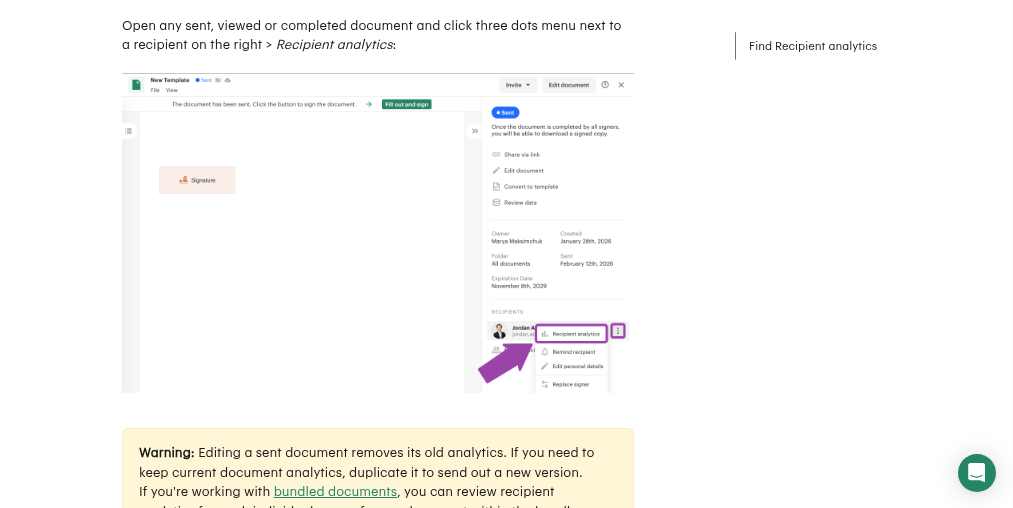
By default, PandaDoc emails each signer a reminder every five days from the day a document goes out, up to ten per recipient per document. Auto-expiration closes a document a set number of days after sending, with an optional warning to signers the day before. Document analytics show each recipient's views, last access and time spent, and how that time split across the pages. Auto-reminders and analytics come with the Business and Enterprise plans.
Automations fire when a document's status changes to Sent or Completed. Moving the document to a PandaDoc folder or sending a follow-up document comes with Business and Enterprise. Filing it in cloud storage such as Google Drive or SharePoint, or moving a CRM deal stage, is an External Automation: a paid add-on on Business, included in Enterprise.
A proposal viewed four times and still unsigned triggers no Automation, because Automations start only at Sent or Completed, and the next auto-reminder goes to the signer. A completed document can set up work only in the systems the Automations list covers, which are CRMs, cloud storage and a few HR and recruiting tools, not a project or field-service tool. Renewal notices go to the document's owner in PandaDoc, a set number of days ahead, and to nobody else.
A signed proposal can start the job it describes the same morning
A deal owner calls a client who opened the proposal three times in two days, already knowing that most of the reading time went on the pricing page, then edits the follow-up drafted from those views and sends it. The sales lead sees each document expiring this week as a card on the team's Trello board and decides whether to extend it, resend it or let it lapse. When a client comments on clause four, the deal owner hears about it in Slack that morning.
When a document is completed, the finance lead reads its value and dates in Microsoft Teams, with a text for the big ones, and the signed PDF sits in the client's folder. The operations manager opens the job already created in the project or field-service tool with the quote's line items, and the bookkeeper sees the deposit paid on the document matched to its invoice in the accounting software.
A month before each renewal date, whoever owns the account in the CRM today gets the reminder, even when the person who created the document has since moved on.
PandaDoc's view history is where each follow-up starts
A good follow-up to a viewed proposal draws on two screens: PandaDoc's view history and the deal record in the CRM.
WebRun is an AI agent that works a real Chrome browser, signed in as you. Its starting point is the documents list and each document's analytics in PandaDoc, and it carries what they show into the CRM, the project tool and the shared drive, filing and logging only what your policy allows.
Every message to a client, and every send, void or signature in PandaDoc, is the deal owner's action, and discount approvals go to the same approver as before. Stalled proposals have a ready setup below that alerts the deal owner in Slack and archives finished documents to Google Drive.
Questions people ask
What does this do that PandaDoc's auto-reminders don't?
It works on the internal side. PandaDoc's reminders go to signers every few days; this tells the deal owner which viewed proposals have stalled, which documents expire this week and which pages each client spent time on.
Which PandaDoc plan gives the agent view data to work with?
Business or Enterprise, where document analytics and auto-reminders are included. On Starter the agent can read statuses and documents but has no view data to report, and the External Automations that file documents or move CRM deal stages are a paid add-on on Business.
Can a signed quote create the job in our project or field-service software?
Yes, through that software's own screens. The completed document's line items become the job, and a line with no clear match is flagged for a person instead of guessed.
Can renewals still be handled when the original owner has left?
Yes. PandaDoc sends renewal notifications to the document owner only, so each renewal date can instead go, a month ahead, to whoever owns the account in your CRM today.
Sources
- Automations | Help Center PandaDoc's help article saying Automations run when a document's status changes to Sent or Completed; PandaDoc-to-PandaDoc recipes (move to a folder, send a follow-up document) come with Business and Enterprise, while External Automations (cloud storage, CRM deal stages, PDF attachments) are a paid add-on on Business and included in Enterprise.
- Auto reminders | Help Center States that reminders go by email every five days by default, to signers only, with a maximum of ten per recipient per document, on Business and Enterprise plans.
- Review Document Analytics | Help Center Describes per-recipient views, last access and time spent, and the share of time spent on each page, on Business and Enterprise plans.
- Agreement Renewals (new experience) | Help Center Explains renewal dates set manually or by AI, and that renewal notification emails go to the document owner only, a chosen number of days before the renewal date.
- Auto expirations | Help Center Explains that a document expires a set number of days after it is sent, with an option to warn signers one day before expiration.
- Payments | Help Center Describes collecting payment on a PandaDoc document, with Stripe as a payment gateway.
3 ready-made PandaDoc workflows
Each one names the apps it touches and the exact steps it takes. Open one to read what it will do, then turn it on.
Want one of these running on your own PandaDoc?
Show WebRun the process once and it will run it on schedule, in your own private browser environment.